![GSI_A7[1]-1-1](https://www.getgsi.com/hs-fs/hubfs/GSI_A7%5B1%5D-1-1.png?width=125&height=56&name=GSI_A7%5B1%5D-1-1.png)
At a Glance
- An ERP assessment is not a vendor selection process; it's a health check evaluating five dimensions: business process alignment, system utilization, technical health, data quality, and realized ROI.
- Warning signs like a longer month-end close, rising shadow IT, or an unknown number of customizations (RICEFWs) mean an assessment is overdue.
- Quantify the cost of technical debt by cataloging all customizations, classifying their relevance, and estimating their annual maintenance and upgrade-blocking costs.
- In 2026, ERP health checks must include AI-readiness, evaluating if your data architecture, integration patterns, and process maturity can support AI-augmented capabilities.
- Shift from one-time assessments to a continuous discipline: conduct lightweight health checks quarterly and a comprehensive, stakeholder-inclusive review annually.
A manufacturing COO I know recently shared a story that's become all too common. Eighteen months after signing off on a major ERP upgrade, he discovered that nearly 40% of the company's licensed modules were effectively shelfware. Three critical supply chain integrations were still being managed with manual spreadsheet workarounds, and the finance team had quietly built its own shadow processes in Excel because the system's configured approval workflows didn't match the actual chains of authority.
The problem is that most organizations only perform an ERP assessment when they're already in pain—during a vendor selection, after a failed audit, or when a key administrator leaves and nobody understands the configuration. This treats the assessment as a one-time project gate, not what it should be: a continuous operational discipline.
This guide provides a practitioner-level framework for doing it right. We'll cover what to assess, how to measure ROI honestly, how to quantify the cost of what you're ignoring, and how to build a governance rhythm that catches problems before they become crises.
What an ERP Assessment Actually Covers—and What It Doesn't
First, let's draw a clear line. An ERP assessment evaluates whether your current system is delivering the value it should. An ERP evaluation or selection process is about choosing a new one. Conflating the two is a common mistake that leads to focusing on vendor features instead of your own operational reality.
A genuine ERP assessment focuses on five core dimensions:
- Business Process Alignment: It starts here. Do your configured workflows still match how your organization actually operates? Or has process drift forced users into creating manual workarounds? For example, we found one distribution company's warehouse management module was still configured for a facility layout that had changed two years prior, adding 12 minutes of inefficient pick-path time to every single order. Using a standard like the APQC Process Classification Framework can provide a valuable benchmark for fit-to-standard scoring.
- System Utilization: This is a hard look at what you own versus what you use. What percentage of licensed modules, user seats, and purchased features are actively used versus collecting dust as shelfware? A module utilization audit that shows less than 60% adoption often signals a major gap between the initial business case and day-to-day reality.
- Technical Health: This covers the core infrastructure and application stability. It includes performance baselines, integration reliability, security posture, and the viability of your upgrade path. Are your integrations brittle, point-to-point connections, or a modern, supportable architecture? Is your system patched and secure?
- Data Quality: An ERP is only as good as its data. This dimension involves a data quality audit to check for golden record integrity, chart of accounts bloat, duplicate customer or vendor records, and the ultimate source of reporting accuracy. If you can't trust the data, the whole system is compromised.
- Realized ROI: Did the system deliver the financial and operational outcomes that justified the investment? This goes far beyond the initial payback period calculation to a continuous tracking of key business metrics.
An ERP assessment is not a vendor demo, a feature comparison sheet, or an RFP exercise. It's an honest, evidence-based look in the mirror.
Five Warning Signs Your ERP System Needs an Assessment Now
Most organizations don't schedule ERP assessments proactively; they react to symptoms. If you recognize your organization in the following scenarios, you are likely overdue for a comprehensive ERP health check.
- Your month-end close takes longer than it did two years ago. Assuming no major change in transaction volume, a lengthening close cycle is a classic symptom of system degradation. It often points to accumulating config drift, where small configuration changes have created downstream reporting issues, or failing integrations that now require manual reconciliation.
- More than 15% of your users rely on personal spreadsheets to do their jobs. This is shadow IT, and it's a direct proxy for system failure. When an energy company's field operations team builds 14 separate Excel trackers for work orders, it's not because they love spreadsheets; it's because the ERP's project module no longer supports their workflow.
- You can't produce a clean RICEFW inventory. If no one in your organization can definitively list all the custom Reports, Interfaces, Conversions, Enhancements, Forms, and Workflows that have been built, your technical debt is accumulating invisibly. This lack of visibility makes every upgrade or patching event a high-risk gamble.
- Your break-fix ratio is climbing. Look at your IT support metrics. If your team is spending more time on incident response and reactive fixes than on optimization and delivering new capabilities, your system is becoming a liability. A high break-fix ratio means you're paying to stand still.
- A major regulatory or security requirement has changed. Since your last configuration review, have new compliance mandates (like data residency laws) or security standards emerged? An ERP configured for yesterday's compliance landscape is a significant source of enterprise risk.
How to Measure ERP ROI Beyond Cost Savings
Most organizations calculate ERP ROI once—during the business case phase—and never revisit it. As a result, they have no idea if the system is actually delivering the value that justified the multi-million-dollar investment. While industry surveys often cite an average ERP ROI of around 52% with a 16-month payback period, these figures are typically self-reported and measure only direct cost savings, missing the full picture.
A continuous ROI assessment requires looking at both tangible metrics and, just as importantly, finding ways to quantify the intangibles. For a retail client, the tangible ROI from their new ERP was an 8% reduction in inventory carrying costs. But the real, game-changing value came from a three-day reduction in their order-to-cash cycle time, which improved working capital by $2.1 million annually. That's the kind of metric that gets a CFO's attention.
Tangible Metrics That Actually Matter
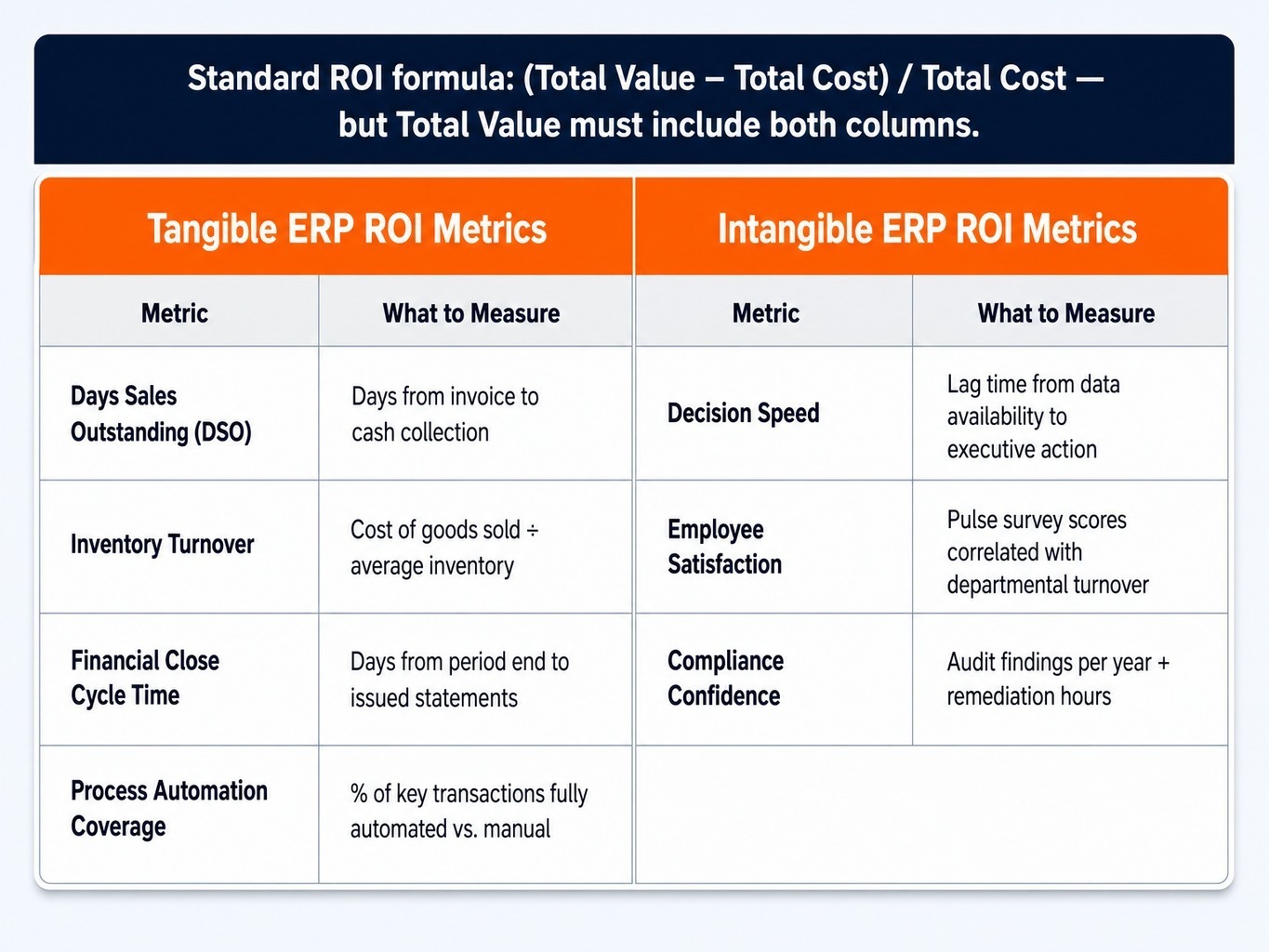
Most tangible ROI models focus on soft metrics like "labor hours saved." This is too vague. A better approach is to track hard operational metrics that directly impact the balance sheet. The standard ROI formula—(Total Value - Total Cost) / Total Cost—is only useful if "Total Value" is defined by real business outcomes.
Focus on tracking these four metrics:
- Days Sales Outstanding (DSO): A lower DSO means you're converting revenue to cash faster. A well-implemented ERP should streamline billing and collections, directly impacting this number.
- Inventory Turnover: Higher turnover means you're managing capital more efficiently. The ERP should improve demand forecasting and inventory management, which you can measure here.
- Financial Close Cycle Time: A faster, more accurate close reduces risk and provides leadership with quicker insights. Track the number of days from period end to the issuing of financial statements.
- Process Automation Coverage: Measure the percentage of key transactions (like purchase order approvals or invoice processing) that are fully automated versus requiring manual intervention.
Quantifying Intangible Value Without Guessing
The common objection is that intangible benefits like "better decision-making" or "improved employee satisfaction" are impossible to measure. That's not entirely true. The key is to find the right proxy metrics.
Intangible benefits become tangible when you measure their effects:
- Decision Speed: Don't just claim decisions are "faster." Measure the lag time between when key data is available in the system and when the executive decision based on that data is made. Is it hours, days, or weeks?
- Employee Satisfaction: Low satisfaction with a core system like an ERP correlates strongly with voluntary turnover in finance, operations, and supply chain roles. Track it with simple pulse surveys and correlate it with departmental turnover rates.
- Compliance Confidence: This isn't just a feeling. It can be measured by tracking the number of audit findings per year and the total hours spent on audit remediation. Fewer findings and faster remediation mean lower risk and higher confidence. A formal stakeholder satisfaction scoring process can formalize this feedback loop.
The Hidden Cost of ERP Technical Debt and Customization Sprawl
The most expensive part of your ERP is not what you paid for it; it's what you've bolted onto it, customized around it, and deferred maintaining. In ERP terms, technical debt is the sum of all customizations that diverge from the vendor's standard configuration. Each one creates a maintenance obligation and a regression testing burden that compounds silently over time, creating "bolt-on fatigue" and a web of spaghetti integrations.
Consider a mid-market manufacturer we worked with running an older version of JD Edwards EnterpriseOne. They had accumulated 47 significant custom modifications over 12 years. When they attempted a standard tools release upgrade, the estimated regression testing scope was 1,400 hours—roughly $280,000 in consulting time. Why? Because nobody had maintained a current RICEFW inventory, and several critical customizations conflicted with new standard functionality. The upgrade was blocked by their own history.
Read more: What is JD Edwards Managed Services? The Insider's Guide
You can quantify this cost. It's not abstract.
- Catalog Every Customization: Build a comprehensive RICEFW inventory. Tools like Celonis or LeanIX can help surface hidden dependencies, but a manual audit is often the necessary starting point.
- Classify Each One: Work with business owners to classify each customization as 'still required,' 'replaceable by standard functionality,' or 'obsolete.' A fit-to-standard score can formalize this.
- Estimate the Run-Rate Cost: For each category, estimate the annual cost of maintenance. This includes direct support hours, the portion of your regression testing backlog it creates, and the upgrade-blocking risk it represents.
Customization sprawl isn't a technical problem; it's a financial liability that grows until it blocks a strategic business initiative.
Assessing AI-Readiness as a Core Dimension of Your ERP Health Check
In 2026, most ERP assessments still evaluate systems as if AI doesn't exist. They check process alignment and data quality but fail to ask the most important forward-looking question: can this system's architecture support AI-augmented decision-making? AI-readiness is no longer an optional add-on; it's a core dimension of a modern ERP health check.
This isn't about buying an "AI tool." It's about evaluating if your ERP foundation can even support one. For example, a consumer goods company tried to deploy a demand forecasting AI but found its ERP's inventory data had a 72-hour latency due to legacy batch processing. The AI's predictions were stale before they ever reached the planning team.
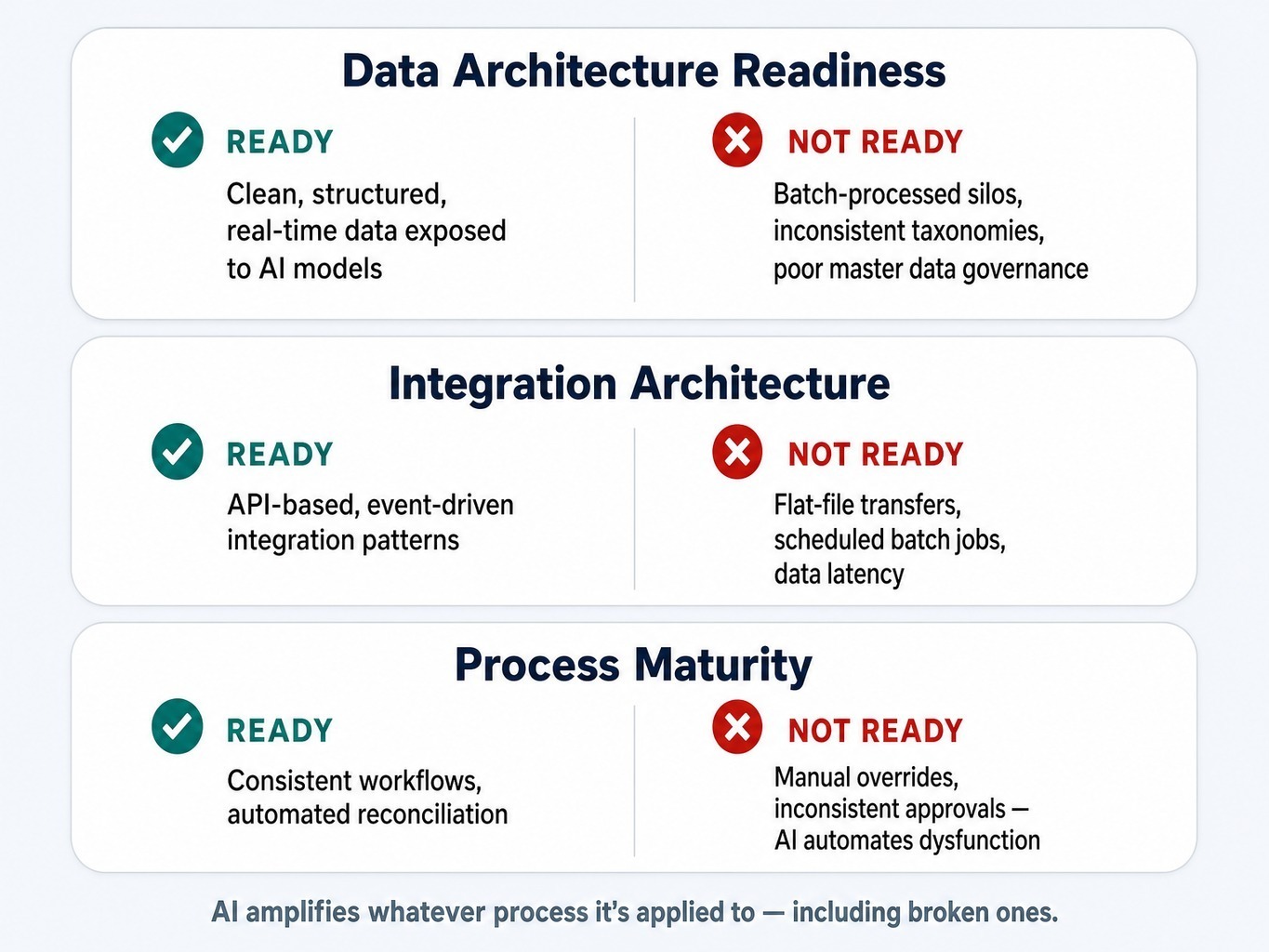
Your AI-readiness assessment should evaluate three specific areas:
- Data Architecture Readiness: Can your ERP expose clean, structured, real-time data to AI models? Or is your critical data locked in batch-processed silos with inconsistent taxonomies and poor master data governance?
- Integration Architecture: Does your system support the modern, API-based, event-driven integration patterns that AI platforms require? Or are you still dependent on flat-file transfers and scheduled batch jobs that introduce data latency?
- Process Maturity: AI amplifies whatever process it's applied to—including broken ones. If your approval workflows are inconsistent or your inventory reconciliation relies on frequent manual overrides, layering AI on top will only automate the dysfunction faster. A composable ERP architecture can provide flexibility, but it can't fix a broken process.
Who Should Be in the Room—and How Often to Reassess
ERP assessments fail when they are treated as isolated IT projects. The most important dimensions—process alignment, user adoption, realized ROI—are business questions, not technology questions. Therefore, the assessment team must be led by business process owners.
At a minimum, these five roles must be represented:
- A Finance Leader: Owns the chart of accounts, financial close, and reporting.
- An Operations Leader: Owns the core order-to-cash or procure-to-pay workflows.
- An IT Leader: Owns infrastructure, security, and the integration architecture.
- A Business Analyst or Power User: Understands the gap between configuration and how people actually work.
- An Executive Sponsor: Can authorize action and hold the team accountable for findings.
Just as important is the cadence. Stop treating assessment as a one-time event performed only during a vendor selection. Adopt a continuous rhythm:
- Quarterly Lightweight Health Check: Review performance baselines, integration error logs, the break-fix ratio, and user satisfaction scores. This is where 24/7 managed services provide the data backbone.
- Annual Comprehensive Assessment: Conduct a deep dive across all five dimensions, involving all key stakeholders. This review sets the optimization roadmap for the following year.
Read more: SaaS Managed Services Guide: What You Need to Know.
When Your ERP Assessment Reveals More Than Your Team Can Address
A thorough ERP assessment often uncovers systemic issues that have been accumulating for years. Your team may be excellent at identifying the symptoms—the shadow IT, the lengthening close cycle—but lack the cross-platform experience to diagnose root causes, quantify the financial impact of technical debt, and build an actionable remediation roadmap. This is where you need practitioners who have seen these patterns before.
The consultants at GSI average over 15 years of experience inside complex JD Edwards, NetSuite, and Oracle Cloud environments. We know where the bodies are buried because we've helped hundreds of organizations excavate them. Our process uses AI-powered application intelligence from our GENIUS platform to replace subjective opinions with evidence-based scoring on utilization, configuration health, and process efficiency.
When an assessment reveals that your upgrade path is blocked by dozens of undocumented custom modifications, you need more than a report. You need a partner who will stand behind the remediation plan. Our 100% service guarantee is our commitment to delivering not just findings, but outcomes. We help you move from assessment to action with a clear, financially-grounded plan.
Request an ERP health check from GSI's senior consulting team.
From Assessment to Action
The most critical shift in thinking is this: an ERP assessment is not a project phase. It is an ongoing operational discipline that determines whether your core enterprise system remains a strategic asset or quietly decays into a liability.
The organizations that get the most from their ERP investments are the ones that assess continuously across all five dimensions. They quantify what they're ignoring—the shelfware, the shadow IT, the technical debt—and evaluate forward-readiness for capabilities like AI alongside current performance. They treat their ERP not as a sunk cost to be maintained, but as a dynamic capability to be optimized.
Here is the challenge: if you cannot produce a current RICEFW inventory, a clean module utilization report, and a defensible ROI calculation for your ERP today, you are flying blind. You are overdue for an assessment.
Frequently Asked Questions
What is the difference between an ERP audit and an ERP assessment?
An ERP audit is a compliance-focused review of controls, access, and data handling against policy. An ERP assessment is broader, evaluating system health, process alignment, utilization, technical debt, and ROI. An audit asks, "Are we compliant?" An assessment asks, "Is this system still serving the business?"
Should you assess ERP health before or after deciding to migrate to the cloud?
Before—always. A pre-migration assessment reveals technical debt, customization dependencies, and integration constraints that directly affect cloud migration scope, cost, and timeline. Skipping this step is how a six-month project turns into a 14-month one when custom code won't transfer cleanly.
What is the average payback period for an ERP implementation?
Industry surveys often cite 14–18 months, but this is self-reported and reflects only direct cost savings. When including the full total cost of ownership—training, change management, and ongoing optimization—a realistic payback period for a mid-market implementation is closer to 24–30 months.
How do you benchmark ERP utilization against industry standards?
Start with a module utilization audit, comparing licensed modules and seats against actual login frequency and transaction volume. Frameworks like the APQC Process Classification Framework provide process benchmarks to map against your workflows. A utilization rate below 60% on licensed modules is a strong signal of shelfware.
How do you assess whether ERP customizations are adding or destroying value?
Build a RICEFW inventory and classify each customization: required, replaceable by standard functionality, or obsolete. Then, calculate the annual maintenance cost for each—support hours, testing burden, and upgrade-blocking risk. If the cost to maintain exceeds the business value delivered, it's destroying value.