
Key Takeaways
- NetSuite's "contract management" is not one module but three distinct capabilities: the Contract Renewals Module, SuiteBilling, and Advanced Revenue Management (ARM), each managing the financial, not the document, lifecycle.
- The two biggest gaps in native NetSuite are amendment version tracking and vendor contract management, which require custom record architectures to close.
- For basic tracking and alerting, you can build a robust system using custom parent-child records and SuiteFlow state transitions for approvals and renewal reminders.
- A dedicated CLM is warranted when you have high contract volume (500+), complex redlining and negotiation needs, or require clause-level version control and analysis.
- The highest risk is a disconnect between contract data and your revenue engine; contract terms must systematically flow into ARM to ensure ASC 606 compliance and prevent audit failures.
A mid-market SaaS company goes live on NetSuite, confident that the Contract Renewals Module will handle their needs. Six months later, the finance team discovers they have no centralized way to track vendor contracts, no version history for customer amendments, and the legal team is still managing clause libraries in a shared drive. This isn't a failure of implementation; it's a misunderstanding of what NetSuite contract management actually is.
For COOs and IT directors in distribution and manufacturing, the cost of treating NetSuite's renewal and billing modules as a complete contract management solution is measured not in licensing fees but in the unplanned remediation projects, the manual reconciliation labor, and the compliance exposure that accumulate when amendment tracking and obligation management are left to spreadsheets. The platform provides a powerful infrastructure for the financial side of contracts, but it is not a contract lifecycle management (CLM) platform.
This guide maps exactly what NetSuite handles natively, where the critical gaps exist, how to extend the platform with custom records and SuiteFlow, and when the operational need is wide enough to justify a dedicated CLM tool.
What NetSuite Actually Provides for Contract Management
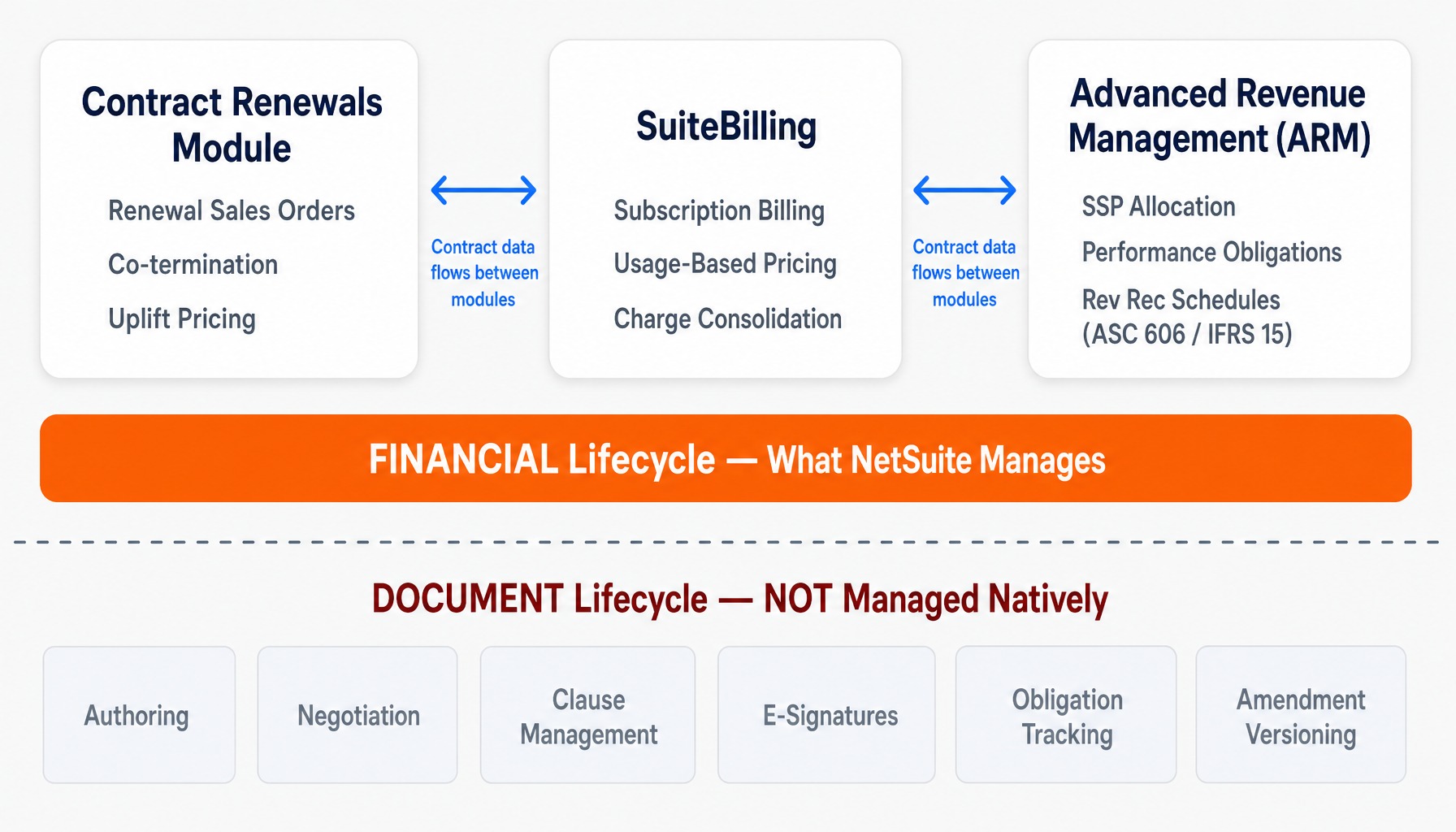
The phrase "NetSuite contract management" is misleading because there is no single, unified module with that name. What exists is a set of three related but distinct capabilities, each serving a different function and none constituting full contract lifecycle management (CLM). Understanding these distinctions is the first step to building a resilient process.
The Contract Renewals Module: Part of NetSuite's Software Vertical features, this module is designed to manage the financial transaction of a renewal. It excels at handling renewal sales orders, managing co-termination for multiple contracts under one customer, and applying uplift pricing automatically. It treats a contract as a transactional record tied to a sales order, focused on generating the next sale.
SuiteBilling: This is NetSuite's engine for managing complex billing schedules. It handles subscription billing, usage-based and tiered pricing models, and charge consolidation. A professional services firm, for example, can use SuiteBilling to invoice a client based on project milestones. It automates the "how" and "when" of invoicing against a contract's financial terms.
Advanced Revenue Management (ARM): As NetSuite's ASC 606 and IFRS 15 compliance engine, ARM is responsible for recognizing revenue correctly over the life of a contract. It handles standalone selling price (SSP) allocation, identifies performance obligations, and creates detailed rev rec schedules.
The critical takeaway is that these modules manage the financial lifecycle of a contract billing, revenue, and renewal. They do not manage the document lifecycle: the authoring, negotiation, clause management, e-signatures, obligation tracking, or amendment versioning. That distinction matters more than most implementation teams realize until it's too late.
Where Native NetSuite Contract Management Stops
Most organizations discover NetSuite's contract management gaps reactively, often during a painful audit, a customer dispute, or a costly missed renewal. These aren't edge cases; they are architectural limitations that affect any business with multi-year agreements or a formal procurement function. The two most significant gaps are in amendment management and vendor contract management.
The Amendment Layer Most Implementations Get Wrong
The Contract Renewals Module treats contracts as transactional records, not as living documents that evolve. When a customer requests a mid-term scope change adding seats, changing service tiers, or modifying payment terms the module can reflect the financial impact. ARM can even handle the complex revenue treatment of a contract mod vs contract combo under ASC 606. But it does not maintain a versioned document history, track which clauses changed, or link the amendment back to the original signed agreement.
This becomes a problem when, six months after a distribution company modifies a three-year vendor agreement, no one can reconstruct what was agreed to in the amendment versus the original contract. The record in NetSuite only reflects the current financial state. This isn't a configuration oversight; it's an architectural reality. That lack of a clear audit trail for mid-term changes has direct implications for dispute resolution and financial reporting integrity.
Vendor Contracts: The Procurement Gap NetSuite Does Not Close
NetSuite's native contract capabilities are almost entirely customer-facing, centered around sales orders, renewals, and billing. Vendor contract management tracking supplier agreements, monitoring SLA compliance, and managing expiration and auto-renewal clauses on the procurement side has no dedicated native workflow.
While the Vendor Center provides portal access and the vendor record can store basic information, there is no out-of-the-box contract record type, approval workflow, or expiration alerting for your supplier agreements. We frequently see this surface in multi-subsidiary organizations. Consider an energy company with three subsidiaries that discovers each procurement team is managing vendor contracts in separate spreadsheets. There is no consolidated view of total committed spend, renewal dates, or compliance obligations across the enterprise. Closing this gap requires intentional custom record architecture; it will not emerge from default NetSuite configuration.
Building a Native Contract Management System in NetSuite
For organizations whose needs center on tracking, alerting, and basic approval workflows not full document authoring or AI-powered clause analysis a custom record architecture inside NetSuite is often more practical and cost-effective than adding a third-party CLM. But the build must be intentional. Most failed attempts result from treating contracts as a flat custom record with a few fields, rather than designing a proper parent-child hierarchy with state management.
Custom Record Architecture: Fields, Hierarchies, and Subsidiary Segmentation
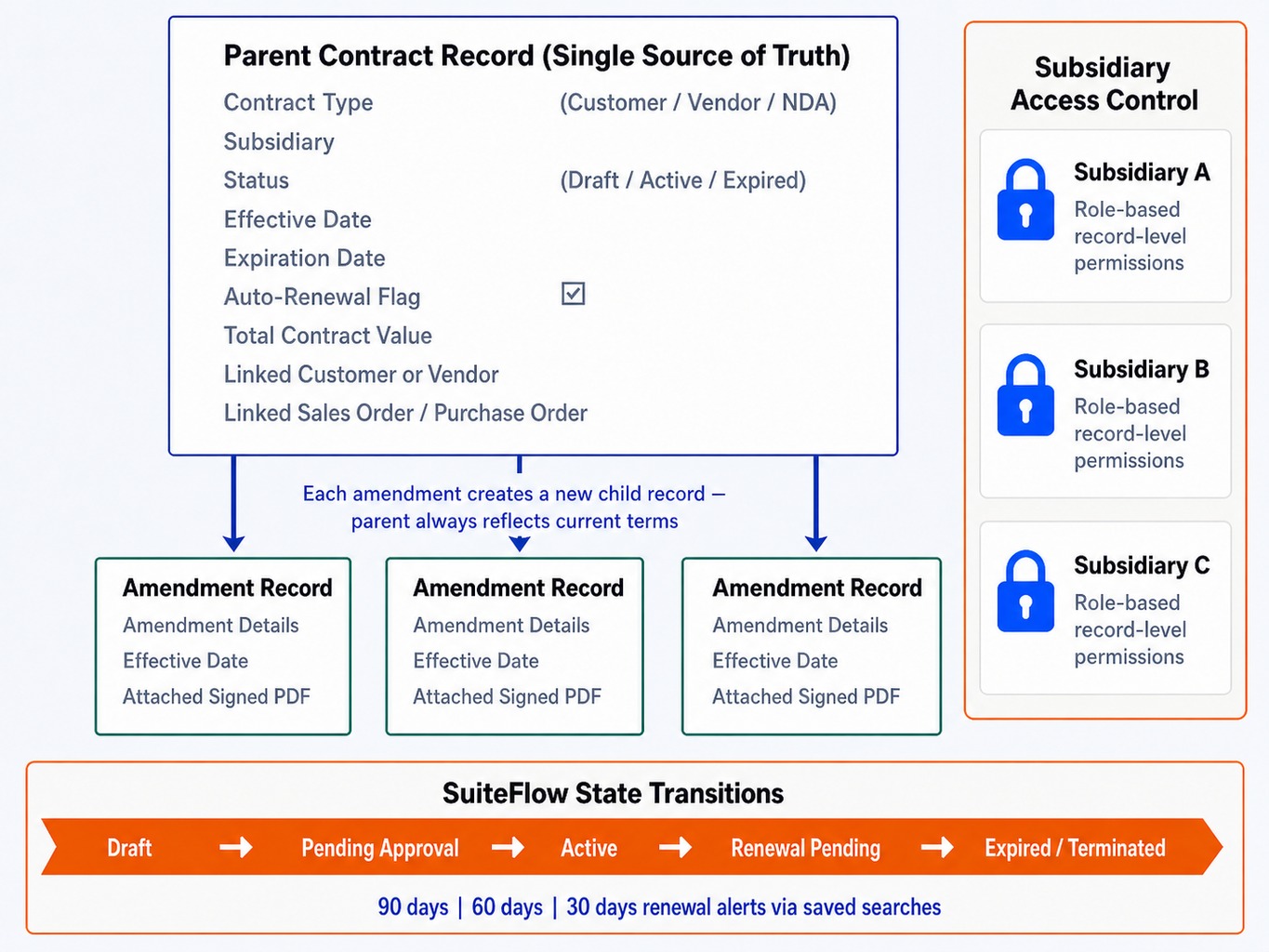
A robust native contract system starts with a well-designed custom record structure. The most resilient pattern is a parent-child hierarchy:
- Parent Contract Record: This is the primary record, acting as the single source of truth for the current state of the agreement. Essential custom fields include: Contract Type (Customer, Vendor, NDA, etc.), Subsidiary, Status (Draft, Active, Expired), Effective Date, Expiration Date, Auto-Renewal Flag (Checkbox), Total Contract Value, and links to the associated Customer/Vendor and any Sales Orders or Purchase Orders.
- Child Amendment Records: Each time a contract is amended, a new child record is created and linked to the parent. This child record stores the details of the modification, the amendment's effective date, and an attached PDF of the signed amendment document. This preserves a full, auditable history of changes while the parent record always reflects the current, consolidated terms.
For multi-subsidiary companies, it's crucial to configure role-based permissions using record-level restrictions to enforce subsidiary-level access controls, as NetSuite doesn't do this automatically on custom records. You can learn more about this in our guide on updating custom record permissions in NetSuite. Finally, migrating existing contracts requires a disciplined approach. You must standardize your contract metadata naming conventions, status values, and contract type taxonomy before beginning a CSV import, ensuring clean data from day one.
SuiteFlow State Transitions and Renewal Alerting
With the custom record structure in place, you can use NetSuite's native SuiteFlow engine to build powerful automation. The primary use case is managing the contract lifecycle through defined state transitions. A contract can move through states like Draft, Pending Approval, Active, Renewal Pending, Expired, and Terminated. The value here is auditability; every state change is logged with a timestamp and user, creating a defensible record of who approved what and when.
For renewal alerting, the most reliable native mechanism is a set of saved searches configured to email stakeholders at 90, 60, and 30 days before the expiration date stored on the contract record. These should be set up for both customer and vendor contracts to prevent missed renewals and unwanted auto-renewals. It's worth noting that while SuiteFlow handles declarative workflows well, more complex logic like auto-generating a renewal transaction or escalating an un-actioned approval often requires SuiteScript 2.1 to extend the automation.
When to Add a Dedicated CLM Instead of Building Natively
The custom-built approach works well for tracking and alerting, but it has a ceiling. When your contract management needs escalate, a dedicated CLM platform integrated with NetSuite becomes the more strategic path. The need for a dedicated CLM is not about features, but about operational complexity.
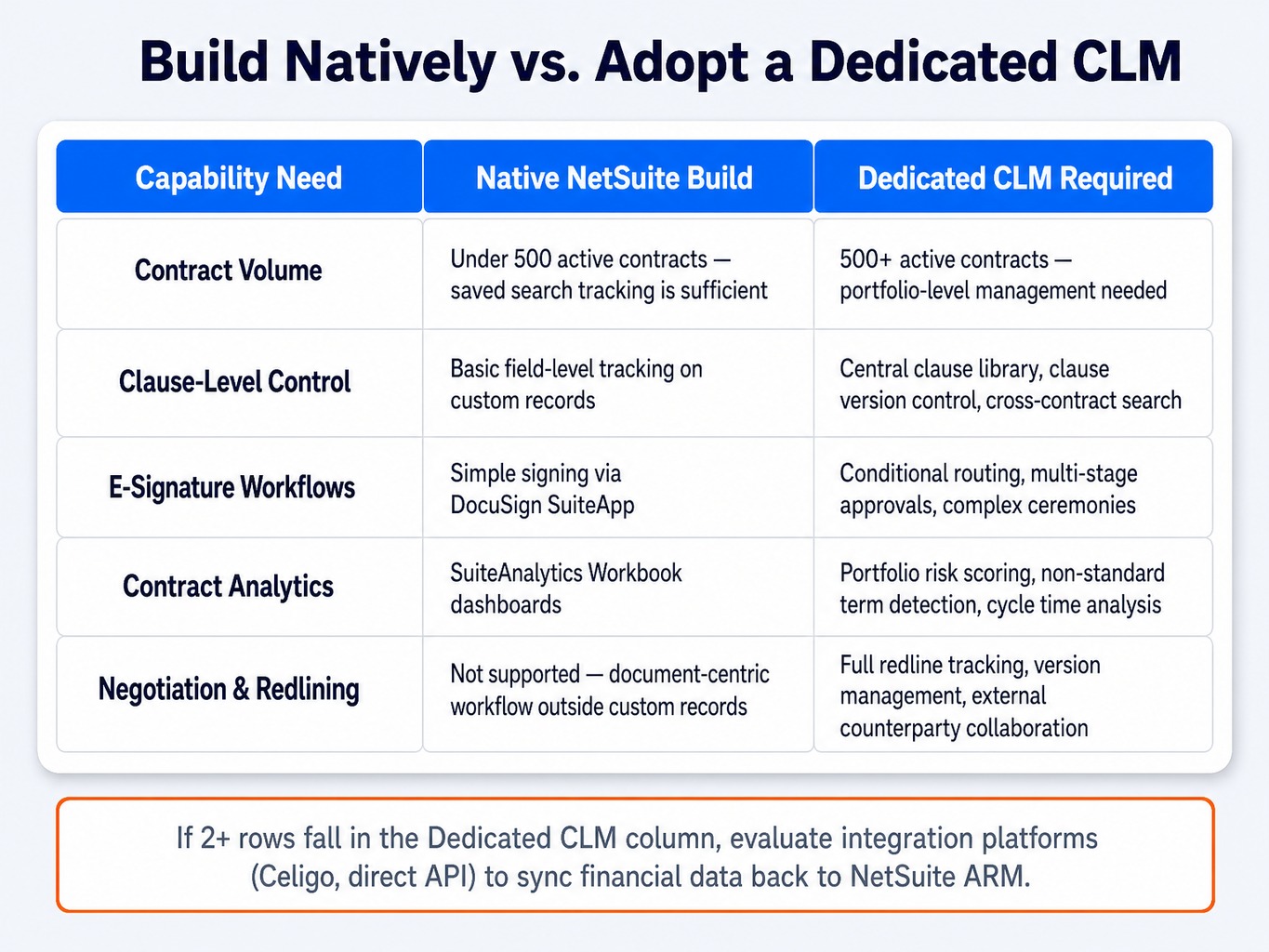
Here are five signals that you've outgrown a native NetSuite build:
- High Contract Volume: When you have more than 500 active contracts, manual and saved-search-based tracking becomes brittle. A dedicated CLM provides the portfolio-level view needed to manage at scale.
- Clause-Level Control: If your legal and compliance teams require a central clause library, version control on individual clauses, or the ability to search across all contracts for specific legal language, a custom build cannot meet this need.
- Complex E-Signature Workflows: While an integration like DocuSign for NetSuite can handle sending a document for signature, it doesn't natively manage complex conditional routing or multi-stage approvals. CLM platforms are built for this.
- Advanced Contract Analytics: When you need to move beyond SuiteAnalytics Workbook dashboards to perform portfolio-level risk scoring, identify non-standard terms, or analyze cycle times, a CLM with built-in AI capabilities is necessary.
- External Negotiation and Redlining: If your process involves significant back-and-forth negotiation with external counterparties, you need a system that can track redlines, manage document versions, and provide a full audit trail of the negotiation. Custom records cannot support this document-centric workflow.
Platforms like Icertis Contract Intelligence, Ironclad CLM, Gatekeeper, and LinkSquares are designed for these scenarios and often integrate back to NetSuite using tools like Celigo integrator.io or direct APIs to sync financial data.
Read more: NetSuite Multi-Book Accounting: A Solution for Companies With Multiple Reporting Requirements
The Hidden Cost of Disconnected Contract and Revenue Recognition Data
The most expensive contract management failure in NetSuite isn't a missed renewal it's a disconnect between contract terms and revenue recognition schedules. When contract data lives outside NetSuite (in a separate CLM, spreadsheets, or email) and isn't systematically linked to the Advanced Revenue Management (ARM) module, your rev rec schedules are built on assumptions, not contractual reality.
This creates two specific audit risks. First, you risk SSP allocation errors. Consider a SaaS company that processes a mid-term upgrade for a customer. The team updates the billing schedule in SuiteBilling but fails to trigger a corresponding contract modification in ARM because the amendment was tracked in a separate system. As a result, revenue continues to be recognized based on the original SSP allocation, not the modified one, creating a material misstatement. NetSuite's SuiteBilling charge schedules can easily diverge from ARM's revenue recognition schedules if the amendment process doesn't update both simultaneously.
Second, you create discrepancies in your unbilled AR backlog. When billing schedules drift from actual contract terms because amendment data wasn't propagated, the financial reporting becomes unreliable. The prerequisite most teams skip is mapping the full contract-to-cash process to ensure contract terms flow cleanly through billing and into revenue recognition without manual handoffs.
Read more: Configure and Customize NetSuite to Fit Your Unique Business Needs
How GSI Helps Teams Close the Contract Management Gap in NetSuite
The challenge is clear: NetSuite provides powerful financial infrastructure for contracts, but a gap often exists between what the platform provides and what a business needs for full lifecycle management. Closing this gap requires a deliberate blend of custom record architecture, SuiteFlow configuration, integration design, and contract-to-cash process mapping.
This is precisely the work that demands deep platform knowledge combined with a functional understanding of finance, procurement, and compliance. The consultants at GSI, Inc. average over 15 years of experience across NetSuite, Oracle JD Edwards, and related enterprise applications. We understand both the SuiteCloud platform and the business processes those configurations must serve. Our 100% service guarantee is a commitment to getting this architecture right, because a misconfigured contract-to-rev-rec pipeline creates audit risk that compounds silently over time. Whether it's building a resilient native system or integrating a dedicated CLM, our managed services and 24/7 support ensure your contract system remains a source of truth, not a source of risk.
Talk to GSI about your NetSuite contract management architecture
Conclusion
NetSuite manages the financial components of contracts exceptionally well renewals, billing, and revenue recognition. But it is not a full contract lifecycle management platform, and treating it as one creates predictable gaps in amendment tracking, vendor governance, and audit readiness.
The right path forward depends on your organization's contract volume and complexity. For many, a well-architected system of custom records and SuiteFlow provides the necessary tracking and control. For others with more complex negotiation and analysis needs, a dedicated CLM integrated with NetSuite is the correct long-term solution.
The most important step, however, is not choosing a tool. It's mapping your contract-to-cash process from end to end before you configure anything. The configuration decisions that matter most are the ones that forge an unbreakable link between your contractual obligations and your financial reporting.
Frequently Asked Questions
1. What is the difference between NetSuite SuiteBilling and the Contract Renewals Module?
SuiteBilling manages how and when you bill, handling complex subscription pricing, usage-based charges, and invoice consolidation. The Contract Renewals Module manages the renewal transaction itself, generating renewal sales orders, handling co-termination, and applying uplift pricing. They are complementary: SuiteBilling controls billing, while Contract Renewals automates the renewal event.
2. Can I track contract amendments and version history natively in NetSuite?
Not with the default Contract Renewals Module, which only reflects the current contract state. To maintain an auditable version history, you must build a parent-child custom record structure. Each amendment becomes a child record linked to the parent contract, preserving a full trail of what changed, when, and who approved it.
3. How do I integrate DocuSign with NetSuite for contract execution?
The DocuSign for NetSuite SuiteApp allows you to send documents for signature directly from NetSuite records and maps the signed document status back. The integration is straightforward for simple signing ceremonies. For more complex routing logic, like conditional signers or sequential approvals, you may need SuiteScript to extend the default behavior.
4. What role-based permissions should I configure for contract records in NetSuite?
At a minimum, restrict edit access on your custom contract records by role (e.g., Legal, Finance, Procurement) and by subsidiary. Use record-level access controls on the custom record type itself, which is more secure than relying on form-level restrictions. Audit log visibility should be granted to finance and compliance roles but restricted for operational users.
5. Is NetSuite contract management sufficient for ASC 606 compliance?
NetSuite Advanced Revenue Management (ARM) is built for ASC 606 compliance, but it depends on accurate contract data as its input. If your contract terms, amendments, and modification types are not systematically captured and linked to ARM records, the revenue recognition output will be unreliable, regardless of how well ARM is configured.
6. How do I migrate existing contracts into NetSuite from a legacy CLM system?
Use NetSuite's CSV import tool to load data into your custom contract records. Before you start, you must standardize your metadata contract types, status values, and date formats to ensure data quality. Migrate active and pending contracts first, then validate parent-child relationships post-import using saved searches before tackling historical records.