![GSI_A7[1]-1-1](https://www.getgsi.com/hs-fs/hubfs/GSI_A7%5B1%5D-1-1.png?width=125&height=56&name=GSI_A7%5B1%5D-1-1.png)
At a Glance
- NetSuite's true advantages are its native multi-subsidiary consolidation (OneWorld) and its platform-level extensibility (SuiteCloud), which outperform midmarket alternatives for specific use cases.
- The most significant disadvantages are not features, but operational realities: a total cost of ownership (TCO) that escalates after year one, mandatory biannual upgrades that put customizations at risk, and an underestimated need for dedicated administrator staffing.
- The platform's greatest strength—flexibility—is also its biggest trap. Unchecked SuiteScript customization creates technical debt, operational fragility, and vendor lock-in that can make switching prohibitively expensive.
- NetSuite is a strong fit for growing companies ($10M-$500M) with multiple subsidiaries or complex revenue recognition. It is often overkill for smaller, single-entity businesses with straightforward accounting.
- Success with NetSuite depends less on its features and more on your organization's ability to govern the platform, manage its costs, and support it operationally over a five-year lifecycle.
If you search for "NetSuite pros and cons," you will find a dozen articles from NetSuite resellers. They follow a predictable pattern: a long list of advantages followed by a short, sanitized list of disadvantages. This isn't surprising—they earn revenue from implementations. But it's not helpful for a CFO, COO, or IT Director trying to make a sound, multi-million-dollar decision.
The truth is that Oracle NetSuite dominates the midmarket cloud ERP space for valid reasons. It's a powerful, scalable platform. But an honest evaluation requires understanding the trade-offs that only surface after you've signed the contract and lived with the system for two or three years.
This is not another reseller's list. Drawing on years of experience implementing and rescuing NetSuite environments for manufacturing, distribution, retail, and professional services firms, this is a practitioner's assessment. We will cover where NetSuite genuinely excels, where it creates operational friction, and how to determine if it fits your business before you commit.
Where NetSuite Genuinely Excels and Why
NetSuite has real advantages, but most lists conflate "things any cloud ERP does" with "things NetSuite does distinctly well." If you strip away generic benefits like real-time data and automation, two capabilities genuinely set NetSuite apart from most alternatives in the midmarket, justifying its position as a leader for its 38,000+ customers.
Multi-Subsidiary Consolidation That Actually Works
NetSuite's single strongest advantage is OneWorld. For companies with multiple legal entities, particularly those operating across different countries and currencies, its native multi-subsidiary, multi-currency, and multi-book accounting consolidation is the capability that most frequently tips evaluations in its favor over Sage Intacct or Microsoft Dynamics 365 Business Central.
Consider a private equity-backed holding company that acquires a new subsidiary and needs it producing consolidated financials for board reporting within 90 days. This is where NetSuite shines. The OneWorld architecture allows you to manage multiple subsidiaries within a single NetSuite account, automating intercompany transactions and subsidiary elimination entries at period close. It handles currency revaluation and local tax compliance at the subsidiary level while rolling up financials into a single consolidated view for the parent company.
This isn't just a feature; it's a structural advantage. While competitors can handle multi-entity accounting, they often require more complex configuration or third-party tools to achieve the same level of real-time consolidation. However, this power comes with a key architectural constraint: NetSuite's OneWorld model generally enforces a shared chart of accounts structure across subsidiaries, which can create significant friction when acquiring a business with a materially different general ledger. For a single-entity company, this entire advantage is irrelevant. But for an organization with three or more subsidiaries, it's a compelling reason to choose NetSuite.
SuiteCloud Platform: Extensibility as a Core Architecture Decision
NetSuite's second genuine differentiator is the SuiteCloud platform. It's crucial to see this not as a "customization feature" but as an architectural decision that makes NetSuite function more like a development platform than a rigid, pre-configured application.
This platform includes several key components:
- SuiteScript: A JavaScript-based language (now on version 2.1) for building complex business logic, automations, and new application functionality directly on the platform.
- SuiteFlow: A graphical, no-code tool for creating custom approval workflows and business process automations.
- SuiteTalk: A set of REST and SOAP web services for integrating NetSuite with other applications.
- SuiteCloud Development Framework (SDF): Tools that allow developers to manage customizations as code, enabling version control and structured deployments.
Imagine a wholesale distributor that needs a custom approval workflow for any sales order over a $50,000 threshold, which must then trigger an API call to a third-party logistics provider to reserve inventory. With SuiteCloud, this entire process can be built and managed natively. Many competitors would require a separate integration platform like Celigo integrator.io or custom middleware to orchestrate the same logic. This extensibility is real and powerful, but as we'll discuss, this flexibility is a double-edged sword that demands careful governance.
The NetSuite Disadvantages That Matter Most
Every ERP platform involves trade-offs. NetSuite's disadvantages are important to understand because they are operational realities that compound over time and are consistently underestimated during the sales cycle. These aren't necessarily deal-breakers, but they are factors that must be budgeted for, staffed for, and governed from day one.
The Real Cost Curve: Year One vs. Year Five
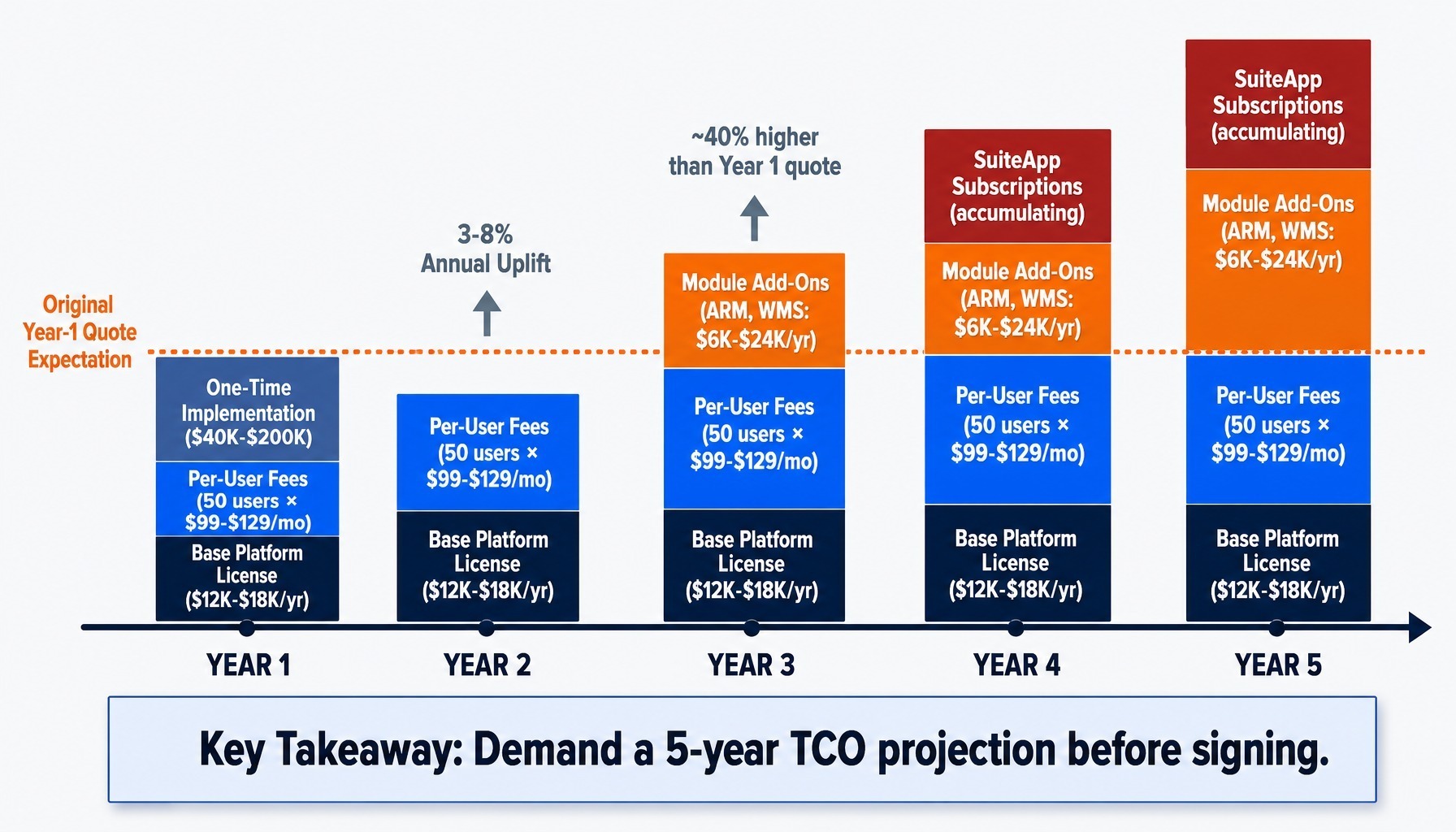
The most common complaint about NetSuite pricing isn't that it's expensive, but that its total cost of ownership (TCO) is front-loaded and escalates in ways that catch buyers off guard. I've seen this firsthand with a mid-market manufacturer whose CFO approved a deal based on an aggressive year-one quote, only to see the renewal price jump by nearly 40% in year three as initial discounts expired and user counts grew.
The cost structure typically includes:
- Base Platform License: Often $1,000-$1,500 per month.
- Per-User Fees: Around $99-$129 per user, per month.
- Module Add-Ons: Advanced Revenue Management (ARM), Demand Planning, or WMS can each add $500-$2,000+ per month.
- One-Time Implementation: Anywhere from $40,000 to over $200,000, depending on complexity.
The trajectory is what surprises most finance leaders. Annual license renewals typically include a 3-8% uplift. New modules get added as the business grows. SuiteApp marketplace subscriptions for specialized functions accumulate. The result is a cost curve, not a flat line. Before signing, demand a five-year TCO projection, not just a year-one quote.
Forced Biannual Upgrades: NetSuite's Greatest Strength and Biggest Risk
NetSuite's mandatory biannual release upgrades are simultaneously its most underappreciated advantage and its most underestimated operational risk. The advantage is clear: you are always on the latest version with access to new features, without undertaking costly, multi-year upgrade projects common with on-premise ERPs.
The risk, however, is directly proportional to your level of customization. For vanilla implementations, these releases are genuinely beneficial. But for environments with dozens of SuiteScript customizations, each forced upgrade requires rigorous regression testing. A user event script that automates a key business rule can easily conflict with a new native feature, breaking a process during month-end close.
Oracle provides a "release preview" account to test upgrades, but it doesn't always contain a full, up-to-date mirror of your production data and customizations. A proper sandbox environment is better, but sandbox refresh cadence is limited. Without a disciplined testing process, you are flying blind twice a year. The forced upgrade cycle that makes NetSuite's cloud-native architecture appealing on a slide deck becomes an operational liability when regression testing for customizations is unfunded or unplanned.
Admin Burnout: The Understaffed NetSuite Team Problem
Admin burnout on NetSuite is a retention and continuity risk that rarely appears in vendor evaluation scorecards. The platform's flexibility creates a significant staffing requirement that most midmarket companies underestimate. To properly manage NetSuite, you need at least one dedicated administrator to maintain saved searches, manage role permissions, handle CSV import mapping, run the period close checklist, and troubleshoot workflow issues.
Many organizations try to assign this as a part-time responsibility to a controller or IT generalist. This inevitably leads to a backlog of configuration requests and accumulating technical debt. Saved searches, for instance, are often treated as simple reporting tools, but they quickly become load-bearing infrastructure when workflows, scripts, and dashboards depend on them. A single edit to a saved search formula field can cause cascading failures across the business.
When that one person who understands the custom record types and role permission granularity leaves, the business faces a single point of failure. For every 100-150 users, you should budget for at least one full-time NetSuite administrator. This is an ongoing operational investment in people, not just software. One way to address this staffing gap is through SaaS managed services, which can provide dedicated expertise without the risk of a single point of failure.
The Customization Trap: When SuiteScript Flexibility Becomes Technical Debt
The same SuiteCloud platform that makes NetSuite powerful is the mechanism that creates the upgrade risk, admin burden, and vendor lock-in discussed above. This is the central trade-off of the platform.
The pattern is predictable. A company starts with a few SuiteScript customizations to handle legitimate edge cases—a specialized pricing rule, a non-standard approval workflow. Over three years, these accumulate. Each one is justifiable in isolation, but collectively they create a brittle, complex system that is expensive to maintain, risky to upgrade, and nearly impossible to migrate away from. During a re-implementation for a distributor, my team discovered over 60 undocumented SuiteScript customizations, a third of which broke during the next release. The remediation effort cost more than the original implementation.
This is the customization trap. It creates powerful vendor lock-in. Consider a SaaS company that built 45 customizations to handle complex recurring billing. They later discovered that migrating to a competitor would require rebuilding all of that logic from scratch, making the switching cost higher than three years of their NetSuite license fees.
Governance is the only solution. Your team must be disciplined about what not to customize. A practical rule of thumb: if a proposed customization cannot be documented in one paragraph and tested in one hour, its business case should be rigorously challenged.
Read more: Top 5 Customizations to Make in Your NetSuite Environment
Who NetSuite Fits and Who Should Look Elsewhere
The NetSuite pros and cons only matter in the context of your specific business. The platform is a strong choice for some and an expensive mistake for others. This is the decision filter.
NetSuite Is a Strong Fit When...
Your organization is likely a good candidate for NetSuite if you meet several of these criteria:
- Revenue & Growth: You have annual revenue between $10 million and $500 million and are on a high-growth trajectory.
- Multiple Subsidiaries: You operate two or more legal entities, especially across different countries, and require real-time financial consolidation.
- Complex Revenue: You have complex revenue recognition requirements, common in SaaS, professional services (project-based), or milestone billing scenarios.
- Integrated Commerce: You need a tightly integrated system for managing inventory, orders, and financials across e-commerce (SuiteCommerce) and other channels.
- PE-Backed: You are a private equity portfolio company where rapid subsidiary onboarding and standardized reporting are key strategic goals.
Consider Alternatives If...
You should probably redirect your search toward other platforms if these descriptions fit your business:
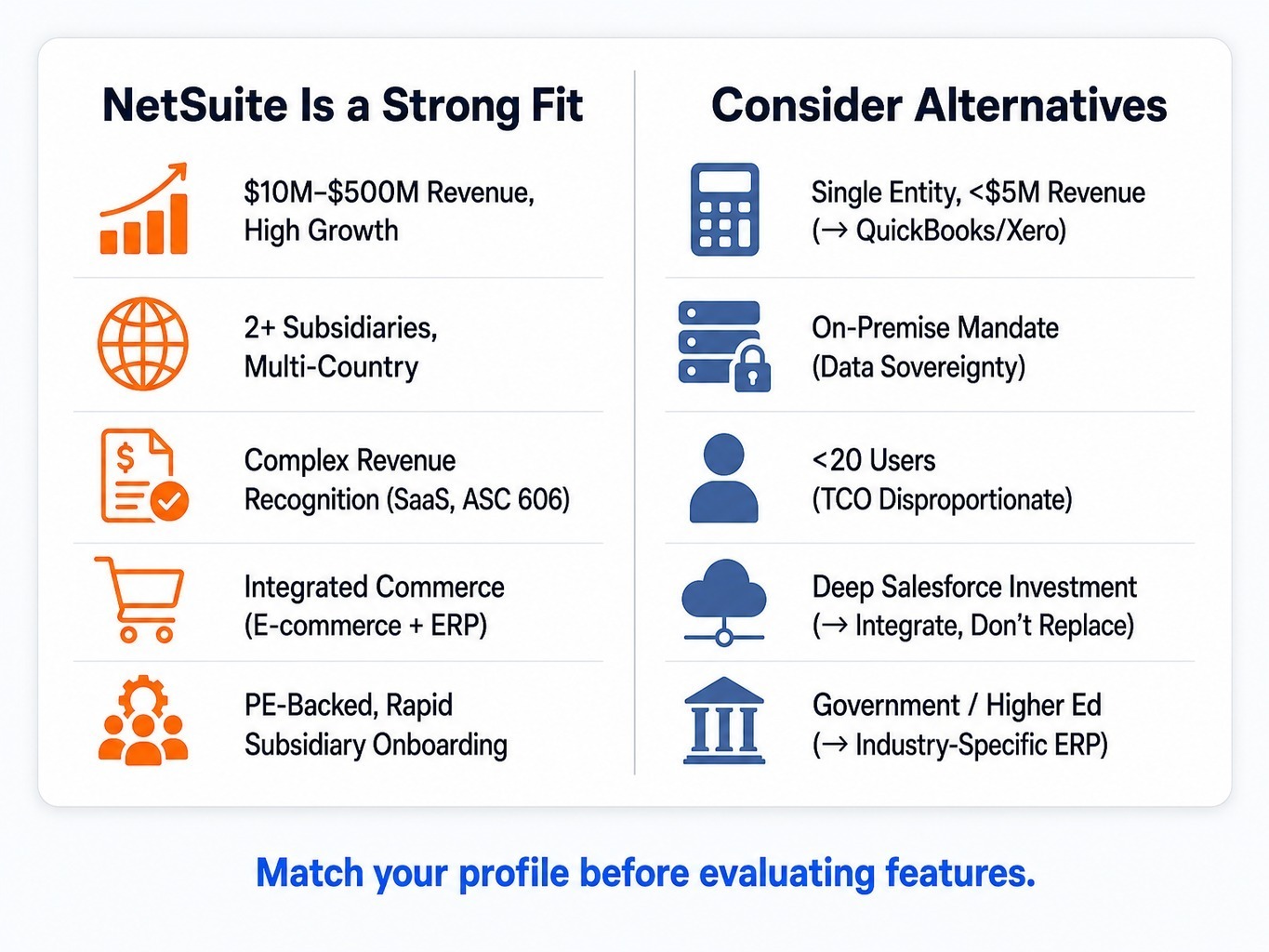
- Small & Simple: You are a single-entity company with under $5 million in revenue and straightforward accounting needs. QuickBooks Enterprise or Xero is likely sufficient.
- On-Premise Mandate: You have strict regulatory or data sovereignty requirements that mandate an on-premises deployment.
- Under 20 Users: Your user count is low enough that NetSuite's module-based and per-user pricing model makes the TCO disproportionately high.
- Deep Salesforce Investment: You already run Salesforce as your system of record for sales and service. NetSuite's native CRM will feel like a downgrade, and integrating the two is a better path than replacing Salesforce.
- Specific Industries: You are in government or higher education, which have specific procurement and compliance requirements that NetSuite doesn't natively support as well as industry-specific solutions. For these scenarios, alternatives like Sage Intacct for finance-first companies or Acumatica Cloud ERP for manufacturing can be a better fit.
How NetSuite Compares on the Dimensions That Actually Decide Evaluations
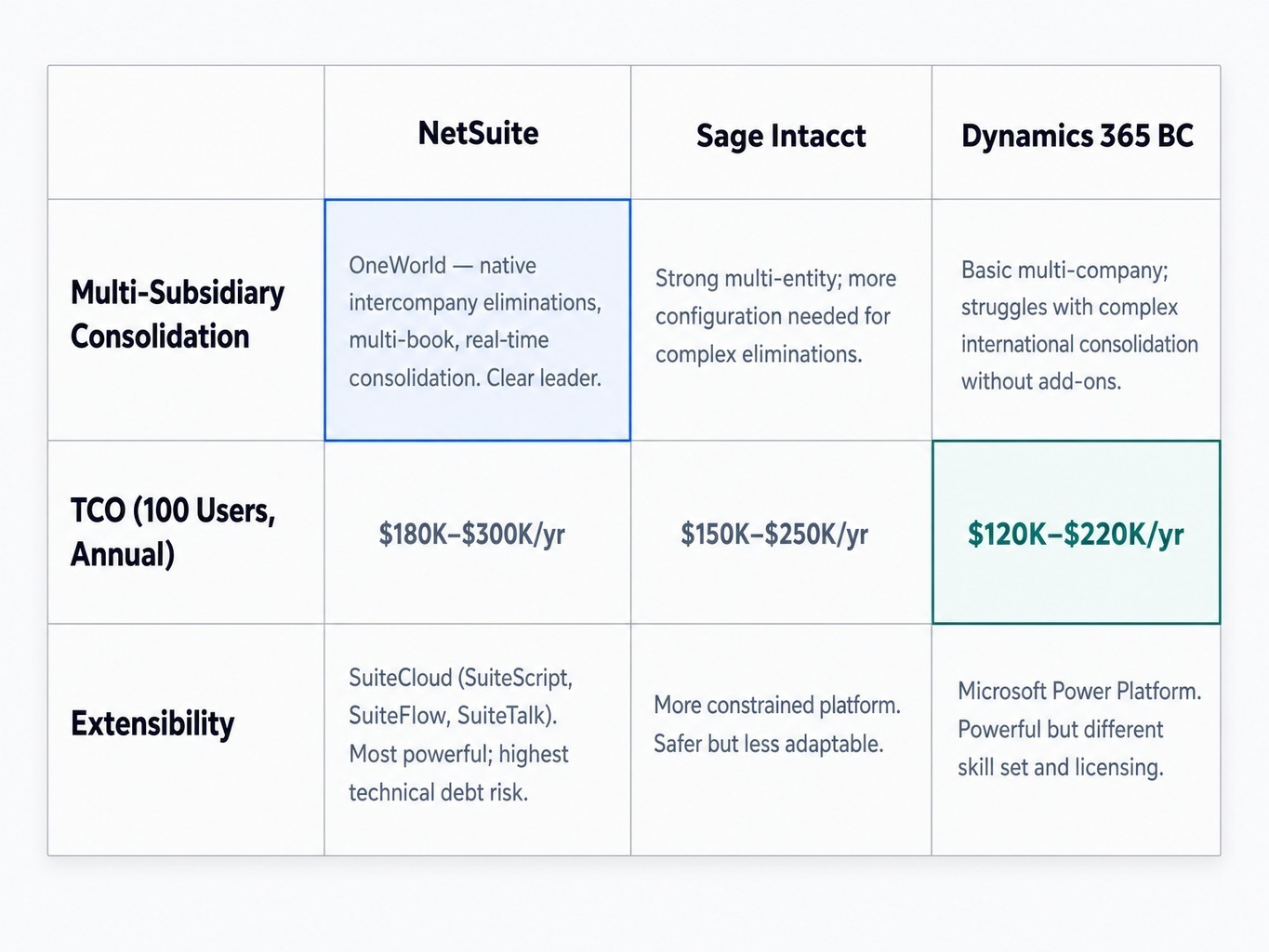
Most evaluations narrow to a shortlist of two or three platforms. In the midmarket, the most common competitors are Sage Intacct and Microsoft Dynamics 365 Business Central. Instead of comparing endless feature lists, let's focus on the three dimensions that most often decide the outcome.
- Multi-Subsidiary Consolidation: NetSuite OneWorld is the clear leader here, handling complex intercompany eliminations and multi-book accounting natively. Sage Intacct also manages multi-entity well but often requires more configuration for complex eliminations. Dynamics 365 BC handles basic multi-company scenarios but can struggle with the demands of complex international consolidation without significant customization or add-ons.
- Total Cost of Ownership (100 Users): For a 100-user implementation with standard modules, conventional wisdom puts approximate annual TCO ranges as follows: NetSuite ($180K-$300K), Sage Intacct ($150K-$250K), and Dynamics 365 BC ($120K-$220K). These are wide ranges because module selection and implementation complexity are huge variables, but they illustrate the general market positioning.
- Extensibility: NetSuite's SuiteCloud platform offers the most power and flexibility, but it also carries the highest risk of creating technical debt. Sage Intacct's platform is more constrained, which makes it safer but less adaptable. Dynamics 365 leverages the broader Microsoft Power Platform, which is powerful but requires a different set of development skills and licensing considerations.
Why Implementation and Ongoing Support Determine Whether NetSuite Works for You
This analysis reveals a core tension: NetSuite's greatest strengths—platform extensibility and consolidation—are the direct source of its most significant operational risks when not managed with discipline. The difference between a NetSuite success story and a story of regret is almost always the quality of implementation governance and ongoing operational support.
This is where a partner model becomes critical. An effective partner doesn't just sell you software; they prevent the failure modes described in this article. At GSI, our consultants bring an average of 15+ years of experience, having seen the customization trap play out and knowing how to establish governance from day one. Our managed services are designed to handle the ongoing admin burden—period close checklists, saved search maintenance, and critical regression testing for forced upgrades—so you don't have to build and retain a large internal team.
As an Oracle Platinum Partner and certified NetSuite Solution Provider, we anchor our projects in a 100% service guarantee that creates accountability for business outcomes, not just go-live dates. The goal is a stable, maintainable system that delivers value for years, not just a successful launch.
Request a NetSuite Readiness Assessment from GSI's Senior Consultants.
The Final Verdict on NetSuite
The pros and cons of NetSuite are not a balanced scorecard. They are a set of interdependent trade-offs. The same architectural decisions that give the platform its unique strengths also generate its most significant operational risks.
NetSuite excels at multi-subsidiary consolidation and platform extensibility in ways that genuinely differentiate it from midmarket alternatives. But those very capabilities create a cost trajectory, an upgrade dependency, and a staffing requirement that must be governed from the moment you sign the contract.
The companies that succeed with NetSuite are not the ones that chose the "best" ERP. They are the ones that implemented it with discipline and invested in the people and processes required to sustain it. Before you evaluate NetSuite's features, evaluate your organization's readiness to govern, staff, and manage the platform over a five-year horizon. That assessment will tell you more than any feature comparison ever could.
Frequently Asked Questions
How long does a typical NetSuite implementation take in 2026?
For a midmarket company with standard financials and inventory, expect 3-6 months. Implementations involving OneWorld, complex revenue recognition (ARM), or significant data migration from legacy systems like JD Edwards typically run 6-12 months. The biggest timeline risk is not technical complexity but internal resource availability for data validation and user acceptance testing.
Does NetSuite integrate well with Salesforce or HubSpot CRM?
Yes, but it requires middleware. Celigo integrator.io is the most common connector for Salesforce, handling bidirectional sync of accounts, opportunities, and orders. If you already run Salesforce deeply, NetSuite's native CRM will feel like a downgrade; plan to integrate your existing CRM rather than replace it.
What reporting limitations does NetSuite have out of the box?
NetSuite's saved searches are powerful but have a steep learning curve; formula fields use a proprietary syntax that frustrates analysts accustomed to SQL. SuiteAnalytics Workbooks improve usability but lack the visualization depth of dedicated BI tools. Most mature customers eventually license NetSuite Analytics Warehouse or connect an external BI tool for executive dashboards.
Is NetSuite a good fit for SaaS companies with recurring revenue?
NetSuite handles SaaS billing well via its Advanced Revenue Management module and integrations with tools like Zone Advanced Billing. However, the ARM module is a costly add-on, and configuring ASC 606 compliance requires experienced consultants. Companies with complex multi-element arrangements benefit most from NetSuite's flexibility.
What happens to my customizations when Oracle forces a NetSuite release upgrade?
Oracle provides a sandbox environment to preview each release, but regression testing is your responsibility. User event scripts and client scripts are the most common breakage points. Best practice is to maintain a customization registry and run targeted tests in the sandbox at least two weeks before each release goes live.
How difficult is it to migrate data from a legacy ERP into NetSuite?
Data migration is the most consistently underestimated workstream. NetSuite's primary ingestion method, CSV import mapping, is rigid, and errors in field mapping or chart of accounts structure cause the majority of delays. Plan for at least two full mock data migrations before your final cutover.