![GSI_A7[1]-1-1](https://www.getgsi.com/hs-fs/hubfs/GSI_A7%5B1%5D-1-1.png?width=125&height=56&name=GSI_A7%5B1%5D-1-1.png)
Key Takeaways
- The real cost of staying on QuickBooks is the "workaround tax" the hidden labor, error correction, and decision latency your team absorbs to compensate for system limitations.
- If your month-end close exceeds 10 days, you rely on multiple reporting spreadsheets, or your chart of accounts is bloated, you have definitively outgrown QuickBooks.
- QuickBooks Online Advanced solves the user-count problem but not the structural limitations around multi-entity consolidation, dimensional reporting, or compliance automation.
- Evaluate ERP alternatives by starting with your specific pain points and total cost of ownership, not by comparing generic feature lists from vendor demos.
- A typical migration from QuickBooks to a core financial ERP takes 3-6 months, with the biggest risk to the timeline being the speed of internal decision-making, not the technology itself.
The controller at a $40M distribution company spends the first three days of every month reconciling inventory. She pulls data from four different spreadsheets because QuickBooks can't provide a consolidated, multi-location view of stock valuation natively. She knows the numbers are probably right, but she can't prove it without hours of manual cross-checks. This isn't a software bug; it's a business hitting a structural ceiling. If this scenario feels familiar, your organization has likely outgrown QuickBooks.
The problem isn't the software's subscription fee. It's the "workaround tax": the cumulative cost of the hours, errors, and delayed decisions that pile up when a growing business is constrained by its financial system. This tax is paid in spreadsheets, manual journal entries, and the institutional knowledge of a few key people who know how to make the numbers tie out.
This article provides a practitioner's framework for moving forward. We will help you diagnose whether you've truly outgrown QuickBooks, explain why an intermediate upgrade probably won't solve the core problem, and provide a structured method for evaluating ERP alternatives without defaulting to whichever vendor shouts the loudest.
The Workaround Tax: What Staying on QuickBooks Actually Costs
The most expensive thing about QuickBooks for a growing company is not its license fee. It's the invisible operational drag your team absorbs to compensate for its limitations. This is the workaround tax every spreadsheet export, every manual reclassification of a journal entry, every month-end reconciliation that requires someone to hunt down data from a disconnected system.
Consider a mid-market manufacturer whose AP team manually re-keys vendor invoices from a procurement system into QuickBooks because the integration is unreliable. The process itself invites errors. They eventually discovered over $12,000 in duplicate payments across six months, not because anyone was careless, but because the manual workflow was fundamentally fragile. This is the workaround tax made visible. It's a cost that compounds over time, silently eroding margin and consuming your team's capacity for higher-value work like flux analysis and strategic planning.
Read more: ON DEMAND: Boost Productivity and Cut Costs with JD Edwards Embedded A/P Automation
Where the Hours Actually Go
During a pre-migration assessment for one 200-person distributor, a detailed time study found that the controller and two staff accountants were spending a combined 35 hours per month manually reconciling inventory valuations between QuickBooks and a standalone warehouse management spreadsheet. This workaround had become so normalized over three years that leadership considered it part of the standard close process rather than a symptom of system inadequacy.
This pattern repeats across four common categories where the workaround tax accumulates:
- Spreadsheet Spaghetti for Reporting: This is the web of exports required to produce reports QuickBooks cannot generate natively. Think dimensional reporting, segment-level P&Ls, and intercompany eliminations. If your board pack depends on a dozen linked Excel files, you're paying this tax.
- Manual Journal Entry Bottlenecks: At month-end, your team is likely bogged down with manual journal entries to account for payroll, fixed assets, and accrued expenses because data from subledgers doesn't flow automatically. This often involves significant time spent on reclassing entries posted to the wrong account.
- Data Re-keying Between Systems: Fragile or nonexistent integrations between QuickBooks and your CRM, e-commerce platform, or procurement system force manual data entry. This isn't just slow; it's a primary source of data integrity errors.
- Audit Preparation Overload: Preparing for an audit becomes an exercise in forensic accounting. Instead of pulling a clean audit trail from the system, your team reconstructs it from exports, emails, and spreadsheets, hoping to prove that controls were followed.
How to Estimate Your Own Workaround Tax
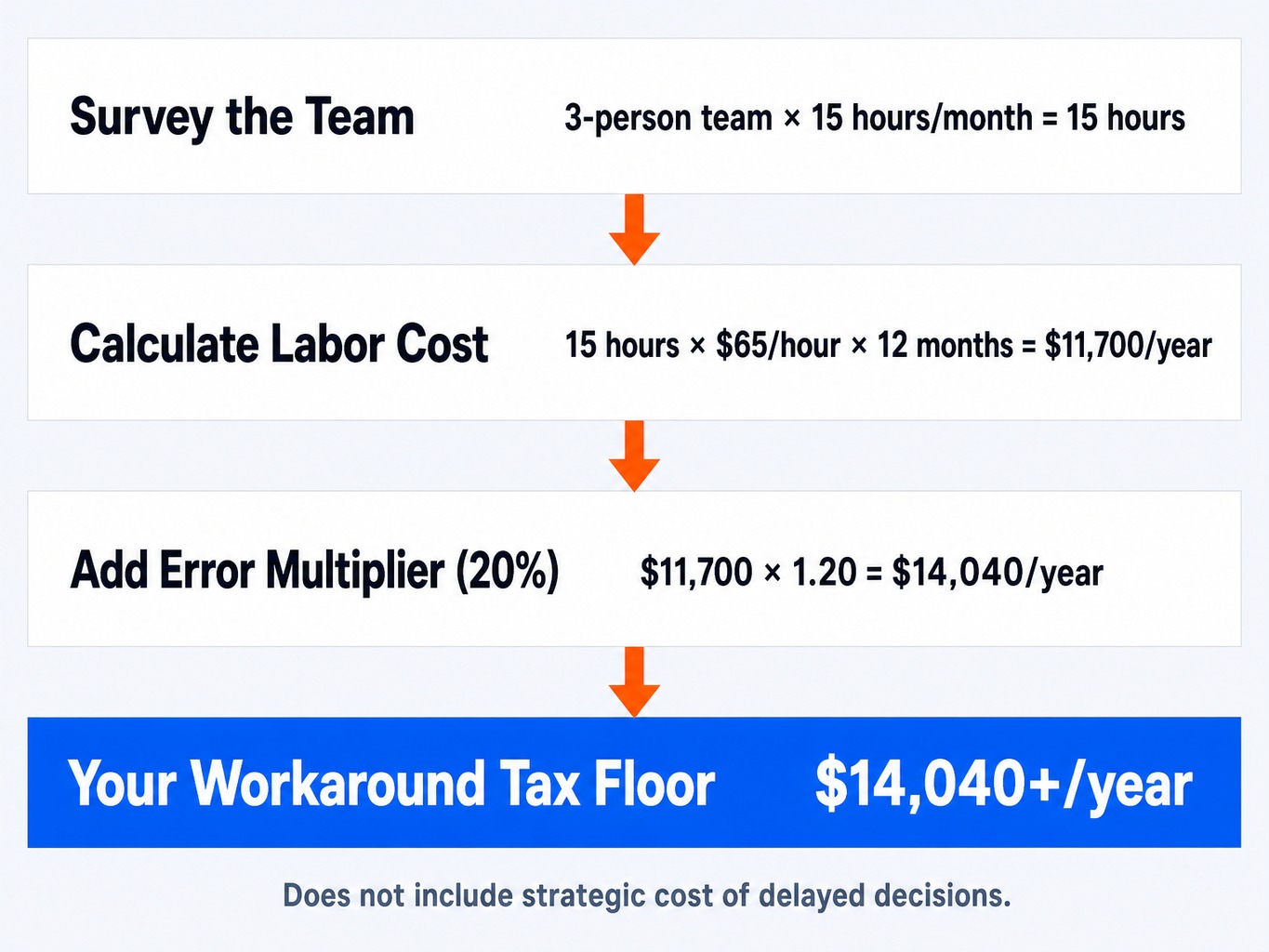
You can get a baseline estimate of your company's workaround tax this week with a simple three-step process.
- Survey the Team: Ask each person in your finance and operations departments to log the hours they spend each month on tasks that exist only because QuickBooks has a limitation. This isn't about tasks that are inherently necessary; it's about the compensating activities.
- Calculate the Labor Cost: Multiply the total hours by a fully loaded hourly cost for each employee (salary, benefits, overhead). If a three-person team spends a combined 15 hours per month on these tasks at an average loaded cost of $65/hour, that's nearly $12,000 a year in direct labor.
- Add an Error Multiplier: Assume that every manual process generates rework. A conservative 20% multiplier for error correction, duplicate payment recovery, and data validation is a reasonable starting point. In our example, that adds another $2,400, bringing the total to over $14,000.
This number is the floor, not the ceiling. It doesn't capture the strategic cost of delayed decisions made because your executive team couldn't get accurate reports until day eight of the month instead of day two.
Five Signs You Have Genuinely Outgrown QuickBooks
Vague symptoms like "it feels slow" are not enough to justify a migration. You need specific, testable signs that the system's architecture can no longer support your operational complexity. Here are five.
Your Close Calendar Exceeds 10 Business Days. As a business grows, its close process should become more efficient, not less. If your close calendar has stretched over time due to manual data gathering and subledger reconciliation, you've outgrown your system.
- Diagnostic Test: Has your close timeline gotten longer, not shorter, over the past two years, even as you've added headcount?
You Maintain More Than Three Critical Financial Spreadsheets. Every company uses spreadsheets, but relying on them for core financial reporting is a major red flag. This "spreadsheet spaghetti" indicates your system of record cannot produce the analysis you need to run the business.
- Diagnostic Test: Would removing any one of your core reporting spreadsheets break your ability to produce an accurate P&L, balance sheet, or cash flow statement for your board?
You Manually Consolidate Multiple Entities. If your business operates with multiple legal entities, locations, or currencies, you've hit a hard architectural limit. Manually exporting trial balances to Excel for consolidation and intercompany eliminations is not a scalable process. It's a monthly source of risk and delay.
- Diagnostic Test: Does generating a consolidated financial statement require anyone on your team to use the VLOOKUP or SUMIF function in Excel?
Your Chart of Accounts Is Bloated (Over 300 Lines). When your chart of accounts (COA) becomes a long, unmanageable list, it's usually because you're encoding dimensional data like departments, projects, or locations directly into account numbers. For example, creating "Revenue - Dept A," "Revenue - Dept B," and so on, instead of using a single revenue account with a department dimension. This is
GL bloat, and it makes reporting brittle and unscalable. The most dangerous version of this is misusing class and location fields to simulate dimensions, which corrupts reporting logic in ways that only surface during a data migration.- Diagnostic Test: Does your COA have more than 300 active accounts, and does it take more than a few minutes to explain its structure to a new hire?
You've Had More Than Two Data Integrity Scares in 12 Months. Once is an accident. Twice is a pattern. Unexplained variances, duplicate transactions, or audit findings tied to manual processes signal that your control environment is breaking down. At this point, the risk of a material misstatement is no longer theoretical.
- Diagnostic Test: In the last year, have you had to launch an internal "investigation" to figure out why numbers didn't tie out between two systems or reports?
Is QuickBooks Online Advanced Enough, or Does It Just Delay the Inevitable?
As companies face these challenges, CFOs often evaluate whether QuickBooks Online Advanced (QBO Advanced) is a sufficient upgrade. They see the higher user limit and better dashboards and hope it's a way to defer a full ERP migration. For some, it is. But for most, it's a costly detour.
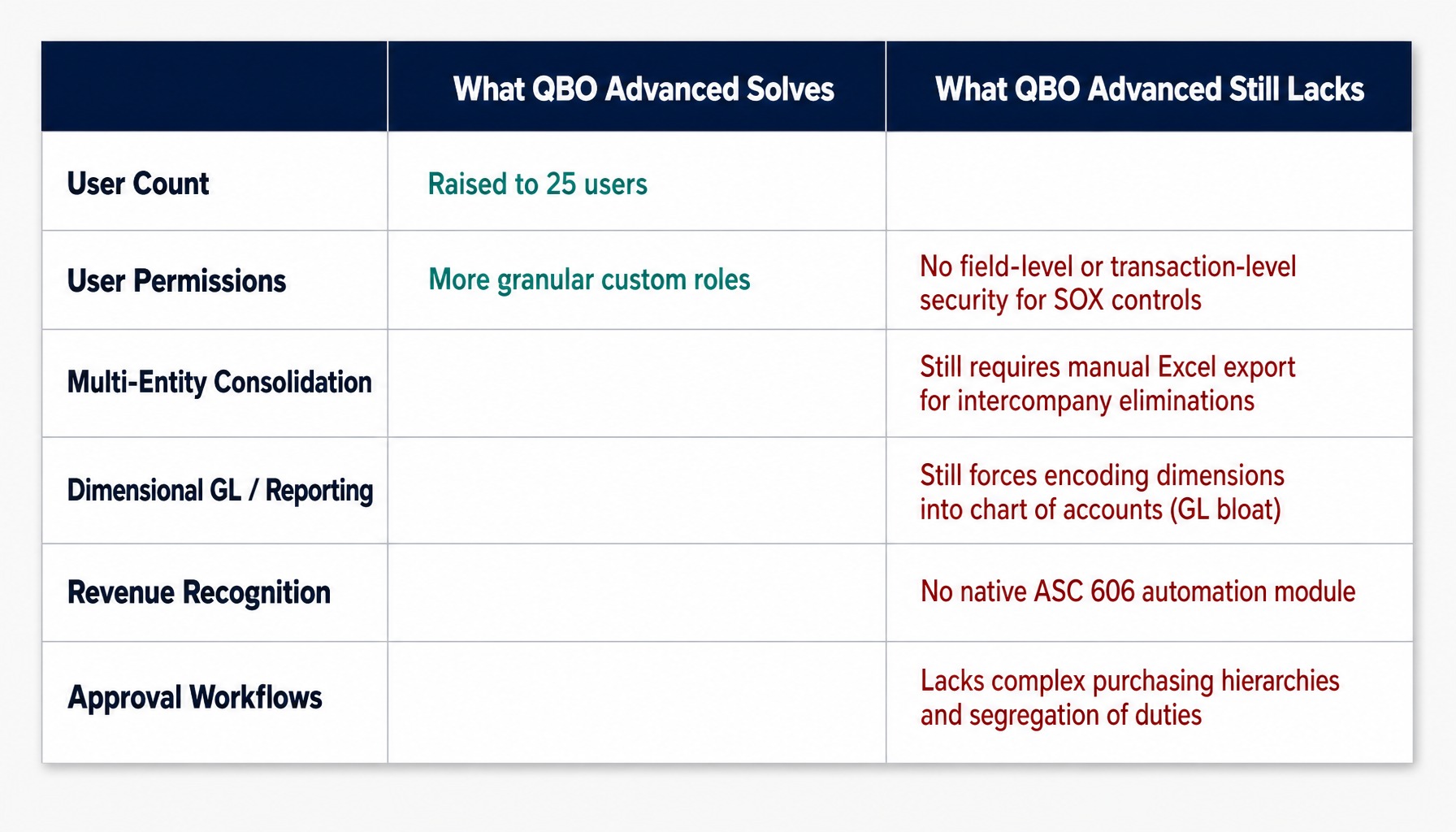
QBO Advanced is Intuit's answer to the outgrowing QuickBooks problem. It raises the user cap to 25, offers more granular user permissions, and provides stronger reporting through its Fathom integration. However, it does not solve the structural limitations that drive most migrations. CFOs evaluating the upgrade often underestimate how quickly they will hit its ceilings, a miscalculation that IT services and consulting providers see repeatedly when clients arrive for ERP scoping having already burned a year on an intermediate solution.
Specifically, QBO Advanced still lacks:
- Native Multi-Entity Consolidation: You can manage multiple companies, but you still have to export each entity's trial balance to Excel to perform intercompany eliminations and produce a consolidated report.
- A Dimensional General Ledger: You are still forced to encode dimensions like departments or projects into your chart of accounts, leading to the same GL bloat and reporting inflexibility.
- Robust Revenue Recognition: It does not have a native module for automating complex revenue schedules required for ASC 606 compliance.
- Advanced Approval Workflows: Its custom roles are an improvement, but they lack the field-level and transaction-level security needed for SOX-adjacent controls or complex purchasing hierarchies.
Consider a $25M professional services firm with three legal entities. They upgraded to QBO Advanced expecting consolidated reporting, only to find they were still running the same manual export-and-eliminate process in Excel. The upgrade bought them more user seats but didn't reduce their close timeline by a single day.
The verdict is clear: QBO Advanced is a reasonable choice if your only problem is user count. If your pain is rooted in multi-entity accounting, dimensional reporting, or compliance automation, it only delays the inevitable migration.
A Practical Framework for Evaluating ERP Alternatives
Most companies evaluate ERPs by watching vendor demos and comparing feature checklists. This is the wrong approach. It leads to decisions based on marketing rather than operational reality. A sound evaluation starts with your specific pain points and uses a structured framework to assess functional fit, total cost, and implementation risk.
Functional Fit: Start With Your Pain Points, Not Feature Lists
The most common evaluation mistake is starting with a vendor's solution instead of your own problems. The right way is to take your "workaround tax" analysis and convert each workaround into a functional requirement.
- If your team spends eight hours a month on manual intercompany eliminations, your requirement is "native multi-entity consolidation with automated eliminations," not just "multi-entity support."
- If your reporting is a mess of spreadsheets, your requirement is "real-time, dimensional financial reporting with self-service dashboards."
With a clear requirements document in hand, you can begin evaluating the major mid-market ERP platforms: Oracle NetSuite, Sage Intacct, Microsoft Dynamics 365 Business Central, Acumatica, and SAP Business One. Each has different strengths. For example, NetSuite's unified platform excels in retail and distribution, while Sage Intacct is strong in professional services. The goal is to match a platform's core capabilities to your specific operational needs, not to find the one with the longest feature list.
Total Cost of Ownership: Beyond the Subscription Price
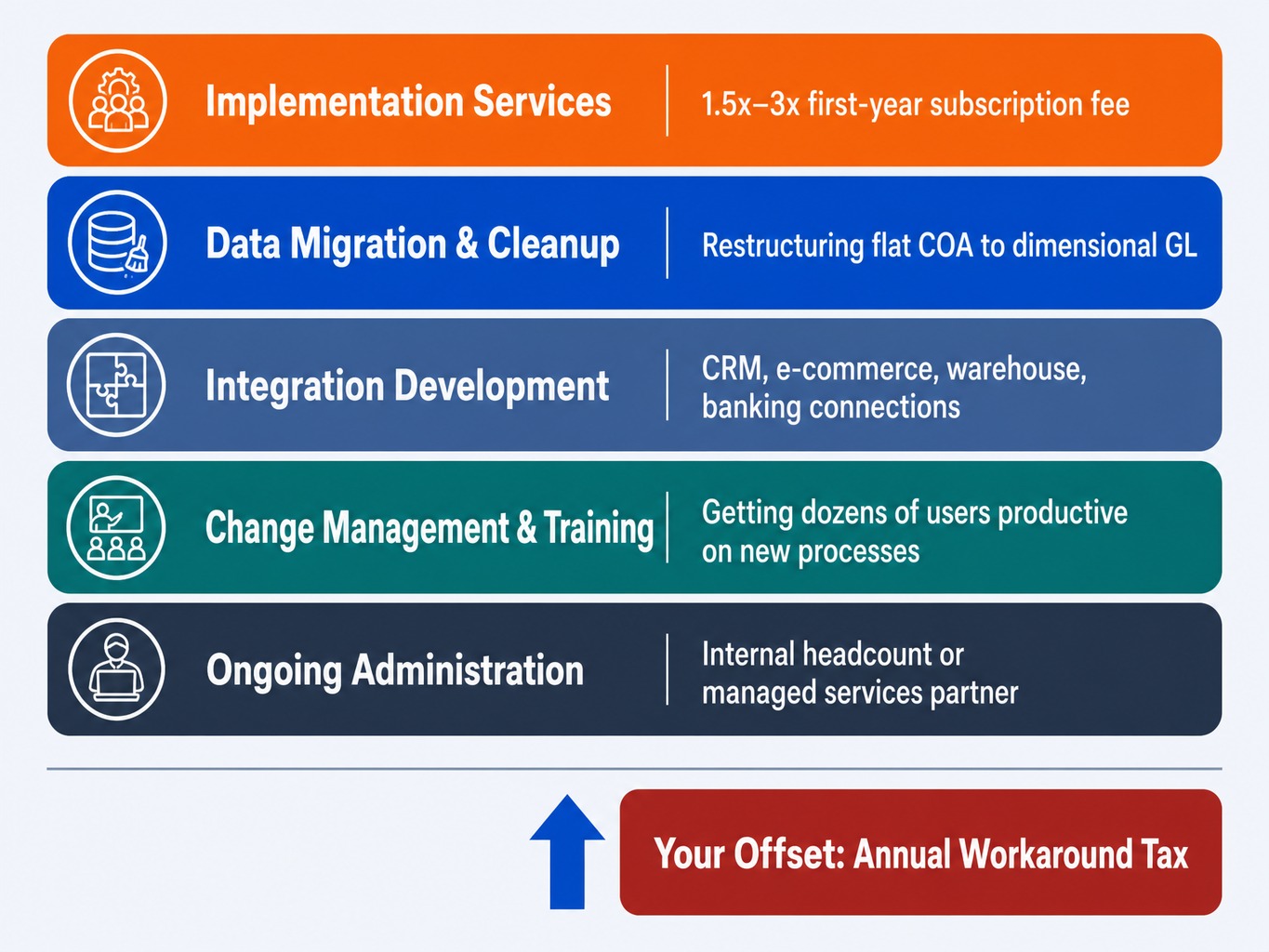
An ERP's total cost of ownership (TCO) extends far beyond the annual subscription. A realistic budget must account for five components that buyers frequently underestimate:
- Implementation Services: For a mid-market deployment, expect implementation costs to be 1.5x to 3x your first-year subscription fee.
- Data Migration and Cleanup: The effort to restructure a flat QuickBooks chart of accounts into a dimensional GL can be significant. This is a business process decision, not just a technical task.
- Integration Development: Budget for the cost to connect your new ERP to your CRM, e-commerce, warehouse, and banking systems.
- Change Management and Training: Factor in the time and resources needed to get dozens of users productive on a new system with new processes.
- Ongoing Administration: Account for either the internal headcount or the cost of a managed services partner to support and administer the system post-go-live.
The workaround tax you calculated earlier is your offset. The true financial comparison is the amortized five-year cost of migration versus the escalating annual cost of staying on QuickBooks.
Implementation Risk: What Derails ERP Projects
ERP projects are notorious for delays and budget overruns, but the causes are predictable and manageable. For companies migrating from QuickBooks, failure typically stems from three sources:
- Underestimating Data Cleanup: You cannot simply export QuickBooks data and import it into an ERP. Inconsistent vendor names, duplicate customer records, and a non-dimensional chart of accounts must be resolved before configuration begins.
- Skipping Process Redesign: The goal is not to replicate your QuickBooks workarounds in a more expensive system. The goal is to adopt the ERP's native capabilities. This requires a willingness to change existing processes.
- Choosing a Partner on Price: Selecting an implementation partner without deep domain expertise in your industry and specific experience migrating companies from QuickBooks is a false economy. They won't anticipate the unique data mapping and change management challenges.
Implementation risk is real, but it can be managed by planning for data quality, process change, and partner selection with equal rigor.
What Migration From QuickBooks Actually Looks Like
The fear of a "big-bang" cutover that disrupts the entire business for months is the single biggest reason companies delay migration. This fear is largely outdated. Modern mid-market ERP migrations are typically phased, manageable projects that prioritize business continuity.
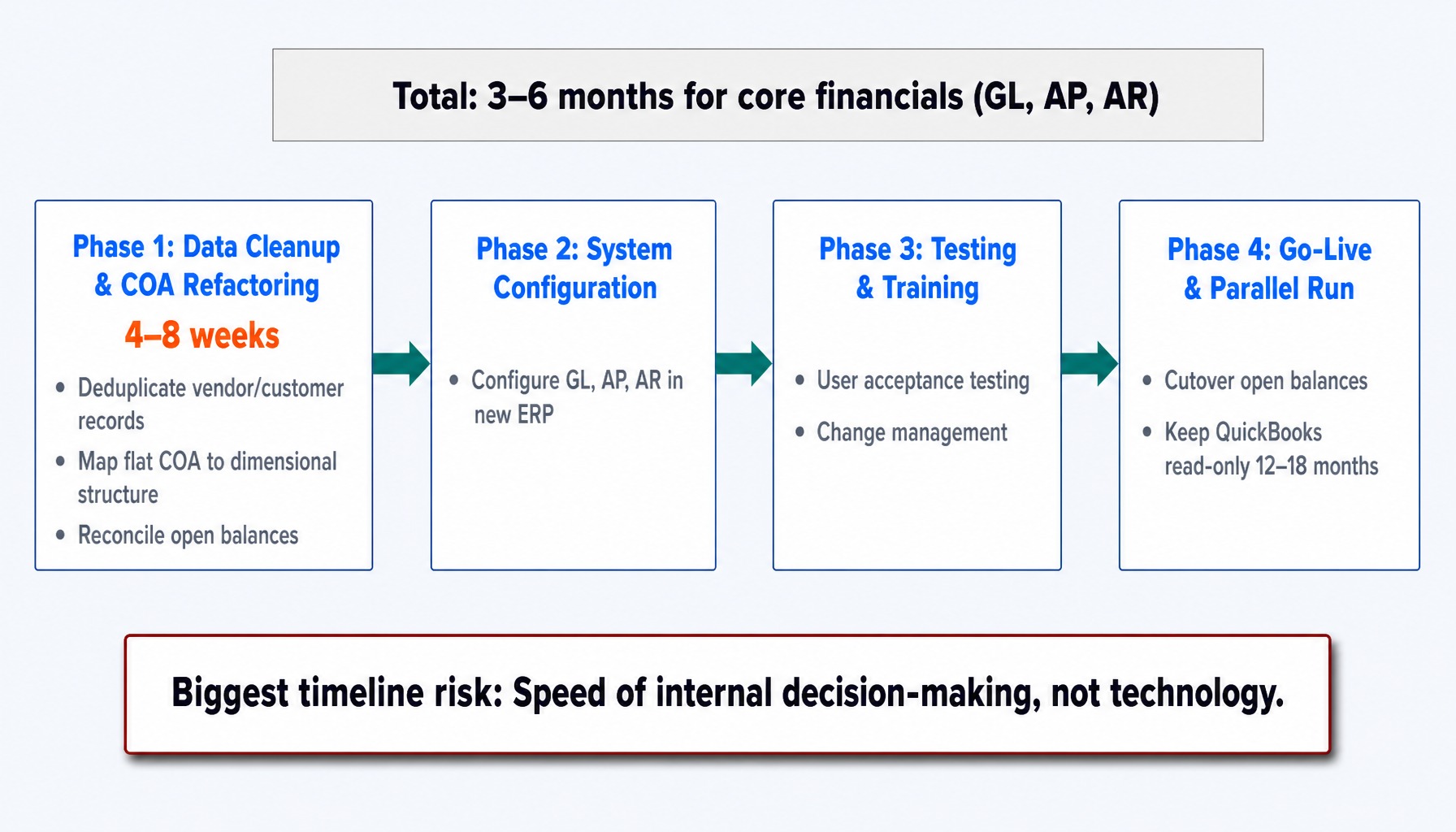
For a company between $20M and $100M in revenue, a core financials migration (GL, AP, AR) usually takes three to six months from kickoff to go-live. A significant portion of this often four to eight weeks is dedicated to data cleanup and chart of accounts refactoring before the implementation partner begins system configuration.
Key data preparation tasks include:
- Deduplicating and standardizing vendor and customer master records.
- Mapping your flat chart of accounts to a new, dimensional structure.
- Reconciling all open balances (outstanding invoices, unpaid bills, current inventory).
- Defining a strategy for historical data.
Most companies do not migrate their entire transactional history. The standard practice is to migrate open balances and beginning balances, then keep a read-only instance of QuickBooks available for 12-18 months for historical lookups. The effort to clean and migrate years of transactions rarely provides a positive ROI.
The biggest risk to your timeline is not technology; it's the speed of internal decision-making. We've seen projects delayed by six weeks simply because department heads couldn't agree on the new chart of accounts structure. Every week spent debating an approval workflow is a week added to the go-live date.
A critical but often overlooked part of the process is planning your migration strategy early defining scope, sequencing phases, and aligning stakeholders before any technical work begins.
Why Companies Migrating From QuickBooks Choose GSI
Migrating from QuickBooks to an enterprise-grade ERP requires a partner who understands both the departure point and the destination. Many consulting firms know how to configure NetSuite or Oracle Cloud, but have never guided a company through the messy reality of extracting data and processes from a maxed-out QuickBooks file. Others know QuickBooks but lack deep expertise in enterprise architecture.
GSI bridges this gap. As an Oracle Platinum Partner and NetSuite Solution Provider with consultants averaging over 15 years of experience, we have a long track record of guiding mid-market manufacturers, distributors, and professional services firms through this exact transition. Our approach begins by quantifying your specific "workaround tax," then designing a target ERP environment that systematically eliminates those hidden costs not by following a generic template.
We understand that implementation risk is a primary concern for any executive team. Our 100% service guarantee is not a marketing slogan; it's a structural commitment to the outcome. It means we are accountable for delivering a successful implementation that meets the business case we build with you. This directly addresses the risk of project failure and ensures your investment yields a tangible return.
The Real Question Is Not If, But When
The cost of outgrowing QuickBooks is not a one-time fee you pay on the day you migrate. It's a tax you pay every single month you stay in wasted hours, costly errors, and slow, uninformed decisions. As your business grows, that tax only gets higher.
If you recognize the diagnostic signs in your own operations, the path forward is clear. The workaround tax is real and quantifiable. The limitations are structural, not superficial. And a migration, while a significant project, is manageable with the right framework and an experienced partner.
If you've read this far, the question is no longer whether you have outgrown QuickBooks. The question is how many more months of workaround tax you are willing to absorb before you act.
Frequently Asked Questions
1. How many transactions can QuickBooks handle before performance degrades?
QuickBooks does not publish a hard transaction limit, but performance typically degrades noticeably once a company file exceeds 500,000 to 1 million transactions. This manifests as slow report generation and laggy navigation. While QuickBooks Online Advanced handles volume better, the bottleneck often shifts to API rate limits at scale.
2. What happens to my historical data when I leave QuickBooks?
Most companies migrate only open balances (outstanding invoices, unpaid bills) and keep QuickBooks in read-only mode for 12-18 months to access historical transactions. A full transactional history migration is rarely cost-effective, as the data cleanup effort typically exceeds the value of having old transactions in the new system.
3. What revenue thresholds typically trigger a QuickBooks migration?
Operational complexity, not revenue alone, is the trigger. That said, most companies hit structural limitations between $10M and $50M in revenue, especially when adding entities or complex revenue streams. A simple $15M single-entity business may be fine, while a complex $8M company with three subsidiaries has likely outgrown it.
4. Can I integrate QuickBooks with my CRM and avoid upgrading to an ERP?
You can, but these integrations are often fragile. Middleware connectors can sync QuickBooks with Salesforce or HubSpot, but they can break after updates and struggle with complex data mappings. The maintenance burden and cost often grow to a point where a native ERP/CRM platform becomes the more economical choice.
5. What QuickBooks limitations affect SOX compliance and audit readiness?
QuickBooks lacks the granular role-based access controls needed for SOX, such as enforcing segregation of duties without add-ons. Its audit trail capabilities are also limited, lacking the kind of tamper-evident, user-attributed logs that auditors expect from an enterprise system. These control gaps alone often justify migration for companies approaching compliance.