![GSI_A7[1]-1-1](https://www.getgsi.com/hs-fs/hubfs/GSI_A7%5B1%5D-1-1.png?width=125&height=56&name=GSI_A7%5B1%5D-1-1.png)
Key Takeaways
- A failed NetSuite implementation is a diagnostic problem, not a sunk cost. The first step is to distinguish between normal post-go-live friction and genuine architectural failure.
- The decision to rescue or re-implement hinges on where the failure lives. If the core architecture (subsidiary structure, chart of accounts) is sound, a targeted rescue is faster and more cost-effective.
- Architectural flaws, like an incorrect OneWorld subsidiary setup, are often irreversible and make a clean-instance re-implementation the only viable path to long-term stability.
- Before deciding, conduct a structured two-part audit: a functional and data health assessment using NetSuite-native tools, and a technical debt inventory of all customizations and integrations.
- Tolerating a broken system creates compounding costs in manual workarounds, reporting inaccuracies, and eroded executive trust that quickly exceed the cost of a structured recovery project.
Eight months after your NetSuite go-live, the finance team is still closing the books in spreadsheets. Your warehouse team runs a parallel inventory system in Excel because the numbers in NetSuite never seem to match physical counts. The C-suite, having spent seven figures on a system that promised a single source of truth, is now asking a pointed question: should we scrap the whole thing and start over?
This is the reality for too many organizations. But the hardest decision after a failed NetSuite implementation is not admitting it failed. It's figuring out whether the right move is a targeted project rescue or a full NetSuite re-implementation from a clean instance.
Most companies get this decision wrong. Paralyzed by the cost of the initial project and lacking a structured way to evaluate the damage, they either patch a fundamentally broken system or prematurely scrap a salvageable one. This article provides the decision framework that most organizations are missing. It's a pragmatic guide for diagnosing what truly went wrong and choosing the right recovery path one based on financial and operational reality, not frustration.
How to Know Your NetSuite Implementation Actually Failed
Many organizations either misidentify normal post-go-live turbulence as a catastrophe or, worse, tolerate genuine structural failure for months because they assume the pain is normal. Before you can choose a recovery path, you must accurately classify your situation.
Post-Go-Live Friction vs. Structural Failure: Knowing the Difference
The critical diagnostic question is not whether users are unhappy they often are after any major system change. The question is whether the system's foundational architecture is sound.
Post-go-live friction looks like user frustration with a new approval workflow or a role permission matrix that needs cleanup. These are training and minor configuration issues, not signs of a NetSuite implementation failure .
Structural failure is different. It's when the core design is wrong. I once walked into a mid-market distribution company where the item fulfillment process was breaking with every NetSuite update. It turned out their partner had built the entire workflow on custom scripts instead of using native features. The failure looked total, but a diagnostic audit revealed the chart of accounts and subsidiary structure were sound. We were able to replace the brittle customization layer without touching the foundation, rescuing the instance for a fraction of what a re-implementation would have cost.
Look for these signs of structural failure in your own instance:
- GL Impact Analysis reveals incorrect account mappings, meaning transactions are consistently posting to the wrong places.
- Saved search spaghetti has taken over, with finance building dozens of complex, fragile searches because standard reports produce the wrong numbers.
- Phantom inventory reconciliation is a routine monthly task because misconfigured item records or a botched data migration created discrepancies that cycle counts can't fix.
- CSV import band-aids are used to move data between NetSuite and other systems, replacing what should be automated integrations.
If you're seeing these patterns, you're likely dealing with more than just post-go-live friction.
The Compounding Cost of Living with a Broken Implementation
For CFOs and COOs, a failed NetSuite implementation is not just an IT problem. It's a financial reporting risk, an audit exposure, and a drag on operational throughput that shows up in inventory accuracy and order-to-cash cycle times. Organizations that tolerate a broken instance accumulate compounding costs that never appear on a project budget.
Consider a distribution company where the warehouse team maintains a parallel spreadsheet for inventory because NetSuite counts don't match physical stock. Every month, two people spend three days on manual reconciliation. That's 72 person-days per year spent chasing phantom inventory a direct, recurring cost that wouldn't exist if the system worked as designed.
Layer on the less visible costs: audit risk from unreliable financial data, delayed strategic decisions because management can't trust the reports, and talent attrition as your best employees leave rather than fight a broken system. The cost of inaction quickly exceeds the cost of a structured NetSuite project rescue .
Five Root Causes Behind Most NetSuite Implementation Failures
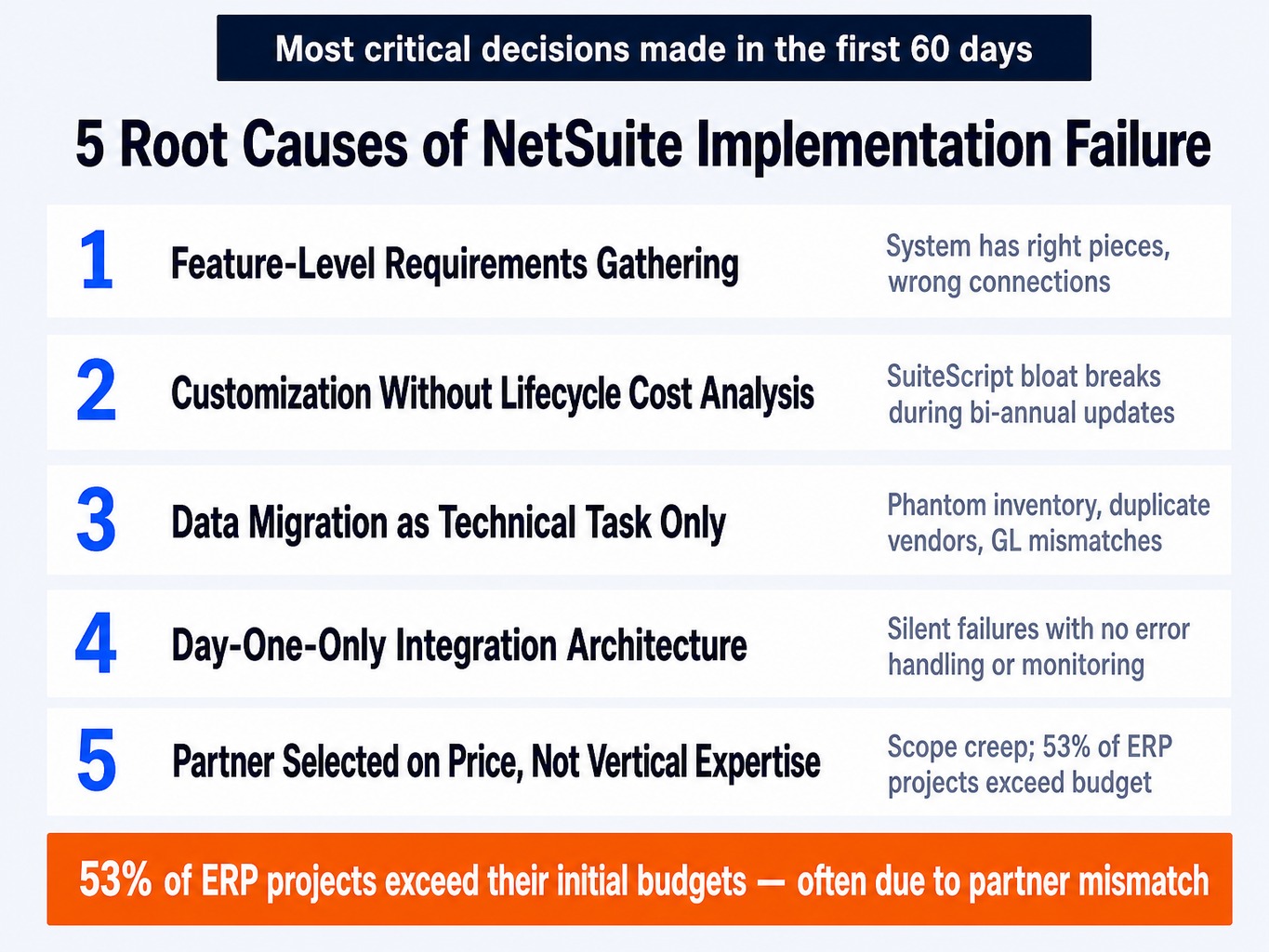
While dozens of things can go wrong in an ERP project, five root causes account for the vast majority of failures. Most are decisions made or not made in the first 60 days of the project.
-
Requirements Gathered at the Feature Level, Not the Process Level. Teams often provide a list of desired fields, forms, and reports from their legacy system. A weak partner builds exactly that, resulting in a system with all the right pieces but none of the right connections. A strong business requirements gathering phase maps end-to-end processes like order-to-cash or procure-to-pay to ensure the system supports the actual flow of work.
-
Configuration vs. Customization Decisions Made Without Lifecycle Cost Analysis. The partner uses SuiteScript or SuiteFlow to replicate legacy ERP behavior instead of guiding the business to adopt NetSuite-native processes. This creates "SuiteScript bloat" and "workflow soup" that becomes a maintenance nightmare. This technical debt often breaks during NetSuite's bi-annual updates, creating SDF deployment conflicts and bundle dependency hell that takes weeks to untangle.
-
Data Migration Treated as a Technical Task, Not a Business Process. Dirty data from legacy systems is loaded into NetSuite without proper validation, cleansing, or governance. This is the primary cause of phantom inventory, duplicate vendor records, and GL balances that don't tie to source systems. It's not a data problem; it's a process failure.
-
Integration Architecture Designed for Day-One Only. Point-to-point integrations with tools like Celigo Integrator.io or Dell Boomi are built without robust error handling, retry logic, or monitoring dashboards. When an API call fails, the failure is silent. No one knows orders from your e-commerce site aren't flowing into NetSuite until a customer calls to complain.
-
Implementation Partner Selected on Price, Not Vertical Expertise. The chosen partner lacks deep experience in your industry (e.g., manufacturing, retail, professional services), uses generic templates, and doesn't have a structured project governance model. This mismatch is a primary driver of scope creep and budget overruns. This aligns with industry data, where up to 53% of ERP projects exceed their initial budgets , often due to rework caused by a partner mismatch.
Read more: Guide To Choosing the Right NetSuite Partner for Your Business
Rescue or Re-implement: A Decision Framework
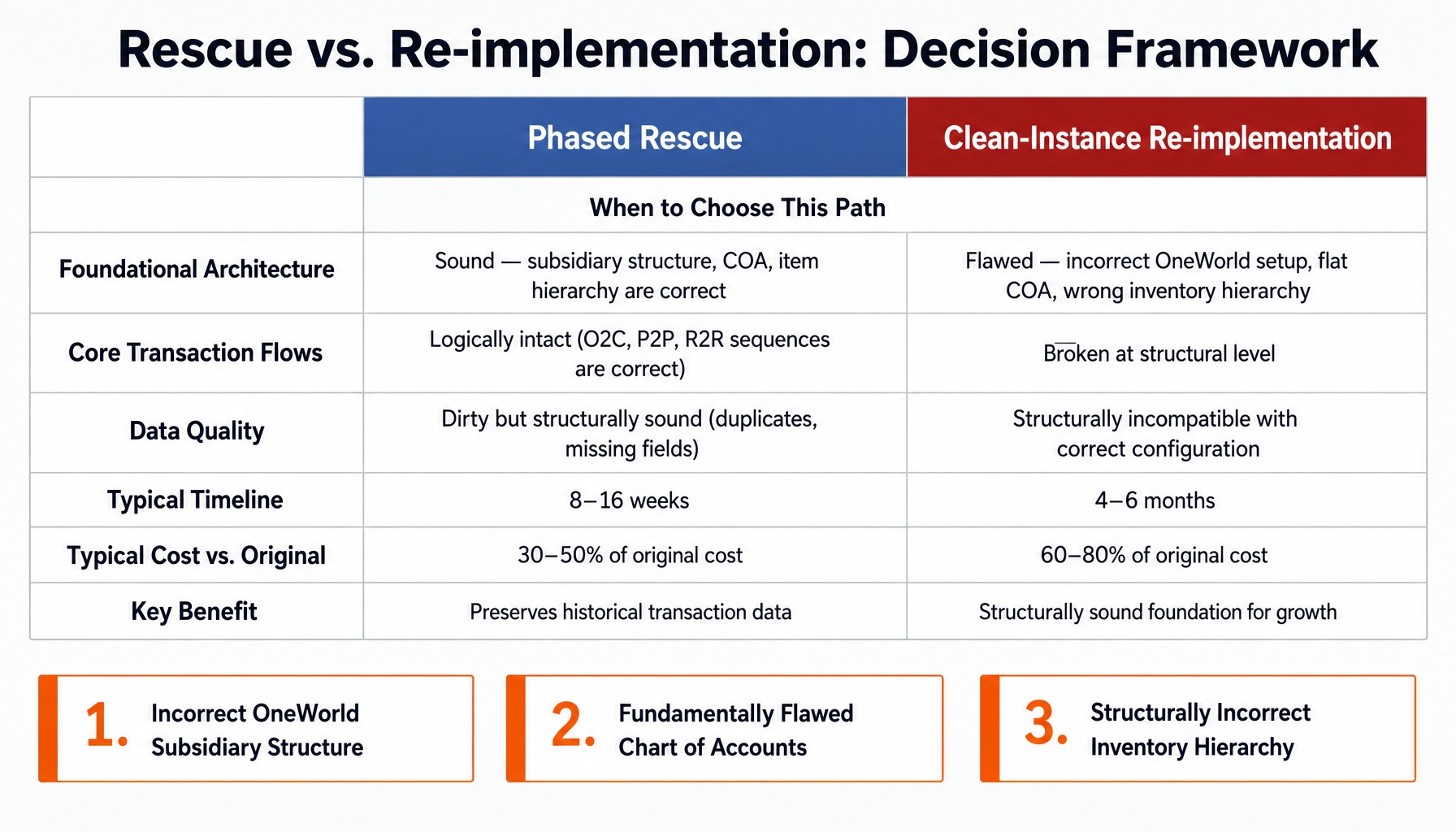
The rescue-versus-reimplementation decision is not a matter of preference or budget; it's a matter of where the failure lives. If the failure is in the upper layers configuration, data, and process mapping a phased rescue is the right call. If the failure is in the foundational architecture, patching the existing instance only creates more technical debt.
When a Phased Rescue Engagement Is the Right Call
A NetSuite project rescue is the right path when a structured audit confirms three conditions are met:
- The Foundational Architecture is Sound. The subsidiary structure, chart of accounts, and item master hierarchy were designed correctly for your business model. A NetSuite instance where the chart of accounts and subsidiary hierarchy are correctly built can almost always be rescued, because workflows, scripts, and reports can be replaced without migrating historical transaction data.
- Core Transaction Flows Are Logically Intact. The end-to-end sequences for order-to-cash, procure-to-pay, and record-to-report are fundamentally correct, even if individual steps are misconfigured or rely on manual workarounds.
- Data is Dirty but Structurally Sound. The data in the system has quality issues (e.g., duplicate records, missing fields) but is not structurally incompatible with the correct configuration. The item records exist, even if their costing methods are wrong.
A phased rescue engagement typically begins with a 2-3 week diagnostic phase. This is followed by prioritized remediation sprints targeting the highest-impact issues first, such as GL mapping corrections, workflow automation, and role permission matrix cleanup. This approach usually takes 8-16 weeks and can deliver a stable, functional system for 30-50% of the original implementation cost.
When a Clean-Instance Re-implementation Is Unavoidable
A full NetSuite re-implementation becomes the only logical choice when the failure is baked into the system's architecture. Patching these issues is like fixing cracks in a faulty foundation it only delays the inevitable collapse. Three architectural failure patterns almost always force a re-implementation:
- Incorrect OneWorld Subsidiary Structure. This is the most common and most severe architectural flaw. For example, a multi-entity retail organization is set up as a single subsidiary with "departments" used to simulate different legal entities. This breaks intercompany eliminations, tax reporting, and consolidated financials at a fundamental level. OneWorld subsidiary structures cannot be meaningfully retrofitted after go-live, making this one of the few truly irreversible decisions.
- Fundamentally Flawed Chart of Accounts (COA). The COA was designed as a flat replica of the legacy ERP's chart of accounts, completely ignoring NetSuite's powerful segment-based reporting model. As a result, every financial report and saved search is built on the wrong foundation, making accurate financial analysis impossible without massive manual effort.
- Structurally Incorrect Inventory Hierarchy. The item master was configured for the wrong fulfillment model for instance, lot-tracked items were set up as standard inventory items, or assembly items were configured incorrectly. This creates systemic phantom inventory and costing errors that no amount of data cleanup can resolve.
While a NetSuite re-implementation feels like a painful step backward, it typically costs only 60-80% of the original project and provides the one thing a rescue cannot: a structurally sound foundation for growth.
How to Audit Your Current NetSuite Instance Before Deciding
You cannot make the rescue-versus-reimplementation decision without a structured audit of your current instance. Most organizations skip this step out of frustration, but it's the only way to make an evidence-based choice. The audit has two distinct dimensions: functional/data health and technical debt.
Functional and Data Health Assessment
This part of the audit uses NetSuite-native capabilities to assess the health of your core business data and processes. A partner can accelerate this, but your internal team can start here:
- Run a GL Impact Analysis. Compare the trial balance from NetSuite to the final trial balance from your legacy system for the cutover period. This is the fastest way to identify account mapping errors at the source.
- Build a Data Quality Dashboard in SuiteAnalytics Workbook. NetSuite's own analytics tools are surprisingly powerful for diagnostics. Create workbooks to flag duplicate vendors, customers with missing tax IDs, open sales orders for inactive customers, and items with zero or negative costs.
- Review the Chart of Accounts Structure. Does the COA use segments to support the reporting dimensions your business actually needs (e.g., by product line, region, channel)? Or is it a flat, rigid structure that forces your finance team to export data to Excel for analysis?
- Test Consolidations and Eliminations. For OneWorld users, run consolidated financial statements and manually verify that intercompany transactions are eliminating correctly. If they aren't, you have a major architectural issue.
Technical Debt and Customization Inventory
This audit focuses on the customizations, scripts, and integrations that are often the source of instability and high maintenance costs.
- Export a Complete Customization Inventory. Generate a list of all SuiteScript files (1.0 and 2.1), SuiteFlow workflows, and custom record types. Categorize each as active, inactive, or unknown. Any remaining SuiteScript 1.0 files are a ticking time bomb, as Oracle has been deprecating these APIs.
- Map All Integrations. Document every connection to and from NetSuite whether through Celigo, Dell Boomi, Workato, or custom code. For each, verify that error handling, retry logic, and monitoring alerts are in place. An integration without error handling is a silent failure waiting to happen.
- Review SuiteCloud Development Framework (SDF) History. Check the deployment history for a high number of conflicts or failed deployments. This often points to poor development practices and a lack of environment parity.
- Check for Sandbox Drift. Compare the configuration and customization list from your primary sandbox to production. Significant differences sandbox drift indicate that changes are being pushed to production without proper testing, a major source of risk.
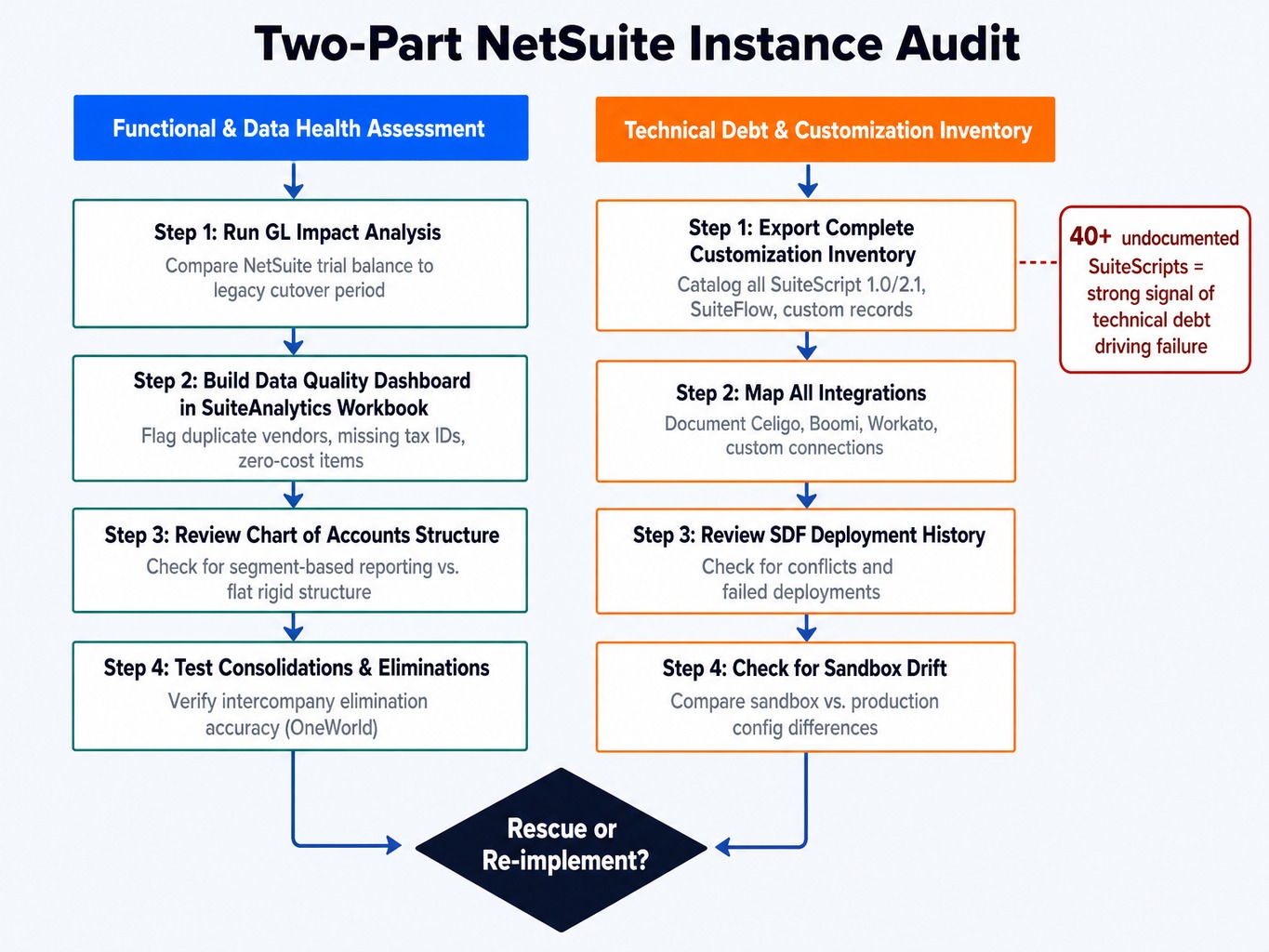
Discovering 40+ undocumented SuiteScripts and a dozen custom records a classic case of custom record sprawl is a strong indicator that technical debt is a primary driver of your system's failure.
Read more: Top 5 Customizations to Make in Your NetSuite Environment for the New Year
Why the Rescue-vs-Reimplementation Decision Requires the Right Partner
The audit process makes one thing clear: diagnosing a failed NetSuite implementation requires deep platform expertise, a structured methodology, and the experience to distinguish architectural failure from fixable configuration problems. Most organizations, especially after a difficult engagement has eroded internal confidence, don't have this capability in-house.
This is where a dedicated recovery partner becomes essential. At GSI, our consultants bring an average of 15+ years of enterprise application experience, having diagnosed and recovered complex NetSuite environments across manufacturing, distribution, and professional services. Our approach is grounded in the diagnostic framework outlined here, using AI-powered application intelligence to accelerate the identification of configuration anomalies, SuiteScript conflicts, and data quality issues faster than manual review.
Most importantly, we understand that trust is the first casualty of a failed project. Our 100% service guarantee is not a marketing slogan; it's a commitment to accountability and quality that directly addresses the risk and uncertainty you're facing. We help you make the right decision and then execute the recovery without repeating the same mistakes.
Your Failed Implementation Is a Problem to Be Solved, Not a Cost to Be Endured
A failed NetSuite implementation is not a sunk cost to be tolerated or a reason to abandon the platform. It is a diagnostic problem with a structured solution. The right recovery path a targeted rescue or a clean re-implementation depends entirely on whether the failure is configurational or architectural.
By distinguishing real failure from post-go-live friction, identifying the root causes with precision, and systematically auditing your instance, you can make an evidence-based decision. You can move from a state of frustration and uncertainty to a clear, actionable recovery plan. The longer you delay this process, the more the compounding costs of workarounds and eroded trust will exceed the investment required to fix the problem correctly.
Frequently Asked Questions (FAQ)
Can I switch NetSuite implementation partners mid-project?
Yes, but plan for a 4-6 week transition period for knowledge transfer, documentation review, and re-baselining the scope. The biggest risk is that the original partner's documentation is often incomplete or missing entirely. Your new partner will likely need to reverse-engineer decisions from the live configuration, which adds time and cost.
How much does a NetSuite re-implementation typically cost compared to the original project?
A targeted rescue engagement typically runs 30-50% of the original implementation cost. A full re-implementation from a clean instance usually costs 60-80% of the original budget, as some discovery work and licensing costs may carry over. The final cost depends heavily on data migration complexity and the amount of technical debt that needs to be unwound.
How long does a typical NetSuite project rescue take?
A phased rescue engagement for a mid-market company typically takes 8-16 weeks, depending on the number of modules and the severity of the issues. A full re-implementation usually takes 4-6 months. Both timelines assume a diagnostic audit has been completed and executive sponsorship is secured before the project begins.
How do I get executive buy-in for a NetSuite re-implementation after the first one failed?
Lead with the compounding cost of inaction. Quantify the monthly cost of manual workarounds, reconciliation labor, and audit risk in clear financial terms. Present the diagnostic audit findings as evidence, not opinion, and frame the re-implementation as a risk-reduction investment with a defined timeline and measurable success criteria.
What role does change management play in preventing a second NetSuite implementation failure?
Change management failures are a primary driver of low user adoption, the most visible symptom of a failed implementation. In a recovery project, invest in process-level training tied to each user's daily tasks, not generic system training. Assign departmental champions who participate in UAT and own adoption metrics post-go-live.
Should I reduce customizations during a NetSuite re-implementation?
Almost always, yes. Evaluate every existing SuiteScript customization and SuiteFlow workflow against NetSuite's native functionality in the current release. Oracle delivers two major updates per year, and features that required customization 18 months ago may now be standard. Eliminate any customization that merely replicates legacy ERP behavior rather than solving a genuine business requirement.