
Key Takeaways
- NetSuite makes sense when the cost of your disconnected systems (in labor, errors, and delays) exceeds NetSuite's total cost of ownership. For many, this "complexity threshold" is hit between $5M and $10M in revenue.
- A realistic first-year budget for a 10-user small business is $40,000–$75,000, including a ~$1,000/month base license, user seats at ~$150/month each, and implementation costs of $15,000–$50,000.
- Start with a minimal module set (Financials, Order Management, Inventory). Overbuying capabilities like Advanced Revenue Management or Demand Planning before your processes are mature is a common and expensive mistake.
- SuiteSuccess implementations are cheaper upfront ($15k–$35k) but can cost more over three years in customizations if your processes don't fit the template. A custom build ($40k–$75k+) costs more initially but reduces long-term friction for non-standard operations.
- Budget for ongoing administration. A typical 10-15 user system requires 8-15 hours of admin work per week, a cost of either internal staff time or $1,500–$3,500/month for outsourced support.
Picture a 35-person distribution company doing $8 million in revenue. They run on QuickBooks Online, a separate inventory management tool, a basic CRM, and a reporting plug-in. Their combined subscription bill is $2,800 a month, yet the controller still spends every Friday afternoon in spreadsheets, trying to reconcile inventory levels between their warehouse and their sales channels. The promise of using NetSuite for small business is that it replaces all of that with a single, unified platform.
Then comes the sticker shock. A preliminary quote might land between $1,500 and $4,000 per month before a single hour of implementation work. This is the moment most small business leaders pause.
This is not a features tour or a vendor sales pitch. It is a decision framework for determining if the NetSuite ERP for small business is the right move for you right now. We'll cover the real costs, the modules that actually matter, the trade-offs between implementation paths, and the ongoing operational burden that most guides conveniently ignore. As a consultant who has led these evaluations, I've seen these decisions make or break a company's operating budget for years to come.
When NetSuite Makes Financial Sense and When It Doesn't
NetSuite's value proposition only activates at a specific intersection of revenue, complexity, and operational pain not at a simple revenue number. The decision to adopt it hinges on reaching a "complexity threshold," the point where the cost of managing your current tool sprawl exceeds NetSuite's all-in price.
Consider two businesses:
- The Overkill Scenario: A 20-person professional services firm at $4M in revenue with simple project invoicing and no inventory. For them, NetSuite is an expensive sledgehammer. A system like Sage Intacct or even QuickBooks Online Advanced provides the needed financial controls at a third of the cost without the implementation overhead.
- The Right-Fit Scenario: A 30-person consumer goods company at $6M in revenue. They sell through wholesale, their own DTC ecommerce site, and Amazon, managing 2,000 SKUs with complex seasonal demand. They are already spending $3,000 a month on disconnected tools and, as is common, losing over 15 hours a week to manual data reconciliation. For them, NetSuite's total cost is competitive when measured against recovered labor, reduced stockouts, and better cash flow visibility.
Small businesses that adopt NetSuite before their operational processes can absorb it routinely spend more on post-go-live remediation than they spent on the original implementation, a pattern that firms like GSI, Inc. see repeatedly when inheriting projects initially scoped without a realistic readiness assessment.
The question isn't just about features. It's about whether your operational pain from disconnected systems is acute enough to justify the cost. If your business runs on fewer than three core systems and your finance team closes the books without a maze of spreadsheet workarounds, you probably do not need NetSuite yet.
Read more: 5 Common Challenges in NetSuite Implementations and How to Overcome Them
What NetSuite Actually Costs at the Small Business Tier
NetSuite doesn't publish its pricing, a practice that creates anxiety and leaves small businesses dependent on sales reps for basic numbers. Based on current market data from implementation partners, the following ranges reflect what a typical small business with 5-25 users and one to three modules can expect to pay.
The cost structure breaks down into two main categories: recurring fees you pay annually and one-time costs to get started. For a 10-user small business with two add-on modules, a realistic first-year total cost is between $40,000 and $75,000.
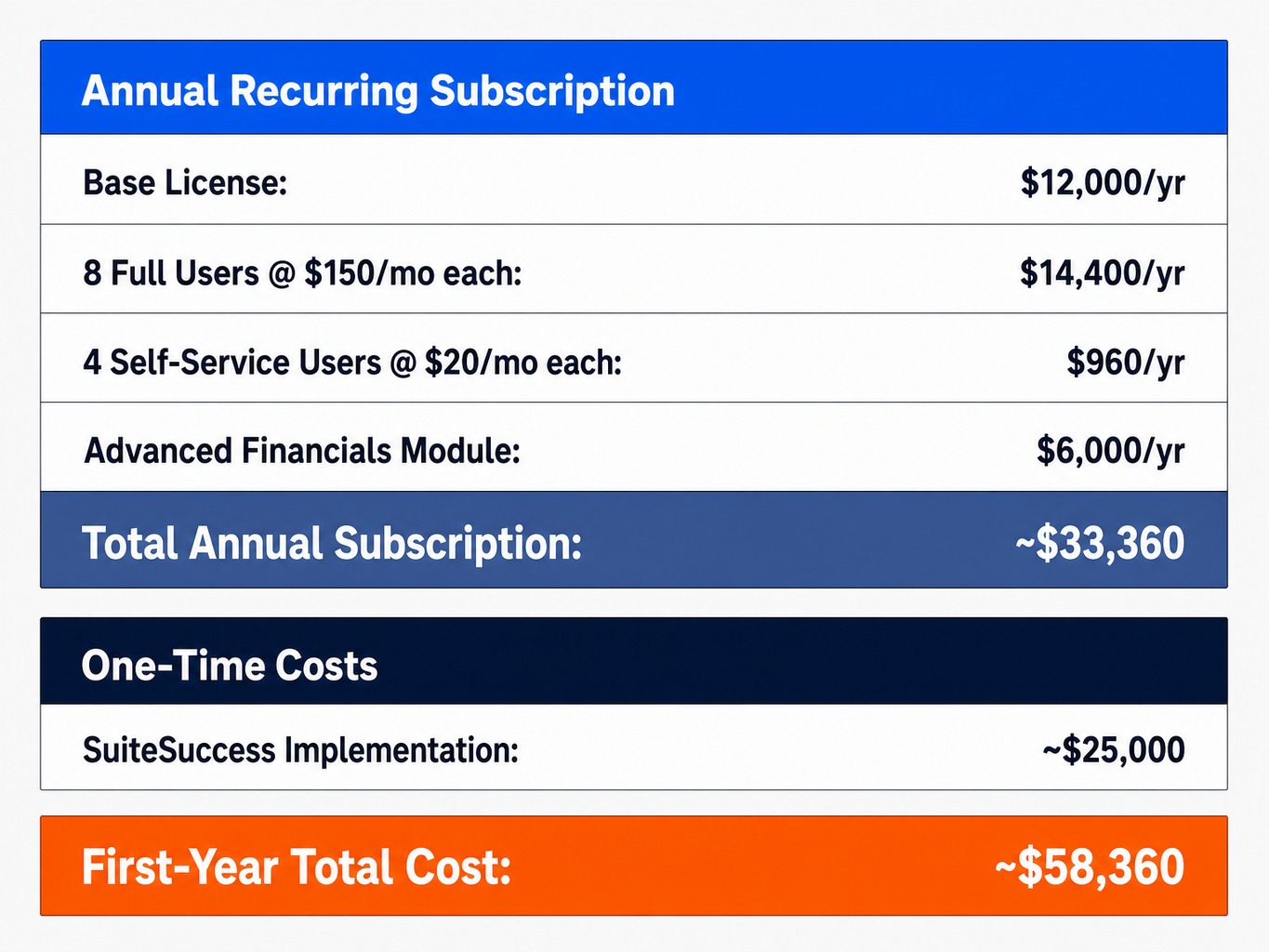
Let's walk through a sample budget for a 12-person wholesale distributor using the SuiteSuccess Starter edition:
- Base License: ~$12,000/year
- User Licenses: 8 full users @ $150/mo each ($14,400/year) + 4 self-service users @ $20/mo each ($960/year)
- Modules: Advanced Financials module @ $6,000/year
- Total Annual Subscription: ~$33,360
- One-Time Implementation: SuiteSuccess deployment @ ~$25,000
- First-Year Total Cost: ~$58,360
This is a grounded starting point for your own financial modeling.
Recurring Costs: Base License, User Seats, and Modules
Your annual NetSuite bill is built from three components:
- Base Platform License: This is your entry ticket. For the NetSuite SuiteSuccess Starter edition, this fee is typically $999 per month ($11,988 annually). This provides the core financial management and operational foundation.
- User Licenses: NetSuite uses a named-user model, meaning every individual who needs to log in requires their own license no sharing. Full-access users cost between $99 and $199 per user, per month. Limited-access "employee self-service" licenses for tasks like expense reporting run $10 to $25 per user, per month. This is a critical detail; there is no cheap read-only tier, so even executives who only need to view dashboard KPIs require a full, paid seat.
- Add-On Modules: Each additional capability, from advanced inventory to subscription billing, is a separate line item. Modules typically range from $500 to $2,000 per month, each.
All contracts are annual, with no month-to-month option. While signing a two- or three-year deal can unlock discounts of 15-25%, it also locks you into a significant financial commitment before you've fully validated the platform's fit for your business.
One-Time Costs: Implementation, Data Migration, and Training
The initial investment to get NetSuite running is often equal to or greater than the first year's subscription fee.
- Implementation: A pre-configured SuiteSuccess implementation for a small business typically costs $15,000 to $35,000. A custom implementation involving significant business process mapping and customization will run $35,000 to $75,000 or more. For small businesses, the implementation-to-subscription ratio is usually 1x to 1.5x. If your annual subscription is $25,000, expect to spend $25,000–$37,500 to get it live.
- Data Migration: This is the most commonly underestimated cost. Moving your chart of accounts, open transactions, and customer/vendor records from a system like QuickBooks requires meticulous work with CSV import templates, field mapping, and validation. This process typically adds $3,000 to $8,000 in partner hours to the project.
- Training: Budget $2,000 to $5,000 for initial user training. NetSuite's interface has a steeper learning curve than entry-level accounting software; most finance and operations teams need four to eight weeks to regain full productivity.
The Modules You Actually Need vs. the Ones You Will Be Sold
NetSuite sales teams are incentivized to bundle modules, and small businesses routinely overspend on capabilities their operational processes aren't mature enough to use. During one implementation for a 40-person distributor, the initial scope included a Demand Planning module that cost roughly $6,000 annually. After we mapped their actual workflows, it became clear the operations team had no formal forecasting process. The module sat unused for 14 months post-go-live, a complete waste of money.
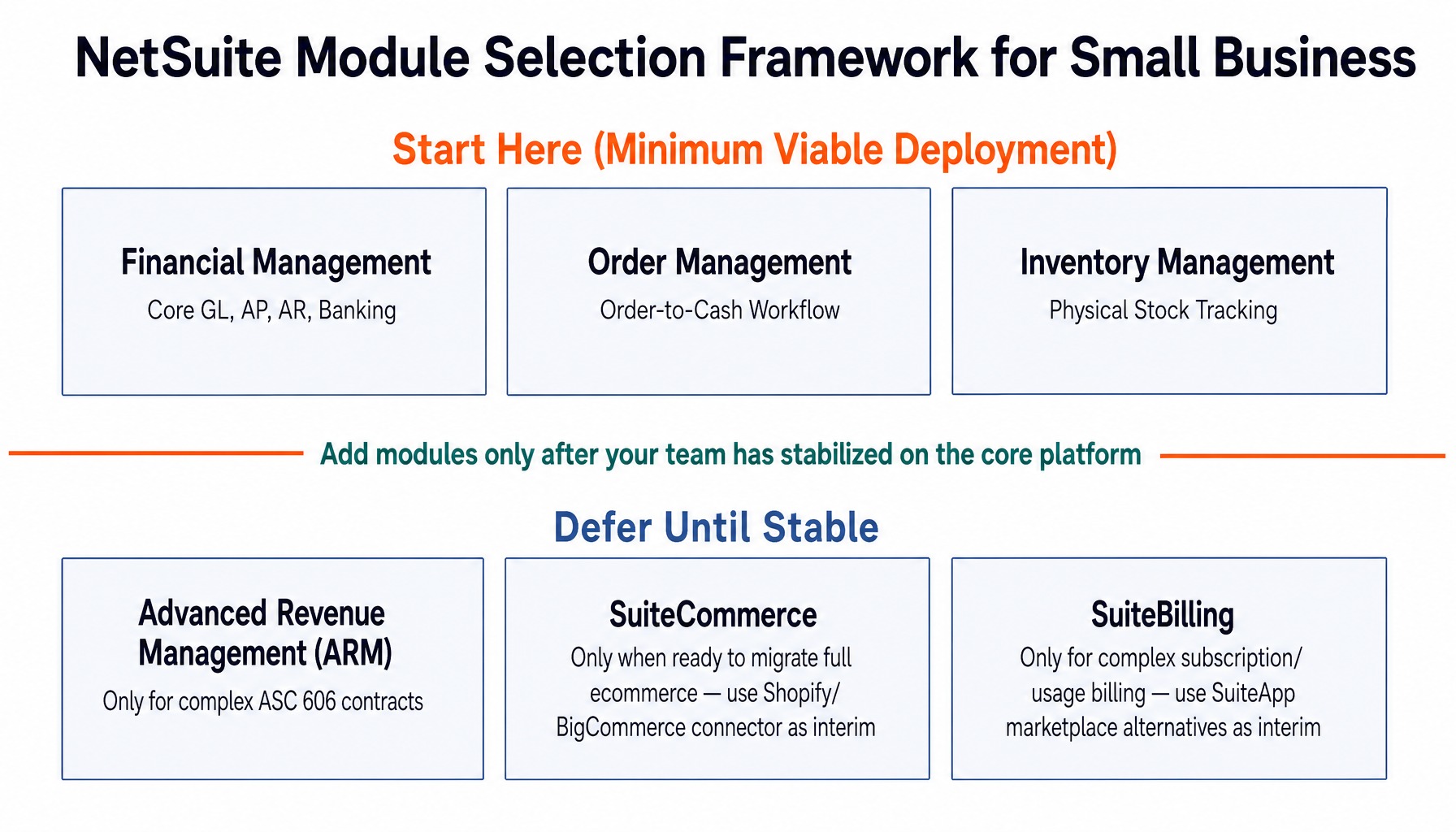
The smart approach is to define a "minimum viable NetSuite deployment" that solves your most immediate operational pain. For most wholesale, retail, light manufacturing, or services businesses, this includes:
- Financial Management: The core GL, AP, AR, and banking functions.
- Order Management: The complete order-to-cash workflow.
- Inventory Management: Essential if you hold physical stock.
Modules to defer until you are stable and ready:
- Advanced Revenue Management (ARM): Only necessary if you have complex, multi-element contracts that fall under ASC 606.
- SuiteCommerce: Only if you are ready to migrate your entire ecommerce operation. A simple connector to Shopify or BigCommerce is often a better interim step.
- SuiteBilling: Only if you have truly complex subscription or usage-based billing models. The SuiteApp marketplace offers lighter-weight options like a Stripe billing integration that can bridge the gap.
Every module adds cost, implementation scope, and training burden. Start with what is essential to fix your top two problems, then expand after your team has stabilized on the new platform.
SuiteSuccess vs. Custom Implementation: Which Path Costs Less Over Three Years
NetSuite offers two primary implementation paths, and the right choice has significant long-term cost implications.
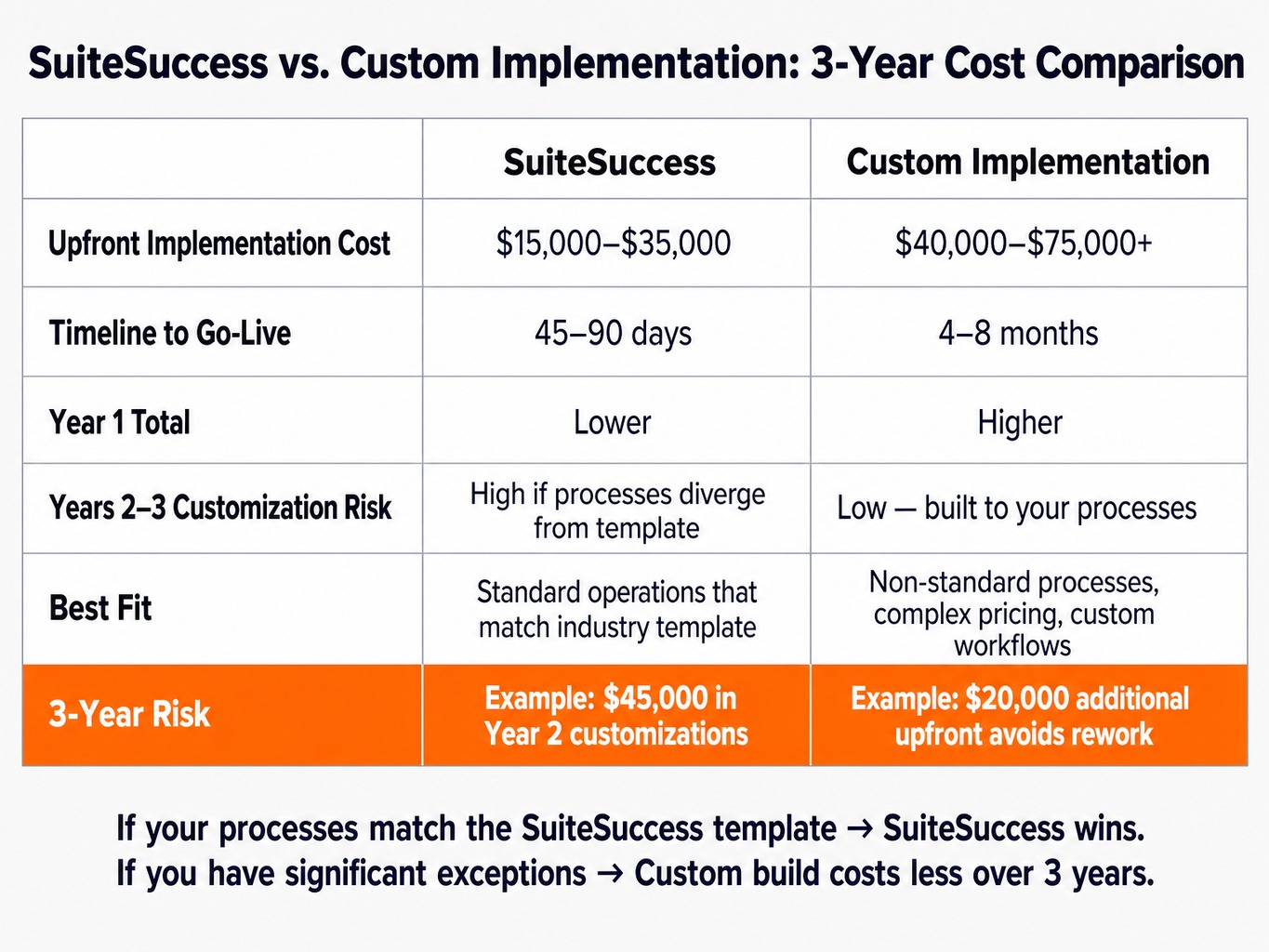
- SuiteSuccess: This is Oracle's pre-configured, industry-specific methodology. It uses pre-built dashboards, workflows, and role configurations designed to get a business live in 45-90 days for $15,000 to $35,000. It's fast and relatively inexpensive upfront.
- Custom Implementation: This approach starts with a blank canvas, involving deep business process mapping, custom SuiteFlow workflows, and tailored saved searches. It is a more thorough but slower and more expensive path, typically taking 4-8 months and costing $40,000 to $75,000+.
The decision looks simple, but the three-year total cost of ownership tells a different story. SuiteSuccess is cheaper in year one. However, if your business processes diverge from the pre-built template, you will spend years two and three paying for customizations and workarounds that often exceed what a custom build would have cost.
Consider a food and beverage distributor with non-standard lot tracking and complex customer pricing tiers. They chose SuiteSuccess to save money but then spent $45,000 in year two on customizations that a properly scoped custom implementation would have handled for an additional $20,000 upfront.
The right path depends entirely on how closely your operations match the SuiteSuccess industry edition. If your processes are standard, SuiteSuccess is the clear winner. If you have significant exceptions, investing in proper business process mapping before you commit is the only way to avoid costly rework.
The Post-Go-Live Admin Burden Nobody Warns You About
Most NetSuite cost analyses stop at the go-live date. In reality, the ongoing operational burden is where small businesses get surprised. After go-live, someone on your team or an outsourced partner must handle a consistent stream of administrative work:
- Maintaining the period close checklist
- Building and troubleshooting saved searches and reports
- Updating role permissions as staff changes
- Managing CSV imports for data updates
- Deploying new bundles and system updates
- Fielding user support questions and errors
For a team of 10-15 users, this administrative work consumes, in our experience, 8-15 hours per week. Most small businesses don't have a dedicated NetSuite administrator. This means either your controller or operations manager absorbs this technical work, pulling them away from their core job, or you budget $1,500 to $3,500 per month for outsourced managed support. Neither option is free, and it's a permanent line item in your total cost of ownership. The NetSuite administrator role is not analogous to a QuickBooks admin; it requires understanding of SuiteScript logic, workflow states, and role-based access control a skill set that rarely exists on a lean finance team without dedicated training.
Migrating from QuickBooks to NetSuite: The True Switching Cost
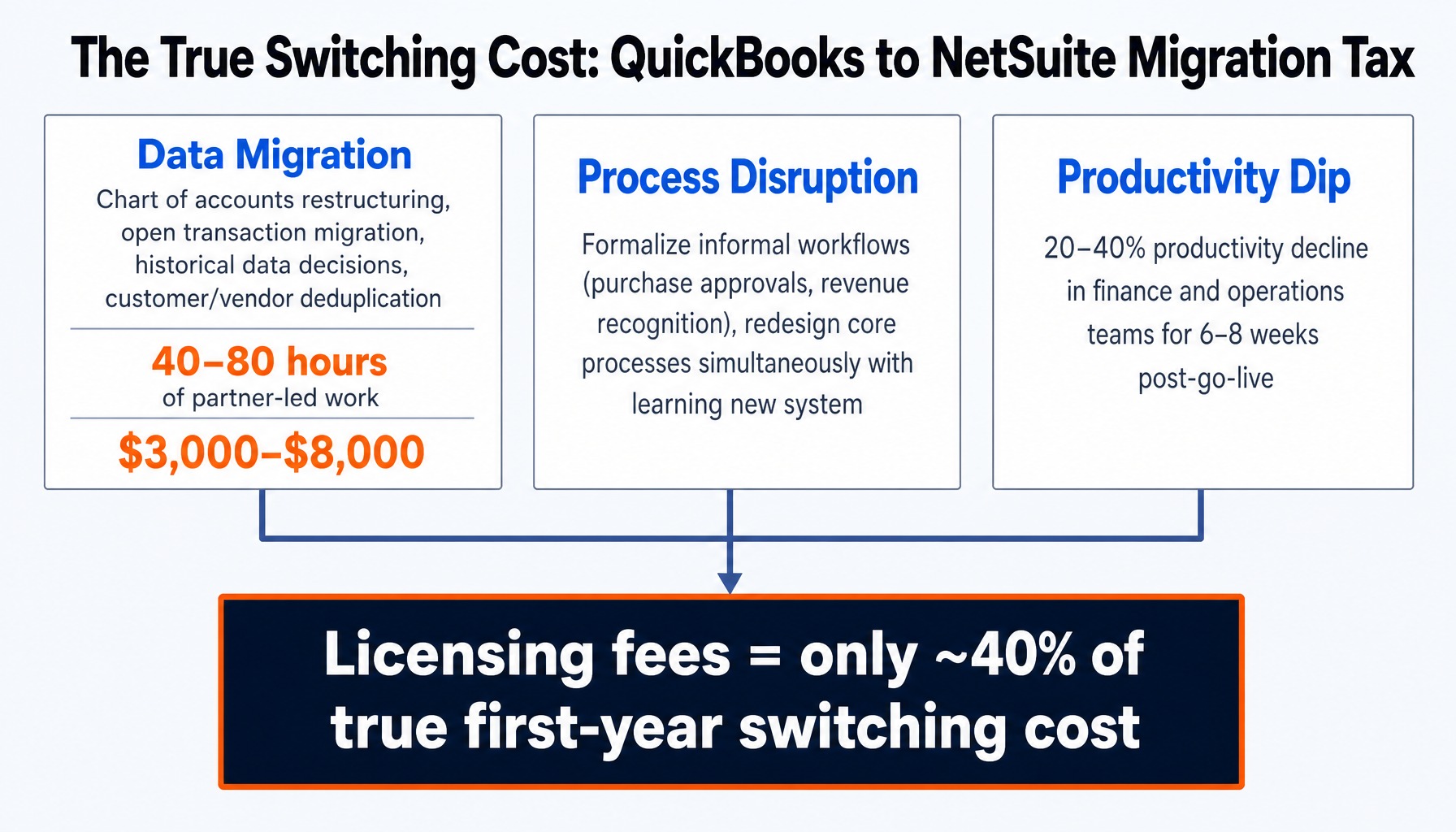
The QuickBooks-to-NetSuite migration is the most common path for growing businesses, and it's the most consistently underestimated in terms of cost and disruption. The true switching cost what I call the "migration tax" goes far beyond licensing fees.
It breaks down into three areas:
- Data Migration Cost: This is not a simple export/import. It requires a complete chart of accounts restructuring, as NetSuite's segment-based structure is fundamentally different from QuickBooks. It involves migrating open transactions, making strategic decisions about how many years of historical data to bring over, and cleaning and deduplicating customer and vendor records. For a small business, this phase alone typically requires 40-80 hours of partner-led work.
- Process Disruption: Workflows that were informal in QuickBooks like purchase approvals or revenue recognition must be formalized and built in NetSuite. Your team is forced to learn a new system and redesign its core processes simultaneously, creating significant operational friction.
- Productivity Dip: Expect a 20-40% productivity decline in your finance and operations teams for the first 6-8 weeks post-go-live. Users need time to adjust to NetSuite's more complex interface and navigate the new workflows.
When you add up these factors, the initial licensing fee often represents only about 40% of the true first-year switching cost. Developing a thorough migration strategy before you begin is essential to controlling these costs.
Read more: Step 8: Training Your Team on NetSuite When Migrating from QuickBooks to NetSuite
Why Small Businesses Work with GSI for NetSuite Evaluations and Implementations
The decision to adopt NetSuite is complex, with layered costs, implementation trade-offs, and hidden operational risks. The right answer isn't to simply buy the software; it's to make the decision with a partner who has navigated hundreds of these evaluations and will tell you honestly whether your business is ready.
GSI's NetSuite consulting team averages over 15 years of NetSuite and Oracle experience, guiding businesses through the exact SuiteSuccess-versus-custom decisions, module selection exercises, and QuickBooks migration challenges described in this article. Our 100% service guarantee isn't a marketing slogan; it's a risk-reduction mechanism that provides accountability for implementation timelines, go-live readiness, and post-go-live stability.
For the post-go-live admin burden that surprises so many small teams, our 24/7 managed support provides a direct answer. Instead of your controller spending Monday mornings troubleshooting saved searches, our team handles ongoing administration, period close support, and system optimization, freeing your team to focus on running the business. If you're evaluating NetSuite, the first step isn't a demo it's an honest assessment of your readiness.
Request a NetSuite readiness assessment from GSI's consulting team
Conclusion
The most important takeaway is this: choosing NetSuite is not a features decision. It is a timing and readiness decision that depends on your operational complexity, your team's capacity to absorb change, and your willingness to budget for the full cost of ownership.
The right time to move is when the cost of your current tool sprawl measured in wasted labor hours, costly reconciliation errors, and delayed decisions conclusively exceeds NetSuite's all-in cost. That includes implementation, ongoing administration, and the inevitable productivity dip during the transition.
Before you talk to a NetSuite sales rep, build your own total-cost-of-ownership model using the ranges in this article. Compare it honestly against what you are spending today across all your disconnected systems. That comparison, not a product demo, is where the real answer lives.
Frequently Asked Questions
What is the minimum number of user licenses required to start with NetSuite?
NetSuite's Starter edition typically begins with a block of 5 full-user licenses and 5 employee self-service licenses. You cannot purchase a single-user license. If your team has fewer than five people who need full ERP access, you will be paying for unused seats, which may make alternatives like Sage Intacct more cost-effective.
Does NetSuite offer startup or small business discount programs in 2026?
Oracle periodically offers startup-focused pricing through programs like SuiteSuccess Starter and promotional bundles via authorized partners. Discounts of 15-30% on multi-year contracts are common. However, these discounts typically apply to the base license and user fees implementation, modules, and support services are rarely discounted and should be negotiated separately.
Do I need NetSuite OneWorld if I only operate in one country?
No. NetSuite OneWorld is designed for multi-subsidiary, multi-currency operations, providing features like automated subsidiary elimination and localized tax engines. If you operate a single legal entity in one country, the standard NetSuite edition handles your needs at a lower cost. OneWorld adds significant annual cost and configuration complexity that single-entity businesses should avoid.
How does NetSuite pricing compare to Sage Intacct for small businesses?
Sage Intacct typically costs $15,000–$35,000 per year for a small business, while NetSuite runs $25,000–$50,000 annually for a similar user count. Intacct's strength is pure financial management and multi-entity consolidation. NetSuite is stronger when you need inventory, order management, and operational workflows on a single platform. The choice depends on whether your primary pain is financial reporting or operational integration.
Can a small business implement NetSuite without hiring a consultant?
While technically possible via NetSuite's self-service path, it is rarely advisable. Core configuration decisions around your chart of accounts, role permissions, and approval workflows have long-term consequences that are expensive to fix. Most businesses that self-implement spend more in year-two remediation than they saved by skipping an experienced partner.
How long does a typical NetSuite implementation take for a small company?
A SuiteSuccess Starter implementation typically takes 45-90 days from kickoff to go-live. A custom implementation runs 4-8 months, depending on data migration complexity and the number of integrations. The most common delay is not technical but internal: slow decision-making on chart of accounts design, approval rules, and user role definitions.