
Key Takeaways
- An enterprise HubSpot audit must evaluate the portal not as a standalone tool, but as a connected part of your ERP and operational technology stack.
- The highest-risk audit findings are rarely in marketing assets; they are in integration sync errors, misconfigured user permissions, and inconsistent data definitions between HubSpot and systems like NetSuite.
- Audit your data quality first. Property bloat, duplicate records, and low field fill rates break every downstream process, from lead routing to financial forecasting.
- For multi-division companies, a governance framework including naming conventions and business unit partitioning is more critical than any one-time cleanup.
- The audit itself provides no ROI. Value comes from a phased roadmap that translates findings into measurable improvements in data integrity, operational efficiency, and forecast accuracy.
For a mid-market distribution company that has used HubSpot for four years, the signs of portal drift are familiar. Its HubSpot portal is integrated with NetSuite for order data, but the sync error log hasn't been reviewed in six months. Three divisions create contacts with inconsistent lifecycle stages, making consolidated reporting unreliable. Over 200 active workflows exist, but fewer than half have a documented owner.
For organizations like this, a standard HubSpot audit focused on cosmetic cleanup misses the point. The real risks aren't in unused landing pages; they're in the silent failures between integrated systems, the security gaps left by employee turnover, and the operational drag from years of ungoverned configuration.
This checklist is built for that reality. It's designed for enterprise and mid-market organizations in manufacturing, distribution, retail, and energy where HubSpot is part of a larger operational ecosystem with ERP integrations, multiple business units, and strict compliance requirements. It's a diagnostic for cross-functional operations, data integrity, and security posture.
What a HubSpot Audit Evaluates in an Enterprise Environment
Most HubSpot audit guides treat the portal as a standalone marketing tool. They focus on cleaning up lists, archiving old campaigns, and improving email deliverability. While important, that scope is too narrow for an enterprise where HubSpot is deeply integrated with core business systems. When your CRM is connected to your ERP, a data quality issue is no longer just a marketing problem; it's a potential revenue recognition or inventory management problem.
Consider a distributor running NetSuite and HubSpot where the sync between the two systems silently stops writing closed-won deal amounts to NetSuite customer records. No one notices for eleven weeks, until finance flags a revenue recognition discrepancy during quarterly close. The root cause turns out to be a minor field-mapping change made by an admin who has no visibility into how that shared property feeds downstream accounting. It's a gap in cross-system field ownership, not a fault in either platform. An audit scoped only to portal hygiene would never surface the break.
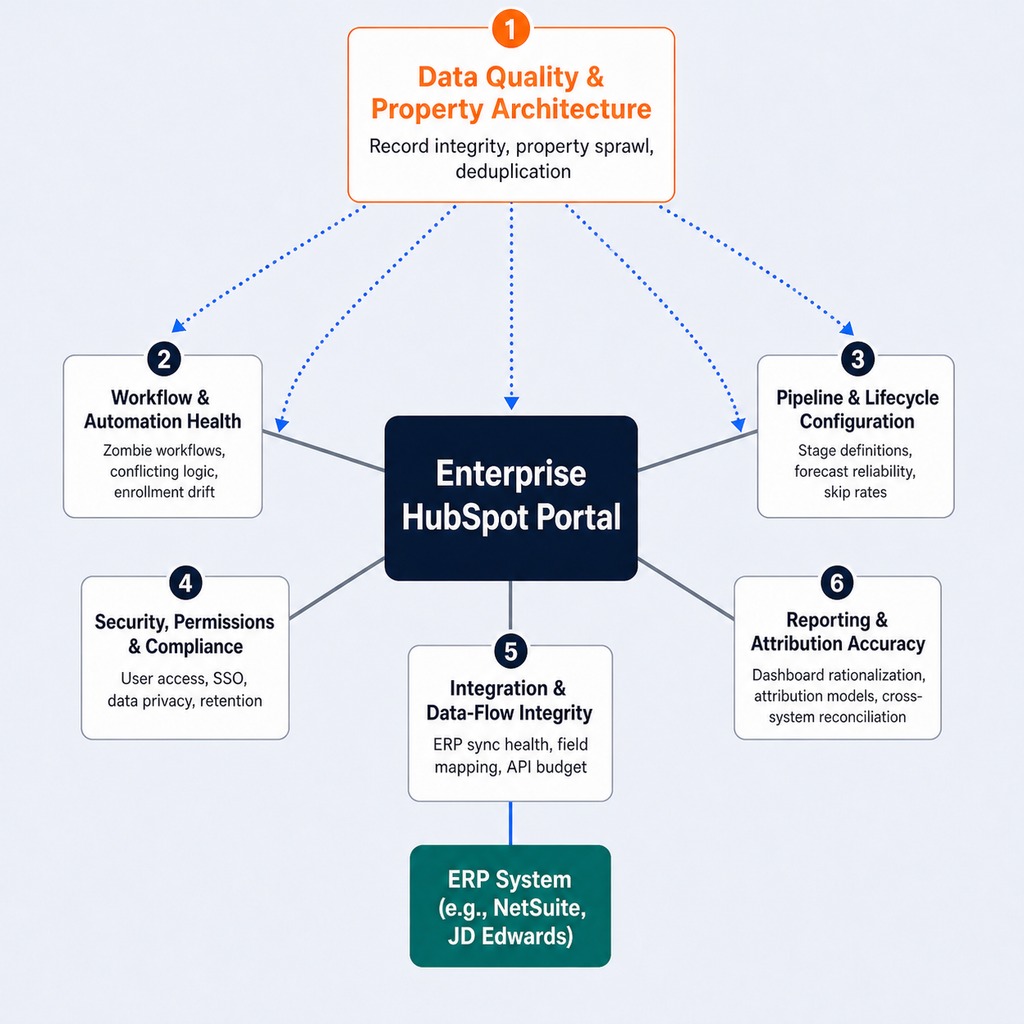
A true enterprise audit evaluates the portal's operational fitness across six domains:
- Data Quality & Property Architecture: Assesses the integrity of contact, company, and deal records, as property sprawl in a multi-division portal creates conflicting segmentation that breaks lead routing.
- Workflow & Automation Health: Inventories active automations to find "zombie workflows" and conflicting logic that corrupts data.
- Pipeline & Lifecycle Configuration: Ensures deal and lifecycle stages are consistently defined and used across teams, which is foundational for reliable forecasting.
- Security, Permissions & Compliance: Reviews user access, SSO enforcement, and data handling settings to close compliance gaps, especially in regulated industries.
- Integration & Data-Flow Integrity: Audits the health of connections to ERP and other systems, where silent failures create the most significant financial risk.
- Reporting & Attribution Accuracy: Validates that dashboards reflect business reality and that attribution models are correctly configured.
This isn't about finding HubSpot failures. It's about identifying optimization opportunities where technical configuration has drifted from business reality.
The Enterprise HubSpot Audit Checklist
This checklist is structured to be sequential. You must address data quality first, because every downstream domain from automation to reporting depends on a foundation of clean, reliable records. Each section includes specific diagnostic checks and red-flag thresholds.
Data Quality and Property Architecture
Property sprawl is the single most common source of audit findings. Teams create custom properties for one-off campaigns or imports and never retire them, leading to property bloat that degrades performance and confuses reporting. It's not a sign of a bad team; it's a sign of a portal that has been actively used for years without a governance layer. Duplicate cleanup carries its own cross-system risk: deduplication in HubSpot and deduplication in an ERP operate on different logic, so merging contacts in HubSpot without confirming how the integration handles merge events can orphan associated records in NetSuite.
- Diagnostic Checks:
- Duplicate Contact/Company Rate: Calculate the percentage of duplicate records. A rate above 2% signals a systemic issue with import processes or integration logic.
- Critical Field Fill Rate: For properties essential to segmentation and routing (e.g., Industry, Country, Lead Source), measure the fill rate. Anything below 80% breaks segmentation and personalization.
- Orphaned Custom Properties: Identify properties with zero populated records or those last updated over a year ago. A retail organization we worked with found 340 custom contact properties, 180 of which had fewer than 50 populated records.
- Picklist Normalization: Review picklist fields for overlapping or conflicting values (e.g., "USA," "U.S.A.," "United States"). This is a classic source of reporting errors.
- Calculated Property Debt: Check calculated properties for formulas that reference deleted or renamed fields, which causes silent calculation failures.
- Post-Audit Action: Use tools like Insycle or the native HubSpot Operations Hub data quality automation to establish ongoing hygiene rules.
Workflow and Automation Health
Workflow accumulation is the enterprise equivalent of technical debt. Teams build automations for specific needs, those needs change, but the workflows are never decommissioned. Eventually, no one can confidently explain what triggers what. This leads to "zombie workflows" active automations that haven't enrolled a single contact in months but still consume system resources and represent a risk of accidental re-activation.
- Diagnostic Checks:
- Workflow Inventory: Compare the total count of active workflows to the number with a documented owner and purpose. If the ratio is higher than 2:1, your automation layer is unmanaged.
- Zombie Workflow Identification: Flag any active workflow with zero enrollments in the last 90 days for decommissioning.
- Enrollment Criteria Drift: Review triggers for critical workflows. Do they still align with current lifecycle stage definitions, or are they based on outdated criteria?
- Re-enrollment Conflicts: Check for workflows with re-enrollment enabled that could create duplicate tasks or send repetitive emails, contributing to nurture fatigue.
- Workflow Error Logs and Property Conflicts: Systematically review action logs for recurring errors, and check for multiple workflows writing to the same property. A distribution company found 15 different workflows modifying the same lifecycle stage property with conflicting logic, causing contacts to cycle between MQL and SQL unpredictably.
- Post-Audit Action: Use HubSpot Sandboxes to test any changes to complex, multi-step workflows before deploying them to production.
Pipeline and Lifecycle Configuration
This is where marketing-to-sales handoff alignment either works or breaks. Inconsistent definitions or misconfigured automation at this layer directly impacts the reliability of your sales forecast a CFO-level concern. It's crucial to distinguish between lifecycle stage (governing a contact's relationship with your business) and deal stage (governing a specific sales opportunity). Conflating them in automation is a common source of compounding errors.
- Diagnostic Checks:
- Lifecycle Stage Definitions: Confirm that every stage (e.g., MQL, SQL, Opportunity) is documented and agreed upon by both marketing and sales leadership.
- Deal Stage Skip Rate: Analyze how many deals jump from an early stage directly to
Closed WonorClosed Lost. A high skip rate indicates a broken process or reps not updating the CRM. - Stale Deal Analysis: Identify deals sitting in active pipeline stages for longer than your average sales cycle. These clog the forecast and signal a need for pipeline hygiene rules.
- Pipeline Consistency: If you use multiple pipelines for different business units, ensure the stage definitions are consistent enough for consolidated forecasting. An energy services firm found consolidated reporting was impossible because its two pipelines used entirely different stage names and probabilities.
- Post-Audit Action: Build dashboards to monitor deal stage velocity and stale deal counts as leading indicators of pipeline health.
Security, Permissions, and Compliance
This domain is often under-scoped in HubSpot audits. For organizations in regulated industries like energy, manufacturing, or professional services, misconfigured access isn't just bad practice it creates tangible compliance exposure. A user's access should be determined by their role, not by permissions granted three years ago that were never revoked. And remember, permission sets govern UI-level access, while API keys need their own governance: an unmanaged key can carry full read-write access that sits outside those permissions.
- Diagnostic Checks:
- Permission Set Alignment: Audit all users and their assigned permission sets against your current organizational chart. Pay special attention to users with Super Admin access.
- Orphaned Admin Accounts: Search for user accounts that remain active after the employee has left. These are critical security gaps.
- SSO Enforcement: Verify that Single Sign-On (SSO) is enabled and, more importantly, enforced for all users.
- Data Privacy & Consent: Check that subscription types, cookie consent banners, and form settings align with GDPR, CCPA, or other applicable privacy regulations.
- Data Retention Policy: Does a policy exist for archiving or deleting contacts who have been unengaged for over 12-24 months?
- Post-Audit Action: For organizations needing strict data separation, evaluate the HubSpot Business Units add-on to partition contacts, assets, and reporting by division.
Integration and Data-Flow Integrity
If HubSpot syncs with NetSuite, Salesforce, or another ERP, the integration's health is paramount. A data quality issue in HubSpot can propagate downstream, and a failure in the sync can starve your ERP of critical sales data. This is where enterprise audits diverge most sharply from generic cleanup guides.
- Diagnostic Checks:
- API Connection Inventory: Document every active integration, its owner, its data sync direction (one-way vs. bidirectional), and its purpose.
- Sync Error Log Review: Analyze the sync error log for the past 90 days. Are errors recurring, and are they being addressed?
- Field Mapping Accuracy: Spot-check critical fields (e.g., deal amount, company name, address) between HubSpot and the connected ERP to ensure they match.
- API Call Budget Utilization: Check your daily API call usage. Approaching the limit can cause silent, intermittent sync failures.
- Connector Type: Identify what is handling the connection HubSpot Data Sync, a native connector, or a third-party middleware platform like Datawarehouse.io.
- Post-Audit Action: Establish a weekly or bi-weekly review of the sync error log as a standard operational task.
Read more: Everything You Need to Know About the NetSuite-HubSpot Integration
If your audit surfaces integration sync failures or field-mapping gaps between HubSpot and your ERP, GSI can help evaluate the root cause and design a resolution; whether that involves reconfiguring your current integration or implementing a new one. Contact GSI’s integration team.
Reporting and Attribution Accuracy
Dashboards accumulate like old files. Teams create them for a specific meeting, then abandon them. Eventually, no one trusts the numbers because they don't know which dashboard is the source of truth. The goal of this audit is dashboard rationalization and validation of the underlying data.
- Diagnostic Checks:
- Dashboard Inventory: How many dashboards exist versus how many are viewed weekly? Archive unused dashboards to reduce clutter.
- Attribution Model Configuration: Is your attribution reporting model actually configured, or is everything defaulting to "Direct Traffic" because of inconsistent UTM discipline?
- Contact Create Attribution: Review the logic for
Original SourceandLatest Sourceproperties to ensure they accurately reflect your marketing channels. - Broken Report Filters: Scan custom reports for filters that reference deleted properties or outdated lifecycle definitions.
- Cross-System Reconciliation: Compare a key metric (e.g., quarterly qualified opportunities) from a HubSpot dashboard to the same metric in your ERP. A professional services firm we audited found their marketing team reported 400 MQLs as qualified opportunities while NetSuite showed 120 the gap traced directly to a lifecycle definition mismatch.
- Post-Audit Action: Create a small set of certified "source of truth" dashboards for executive reporting and lock them from general editing.
How to Audit HubSpot-to-ERP Data Flows
Auditing HubSpot in isolation without scrutinizing how data moves between it and your ERP misses the highest-risk failure points. HubSpot and systems like NetSuite or JD Edwards are complementary: HubSpot manages demand generation and sales engagement, while the ERP is the system of record for orders, inventory, and financials. When the data flow between them drifts, the consequences manifest as mismatched customer records, inaccurate revenue attribution, and fulfillment errors that have to be resolved at the integration layer, not through CRM cleanup alone.
The diagnostic process requires looking beyond HubSpot's UI. Field-level sync direction in a HubSpot-to-ERP integration, for instance, is not always bidirectional by default. Many organizations assume it is, only to discover that corrections made in the ERP are silently overwritten on the next sync cycle because the field's sync direction was never aligned between the two systems.
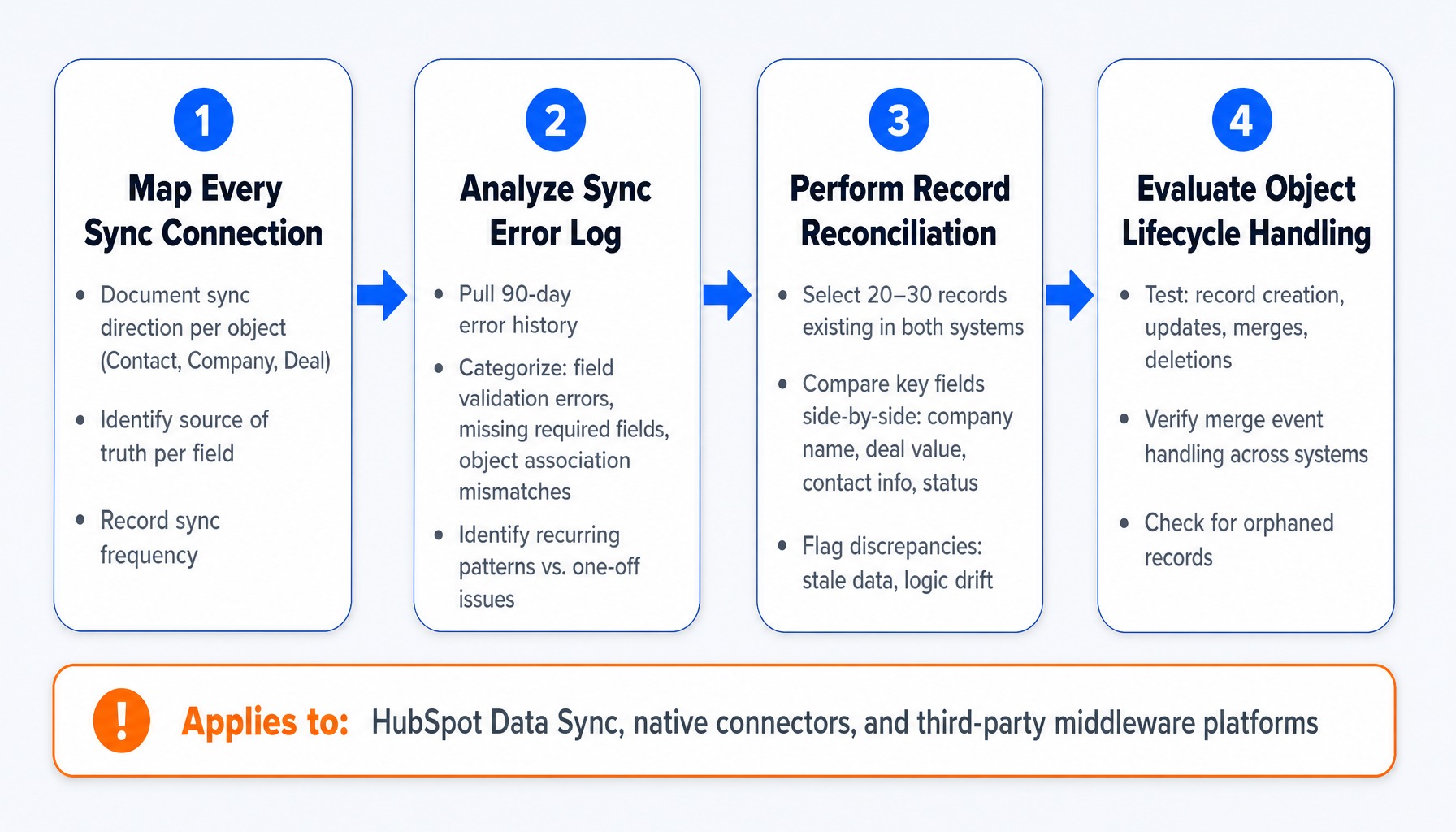
Use this four-step sequence to diagnose the health of your integration:
- Map Every Sync Connection. Document the integration architecture. For each key object (Contact, Company, Deal), identify the sync direction (HubSpot to ERP, ERP to HubSpot, or bidirectional), the sync frequency, and which system is the designated source of truth for each critical field.
- Analyze the Sync Error Log. Pull the complete sync error log from your integration platform for the past 90 days. Don't just look for failures; categorize them. Are they field validation errors (e.g., a text value being pushed to a number field), missing required fields, or object association mismatches? A pattern of recurring errors points to a systemic configuration flaw, not a one-off data issue.
- Perform Record Reconciliation. Randomly select 20-30 records that exist in both systems. Manually compare key fields side-by-side. Look for discrepancies in company names, deal values, contact information, and lifecycle or customer status. This is often where you discover issues like stale data or logic drift.
- Evaluate Object Lifecycle Handling. How does the integration handle record creation, updates, merges, and deletions? A distribution company discovered its HubSpot-to-NetSuite sync had been failing on new company records for three months because a required custom field was added to NetSuite but never mapped in the connector. The result was over 1,200 customer records in HubSpot with no corresponding entry in the ERP.
For organizations using HubSpot Data Sync or Operations Hub, these tools provide dashboards for monitoring health. If you use custom-coded actions or third-party middleware, this audit must extend to that platform's logging and configuration.
Portal Governance for Multi-Division Organizations
A single HubSpot portal shared across multiple business units creates a governance challenge that no checklist can solve alone. The audit must evaluate whether structural controls are in place to prevent the same problems from recurring every six months.
The common failure pattern is predictable: Division A's marketing team creates properties and workflows with their own naming conventions. Division B does the same. Within 18 months, the portal is ungovernable. A retail client discovered 14 active workflows with the identical name "Lead Routing," each created by a different division with conflicting criteria. This isn't a technology problem; it's a governance vacuum.
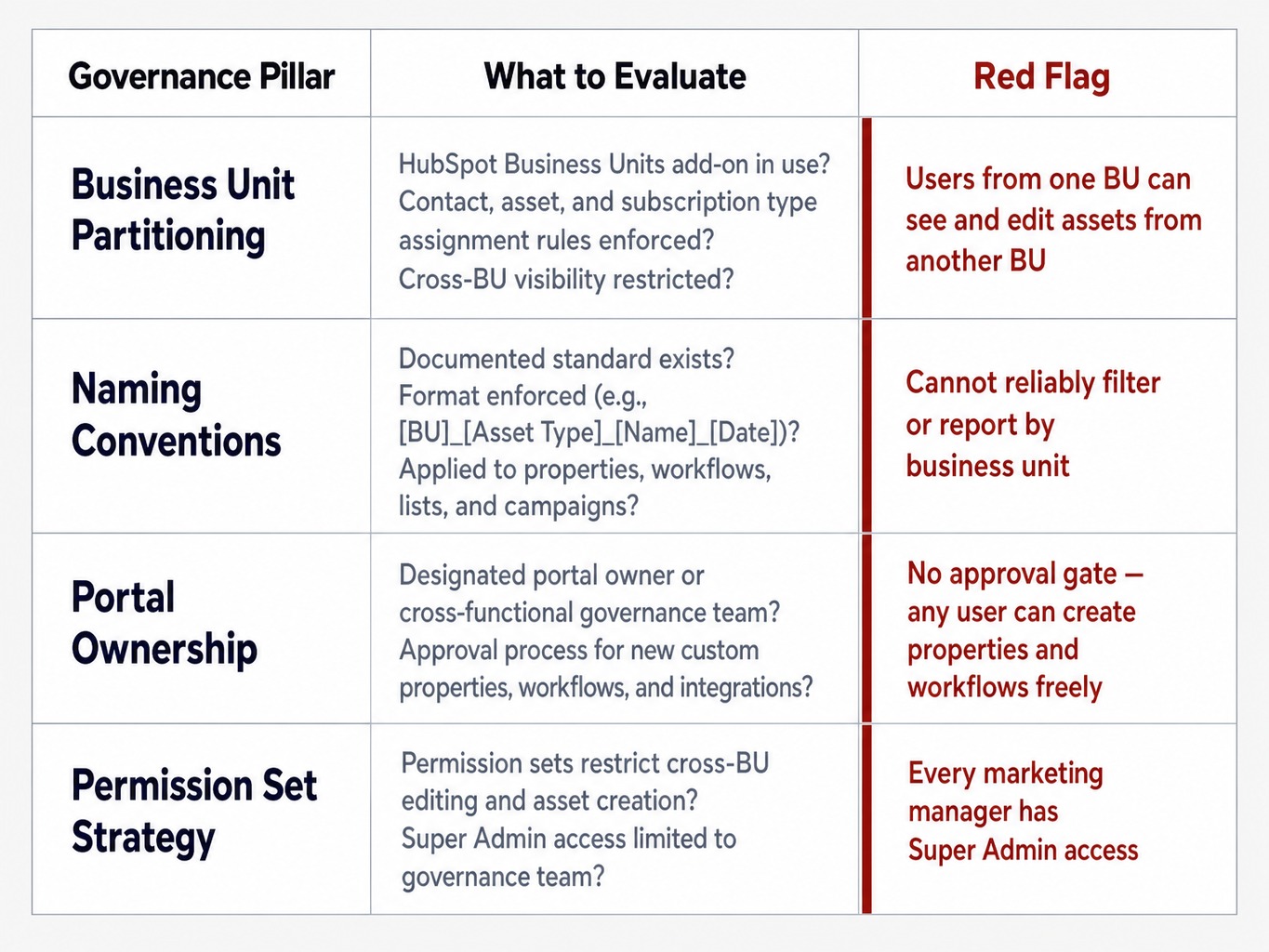
An audit of a multi-division portal should include these governance checks:
- Business Unit Partitioning: Is the HubSpot Business Units add-on being used to partition contacts, assets, and subscription types? If so, are the assignment rules being enforced, or can users from one BU see and edit assets from another?
- Naming Conventions: Is there a documented and enforced naming convention for all new assets (e.g.,
[BU]_[Asset Type]_[Name]_[Date])? Without this, you cannot reliably filter or report by business unit. - Portal Ownership: Is there a designated portal owner or a cross-functional governance team responsible for approving new custom properties, workflows, and integrations? This prevents the property bloat and workflow sprawl that plague ungoverned portals.
- Permission Set Strategy: Are permission sets configured to restrict cross-BU editing and asset creation? Giving every marketing manager Super Admin access lets any division edit or delete another division's properties, workflows, and assets.
Governance isn't a one-time audit finding. It's the operating model that determines whether your audit improvements persist or decay.
Turning Audit Findings into a Phased Optimization Roadmap
The audit itself generates zero ROI. The value comes from translating its findings into a structured, prioritized plan. The most common mistake organizations make is treating the audit report as a single, overwhelming to-do list. The better approach is a phased roadmap that aligns technical fixes with business KPIs.
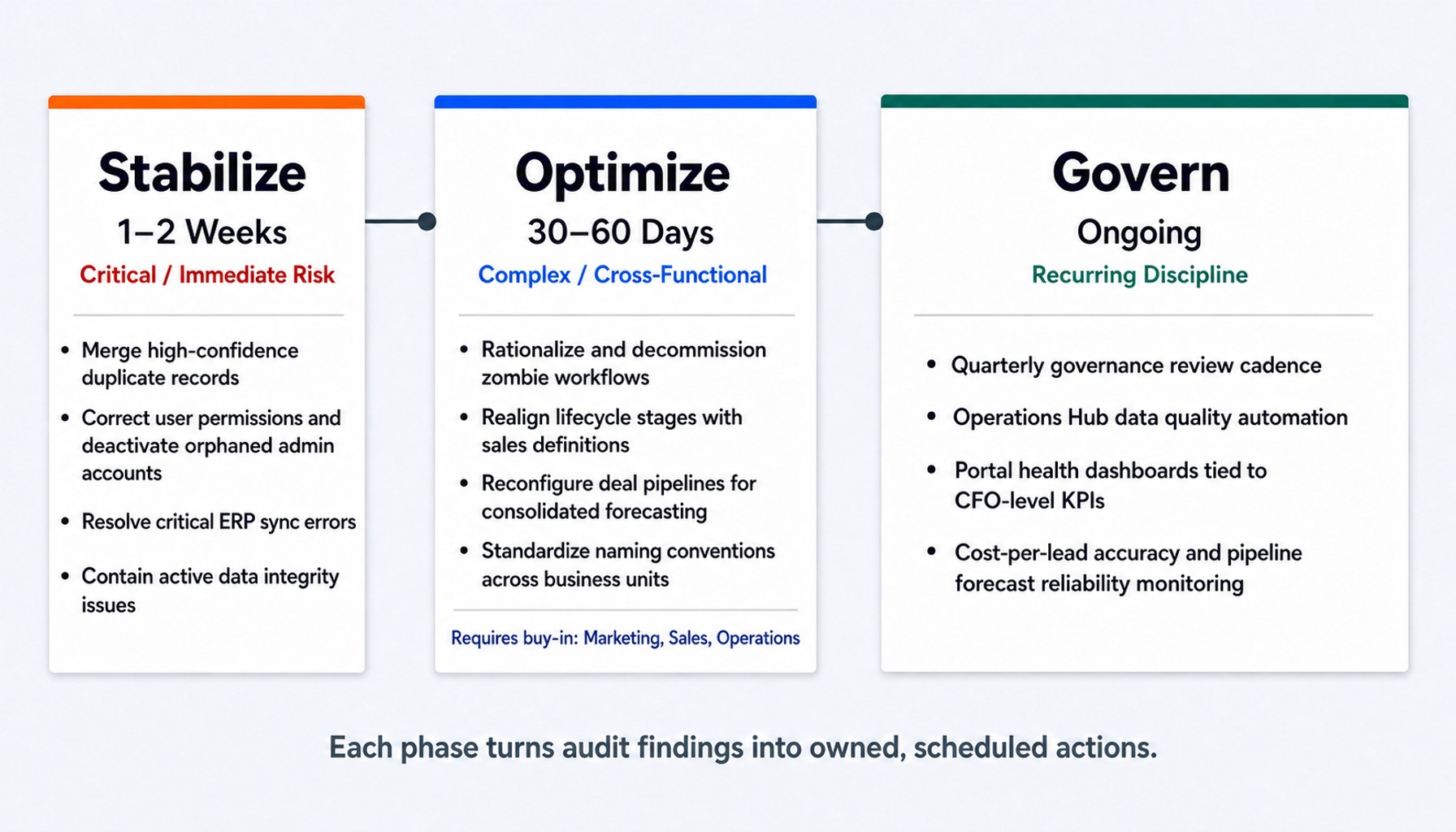
Frame the work in three phases:
- Phase 1: Stabilize (1–2 Weeks). Address the critical data integrity and security gaps that create immediate operational or compliance risk. This includes merging high-confidence duplicates, correcting user permissions, resolving critical sync errors, and deactivating orphaned admin accounts. The goal is to contain immediate risk before deeper changes begin.
- Phase 2: Optimize (30–60 Days). Tackle the more complex process and configuration changes that require cross-functional agreement. This is where you rationalize workflows, realign lifecycle stages with sales, reconfigure deal pipelines, and standardize naming conventions. This phase requires buy-in from marketing, sales, and operations.
- Phase 3: Govern (Ongoing). Establish the recurring disciplines that prevent portal drift. This includes setting up a quarterly governance review, implementing HubSpot Operations Hub data quality automation to reduce manual cleanup, and building dashboards that tie portal health metrics to CFO-level KPIs like cost-per-lead accuracy and pipeline forecast reliability.
Without a roadmap, an audit report tends to sit unused. Assigning each phase an owner and a target date gives the next quarterly governance review something concrete to check against.
How GSI Approaches HubSpot Audits for Enterprise Organizations
A meaningful HubSpot audit for an enterprise requires evaluating integration health with ERP systems, security configuration for compliance, and governance for multi-division operations.
GSI approaches this challenge by looking at the entire technology stack, including the integration layer that connects HubSpot to your financial system of record. Our consultants work on both sides of the CRM-ERP boundary: we sell and implement HubSpot as a standalone offering, and we work with ERP systems like NetSuite. For NetSuite users, GSI's NetSuite-to-HubSpot integration is one way to resolve sync-direction and field-mapping findings. Other findings, such as API budget limits, non-NetSuite connectors, and process or governance gaps, still require changes on your team's side.
An audit from GSI produces a phased roadmap tied to those findings, and 24/7 managed support is available if you want help maintaining portal health after the audit is complete. For support between audit cycles, see HubSpot managed services.
If you're planning a HubSpot audit, contact GSI to scope one and cover your ERP integration. Depending on what it surfaces, the next step might be a standalone HubSpot implementation from GSI or our NetSuite-to-HubSpot integration to resolve the ERP integration gaps it identifies, with the remaining findings handled as part of your roadmap.
An Audit Is a Discipline, Not a Project
A comprehensive HubSpot audit delivers a clear snapshot of your portal's health. But its true value lies in shifting the organization's mindset. The goal is not to achieve a "perfect" portal in a one-time cleanup. The goal is to establish the operational disciplines data governance, change management, and recurring health checks that keep the portal aligned with how the business actually operates. Organizations that treat the audit as a recurring practice, not a project, are the ones whose data stays trustworthy as the business adds divisions, integrations, and users.
Frequently Asked Questions About Enterprise HubSpot Audits
How often should an enterprise organization audit its HubSpot portal?
A full, comprehensive audit should be conducted annually. This should be supplemented with lighter quarterly reviews focused on key health metrics: data quality scores, integration sync error logs, and changes to the workflow inventory. Organizations undergoing rapid growth, an acquisition, or a major ERP change should perform a full audit immediately following those events.
What are the clearest signs that a HubSpot CRM needs a full audit?
Three indicators signal an immediate need: (1) your marketing and sales teams consistently report different pipeline numbers from the same data; (2) the sync error log between HubSpot and your ERP shows recurring failures that no one is investigating; and (3) no one on your team can confidently explain what more than half of the active workflows are supposed to do.
What is the difference between a HubSpot portal audit and a HubSpot migration assessment?
A portal audit evaluates the health and configuration of your existing HubSpot environment to optimize it in place. A migration assessment evaluates whether and how to move data, assets, and processes from one platform to another (or from one HubSpot portal to a new one). While their diagnostic steps can overlap, they serve fundamentally different business decisions.
What compliance considerations should energy and utilities companies address in a HubSpot audit?
Energy and utilities firms must verify that data privacy settings align with GDPR and other regional regulations, that data retention policies are enforced, and that SSO is mandated for all user access. Critically, they must ensure that any customer data subject to industry-specific rules (like NERC CIP) is not being stored or processed in HubSpot without appropriate access controls and data handling agreements.
What role does Operations Hub play in reducing recurring audit findings?
HubSpot Operations Hub helps resolve common, recurring audit findings at their source. Its data quality automation tools can enforce formatting rules, manage duplicates, and cleanse data programmatically. It doesn't replace the need for a strategic audit, but it automates the rule-based cleanup that would otherwise be done manually between audit cycles.