![GSI_A7[1]-1-1](https://www.getgsi.com/hs-fs/hubfs/GSI_A7%5B1%5D-1-1.png?width=125&height=56&name=GSI_A7%5B1%5D-1-1.png)
Key Takeaways
- Effective NetSuite account reconciliation extends beyond bank statements to cover all balance sheet accounts, including subledgers, prepaids, accruals, and intercompany balances.
- Reconciling high-risk accounts like AR, AP, and intercompany weekly or daily instead of waiting for month-end is a key strategy for accelerating the close cycle.
- Use NetSuite's built-in reconciliation templates for non-bank accounts to create roll-forward schedules and automate variance detection for accounts like prepaid expenses and accrued liabilities.
- Complete the tiered cadence by reconciling moderate-volume accounts (prepaids, fixed assets) monthly and low-volume accounts (equity, long-term debt) quarterly.
- Leverage NetSuite's preparer-reviewer-approver workflows to create a full reconciliation certification (rec cert) audit trail, reducing the manual work of external audit preparation.
For most finance teams, the term NetSuite account reconciliation is synonymous with bank reconciliation: importing a statement, matching cleared transactions, and investigating outstanding items. It's a critical, well-understood process. But it represents only the first layer of the work that determines whether your balance sheet is actually reliable. The real risk and the source of most close delays lies in the accounts often reconciled in spreadsheets outside the ERP: AR and AP subledgers, prepaid expenses, accrued liabilities, and complex intercompany balances. When these accounts go unreconciled, finance teams at mid-market manufacturers and distributors spend additional days each quarter investigating variances. As a firm specializing in enterprise applications, GSI, Inc. sees this pattern repeatedly when scoping NetSuite optimization engagements for clients whose bank recs are clean but whose close timelines remain long.
In this guide, our team at GSI moves beyond bank statements to provide a practitioner's view of a complete reconciliation framework in NetSuite. We will cover how to structure reconciliations for your entire balance sheet, build a cadence that scales, and use certification workflows to reduce audit risk.
For teams reviewing their close process, GSI's NetSuite consultants can help design and implement a complete reconciliation framework. Contact GSI.
- Bank Reconciliation Is the Foundation, Not the Finish Line
- Balance Sheet and Subledger Reconciliation in NetSuite
- Intercompany and Multi-Subsidiary Reconciliation
- Building a Reconciliation Cadence That Scales
- Reconciliation Certification and Audit Readiness
- How GSI Helps Finance Teams Get Reconciliation Right in NetSuite
- Conclusion: Moving From Bank Recs to Balance Sheet Integrity
Bank Reconciliation Is the Foundation, Not the Finish Line
A rigorous NetSuite bank reconciliation process is essential. Using the Match Bank Data workflow and Reconcile Account Statement page to clear transactions from an imported statement whether via Bank Feeds SuiteApp or a CSV file is the most visible reconciliation activity for good reason. Cash is the most closely watched balance on the books and the first place auditors look. A well-tuned process with effective matching rules can and should be highly automated.
The problem arises when this is the only highly automated reconciliation process. Consider a multi-subsidiary distribution company running NetSuite OneWorld. Its controller's team has bank reconciliation perfected, with auto-match rules clearing over ninety percent of transactions and month-end bank recs done in under two hours. Yet the same team spends eleven days closing the books. Why? Because prepaid expense schedules, accrued liabilities, and intercompany loan balances are reconciled in a shared Excel workbook passed between accountants via email. The bank rec is pristine; the balance sheet behind it is held together with conditional formatting and tribal knowledge.
Stopping at the bank rec leaves the majority of balance sheet risk unaddressed and does nothing to accelerate the overall close. The discipline applied to cash daily matching, investigating stale-dated items, clearing deposits in transit must be extended to the rest of the balance sheet.
Balance Sheet and Subledger Reconciliation in NetSuite
This is where most NetSuite implementations have the widest gap between system capability and actual use. NetSuite's Account Reconciliation module is designed to manage the reconciliation of any GL account, not just bank and credit card accounts. It supports flexible templates, flux analysis for explaining balance changes, and configurable matching rules. Yet many finance teams never configure it beyond cash accounts, defaulting to spreadsheets for everything else.
Two areas in particular cause the most significant close delays for manufacturing, distribution, and retail companies.
AR and AP Subledger-to-GL Tie-Outs
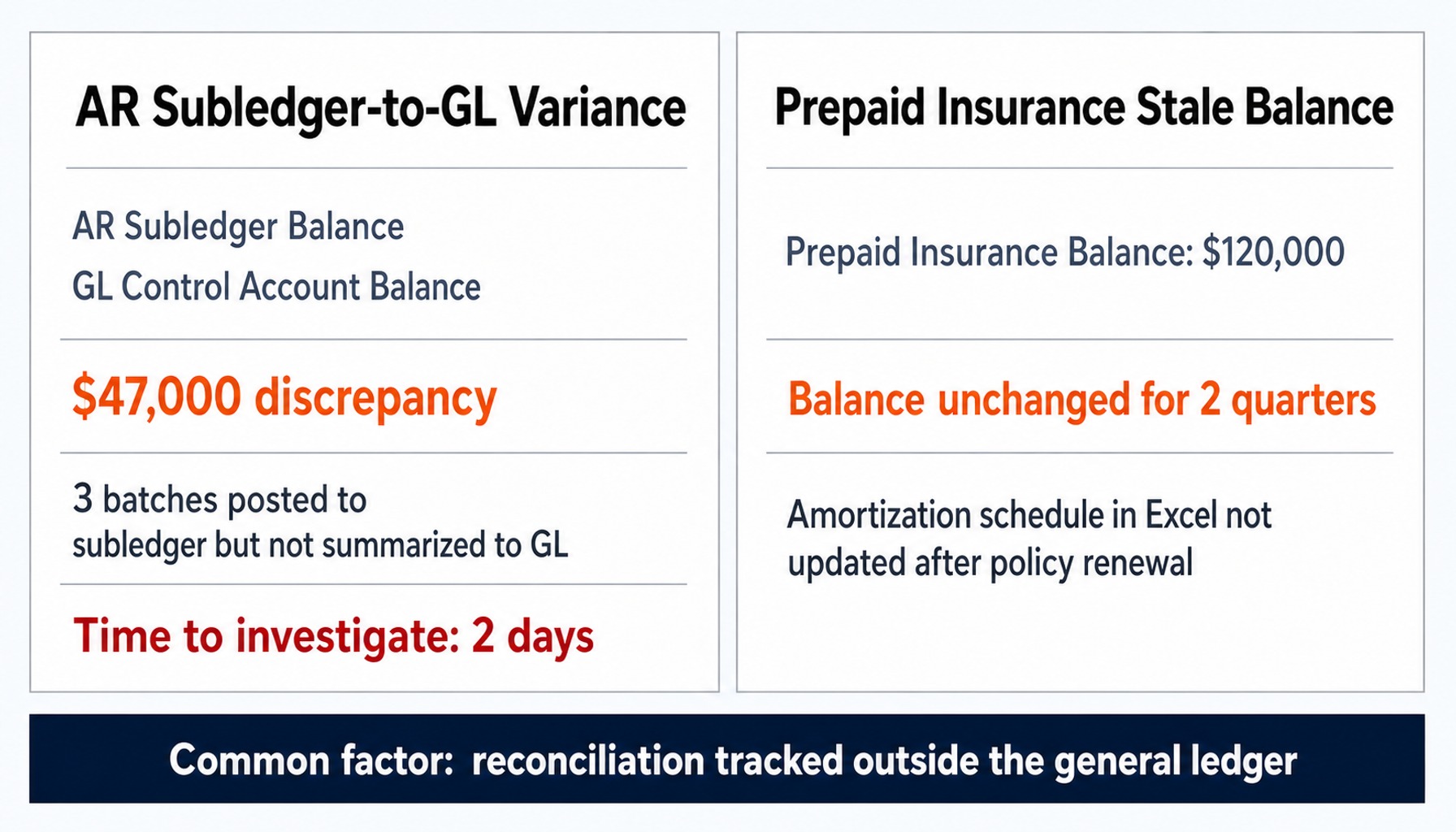
The GL-to-sub tie-out for Accounts Receivable and Accounts Payable is the reconciliation most likely to surface data integrity issues, such as unapplied cash receipts, duplicate vendor invoices, or simple timing differences. Imagine a manufacturing company where the AR subledger balance exceeds the GL control account by $47,000 at month-end. After two days of manual investigation, the controller finds that three large cash application batches have posted to the subledger but have not yet been summarized and posted to the GL. It is just a timing issue.
A structured reconciliation process inside NetSuite surfaces this kind of timing difference much earlier. The system's transaction matching engine can be configured to automate the comparison of subledger detail against GL summary balances. Building aging bucket tie-outs into the reconciliation template provides another layer of validation, catching variances before they can delay the close or become an audit finding. This moves the GL-to-sub tie-out from a manual spreadsheet exercise into a systematic, repeatable control within the ERP.
Prepaid, Accrued, and Suspense Account Reconciliation
Prepaid expenses, accrued liabilities, and suspense accounts are notorious for carrying stale balances. The reason is simple: they require roll-forward schedules that most teams maintain in spreadsheets, disconnected from the general ledger. Consider an energy company with a prepaid insurance account that carried the same $120,000 balance for two quarters because the amortization schedule lived in an Excel file that no one updated after the policy renewal.
This is a failure of process, not a limitation of NetSuite. The Account Reconciliation module supports roll-forward templates where the opening balance, additions, amortization or accrual, and closing balance are all tracked and validated within the system. These templates embed the schedule directly into the reconciliation itself. Flux analysis adds a second check: it can be configured to automatically flag accounts where the balance change is outside expected parameters. Furthermore, establishing suspense account clearing as a hard-close prerequisite, rather than a soft-close afterthought, ensures unidentified transactions are resolved in-period, maintaining the integrity of financial reporting.
Read more: Answer Business Questions in Real-time With NetSuite SuiteAnalytics
Intercompany and Multi-Subsidiary Reconciliation
For organizations with multiple subsidiaries, intercompany reconciliation is the process most likely to delay the consolidated close. It's also where spreadsheet-based processes are most likely to break down as the business scales. Consider a retail company with six subsidiaries where intercompany loan balances didn't agree at quarter-end. One subsidiary had posted a reclass entry that the counterparty hadn't recorded, and untangling the discrepancy consumed four days of a senior accountant's time.
NetSuite's multi-subsidiary reconciliation capabilities are designed to prevent this. When combined with features like NetSuite Multi-Book Accounting for entities with different reporting standards, these capabilities allow finance teams to reconcile intercompany balances directly within the system. Matching rules can be configured to automatically flag one-sided entries, surfacing mismatches for immediate investigation. The process of interco netting offsetting reciprocal balances before elimination becomes systematic.
However, the technology only works if the process discipline exists. Intercompany elimination journals in NetSuite OneWorld must be posted in both the originating and receiving subsidiaries to clear correctly on consolidation. If one side of the transaction is missing, you end up with a residual balance. NetSuite can flag the mismatch, but only a clear cross-subsidiary governance model ensures both sides get posted consistently. That discipline also pays off at audit time, because intercompany balances that are reconciled without residuals can feed the Prepared by Client (PBC) list auditors request, reducing manual schedule creation.
Teams moving balance sheet reconciliations out of spreadsheets can discuss the process with a GSI NetSuite consultant.
Building a Reconciliation Cadence That Scales
Having reconciliation capabilities in NetSuite is one thing; having a reconciliation schedule is another. A schedule that assigns accounts to specific periods, preparers, and reviewers is what turns reconciliation from a month-end fire drill into a continuous, manageable control. Not all balance sheet accounts require the same level of attention, and assigning a monthly cadence to every account wastes preparer capacity without meaningfully reducing risk.
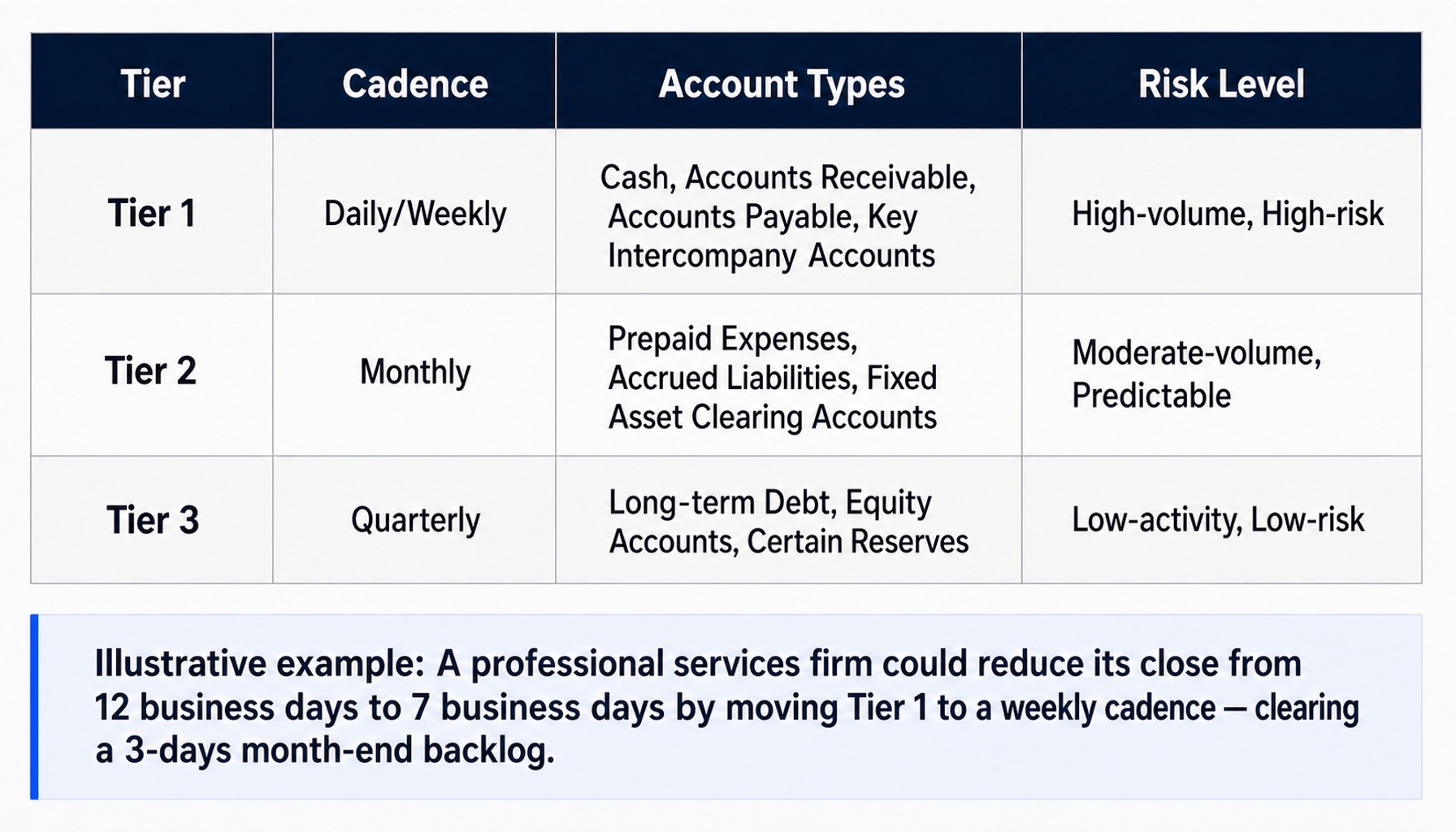
Enterprise-scale finance operations structure this with a tiered framework:
- Tier 1 (Daily/Weekly): High-volume, high-risk accounts. This includes cash, accounts receivable, accounts payable, and key intercompany accounts. Reconciling these more frequently catches errors almost as they happen.
- Tier 2 (Monthly): Moderate-volume accounts that change predictably. This covers prepaid expenses, accrued liabilities, and fixed asset clearing accounts.
- Tier 3 (Quarterly): Low-activity, low-risk accounts. Think long-term debt, equity accounts, and certain reserves.
Imagine a professional services firm that reduces its close from 12 business days to 7. It achieves this primarily by moving its Tier 1 reconciliations to a weekly cadence, which clears the backlog that would otherwise consume the first three days of every month-end close. NetSuite's Close Management features allow finance teams to build this cadence directly into the system, assigning tasks, setting dependencies, and tracking completion against the close calendar.
Reconciliation Certification and Audit Readiness
A reconciliation without certification is just analysis. It doesn't become an auditable control until a preparer signs off that the balance is correct, a reviewer confirms the work, and all supporting documentation is attached and archived. Certification is the step that completes the reconciliation framework.
Automated checks in NetSuite are held to the same standard, so a saved search that compares a subledger total to a GL balance also needs to be scheduled, assigned, reviewed, and logged as complete. Without those elements, auditors will classify it as an analytical procedure, which carries a materially different weight in a controls assessment.
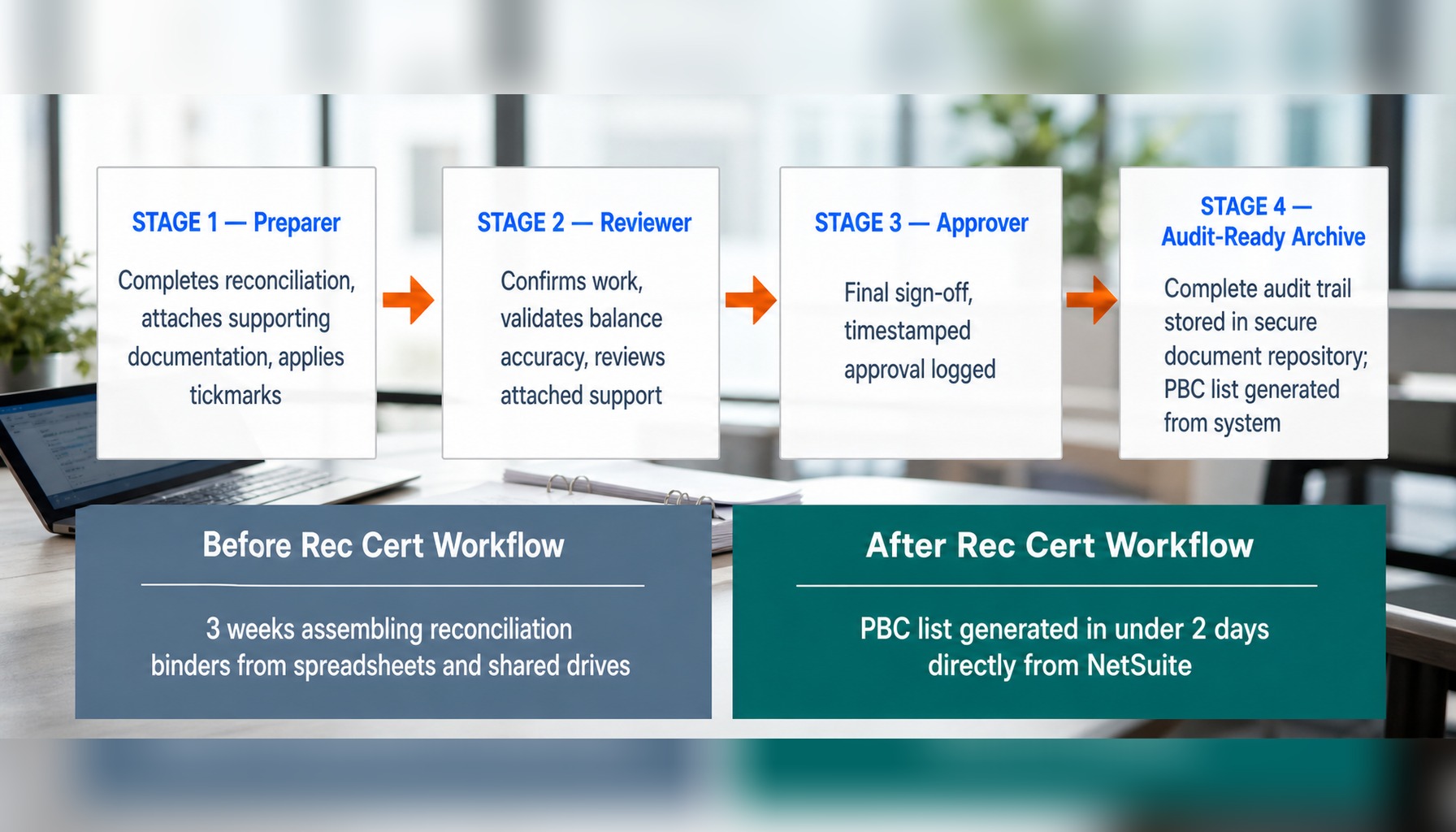
NetSuite Account Reconciliation supports a full preparer-reviewer-approver workflow. Each reconciliation moves through defined stages with attached support, tickmark documentation, and timestamped sign-offs, creating a complete audit trail. For one manufacturing client, this significantly shortened their audit prep. They previously spent three weeks assembling reconciliation binders from spreadsheets and shared drives. After implementing rec cert workflows in NetSuite, the PBC list was generated directly from the system in under two days. The secure document repository stores the evidence in one place, which reduces the manual compilation needed before auditors can access it.
How GSI Helps Finance Teams Get Reconciliation Right in NetSuite
NetSuite provides a capable reconciliation framework, but using it fully takes deliberate configuration. Configuring matching rules for non-bank accounts, building custom roll-forward templates, designing a multi-subsidiary cadence, and implementing auditable certification workflows all require both system knowledge and accounting process design. Internal finance teams that are already running the close sometimes bring in a partner for this configuration work.
GSI's NetSuite consultants design and implement these workflows for manufacturing, distribution, retail, and professional services companies. GSI offers functional consulting to architect a reconciliation framework and managed services to support it after implementation. For organizations where customer data from a CRM feeds the order-to-cash process, GSI also provides HubSpot and a NetSuite-to-HubSpot integration. Cleaner CRM-to-ERP data flow means fewer mismatched customer and order records surfacing as exceptions during AR reconciliation — though the integration supports the reconciliation rather than performing it.
Learn more about structuring reconciliation in NetSuite Financials.
From Bank Recs to Balance Sheet Integrity
The most important shift in thinking is this: NetSuite account reconciliation builds on bank reconciliation and extends it well beyond bank statements. It is a comprehensive framework for ensuring balance sheet integrity that should span every GL account, every subsidiary, and every close cycle.
Bank reconciliation is the foundation. But extending that same discipline to subledgers, intercompany transactions, prepaids, and accruals all governed by a tiered cadence and formal certification workflows is what accelerates the close and strengthens your controls for audit review. If your reconciliation process still depends on spreadsheets for anything beyond a bank account, the capability gap is not in NetSuite. It is in how the system has been configured and deployed. GSI’s NetSuite consultants can assess your current reconciliation framework and close the gap — contact GSI to start that conversation.
Frequently Asked Questions
What matching rules should I configure for NetSuite bank reconciliation?
Start with one-to-one exact-match rules for cleared checks and deposits. Then, add one-to-many rules with a small dollar tolerance (e.g., $1 to $5) to handle batched deposits or fees. Use many-to-many rules cautiously for high-volume scenarios like credit card settlement files, and always test new rules against a prior-period statement before deploying them in production to avoid false positives.
How do manufacturing companies handle WIP account reconciliation in NetSuite?
Work-in-Process (WIP) reconciliation involves tying the WIP general ledger balance back to the value of open work orders. The reconciliation uses a roll-forward template: opening WIP balance, plus material and labor costs issued, minus costs relieved upon completion, equals the closing balance. Variances often arise from work orders closed without full cost absorption or from standard cost revaluations that hit variance accounts instead of WIP.
How can CRM data from HubSpot affect receivables reconciliation in NetSuite?
When order or invoice data originates in a CRM like HubSpot and syncs to NetSuite, data quality issues like duplicate contacts or mismatched billing addresses can create AR subledger entries that don't tie cleanly to the GL. Clean CRM-to-ERP data flow reduces the volume of exceptions during AR reconciliation.
What is the best way to handle unreconciled transactions in NetSuite after period close?
Unreconciled items should be categorized for action: timing differences that will clear next period, errors requiring a reclass entry, and stale items over 60-90 days that may require write-off. Use NetSuite's exception reporting to age these items, and establish a policy where any item unreconciled for two consecutive periods triggers a mandatory review by the controller or accounting manager.
How do energy and utilities companies manage revenue account reconciliation in NetSuite with complex billing?
These companies often have unbilled revenue, estimated meter reads, and rate adjustments that create timing differences between revenue recognition and cash. Reconciling revenue requires a custom roll-forward template that tracks billed revenue, unbilled accruals, adjustments, and collections as separate activities. NetSuite's flux analysis can help flag unexpected movements, but the reconciliation structure must mirror the utility's specific billing and revenue recognition cycle.
Can NetSuite reconcile prepaid and accrued accounts automatically?
NetSuite can automate much of the matching and variance detection for prepaid and accrued accounts using roll-forward reconciliation templates. However, full automation depends on whether the underlying amortization or accrual entries are also generated within NetSuite. If amortization schedules are still managed in spreadsheets, the reconciliation will flag variances, but the root-cause investigation will remain a manual task.