
Key Takeaways
- The NetSuite CRM vs. Salesforce choice is an architecture decision, not a feature comparison. NetSuite offers a unified ERP/CRM database; Salesforce requires an integration layer with a recurring "middleware tax."
- NetSuite CRM is the stronger choice for finance-led organizations that prioritize lead-to-cash efficiency and a single source of truth for financial and operational data, especially if they already run NetSuite ERP.
- Salesforce wins for sales-led organizations with complex B2B sales cycles, territory management, and a need for sophisticated AI-driven forecasting and a vast third-party app ecosystem.
- The "middleware tax" for running Salesforce with NetSuite ERP includes middleware licenses ($15K-$60K+ annually), integration maintenance, data reconciliation efforts, and project management overhead.
- Your decision should hinge on four questions: Where is your operational pain? How complex are your sales cycles? Do you already run NetSuite ERP? What is your internal technical capacity?
A midmarket distributor is at a crossroads. The VP of Sales, whose team used Salesforce at their last company, is demanding it. The CFO, staring at the subscription budget, wants to activate the native CRM module in their existing NetSuite ERP. Both are right, and both are missing the point. The debate over NetSuite CRM vs Salesforce should not be about which has better features. It's about which architecture matches how your company operates.
Most comparison articles get this wrong. They create feature checklists, treating this as a simple CRM-for-CRM contest. In reality, it's a fundamental choice about your operating model. For CFOs and COOs, the NetSuite CRM versus Salesforce decision directly shapes whether finance and sales teams operate from a single source of truth or maintain parallel customer records that require continuous reconciliation a cost many discover not during implementation but during their first audit under the new architecture.
This is an architecture decision. It's about where your single source of truth lives, how much integration tax you're willing to pay, and whether your organization is ultimately finance-led or sales-led. This analysis covers the architectural difference, where each platform genuinely wins, what integration actually looks like in production, and a four-question framework to make the right call.
The Architectural Difference That Drives Every Other Decision
The foundational split is this: NetSuite CRM is a module inside a single ERP database, while Salesforce is a standalone platform that must be connected to your ERP. This isn't a marketing distinction; it dictates your data model, reporting capabilities, integration budget, and ongoing maintenance burden. Every downstream difference in cost, user experience, and analytics flows from this single fact.
Consider a sales rep creating a quote. In NetSuite, the rep can see real-time inventory availability and the customer's current accounts receivable balance on the same screen because it's all in the same database. In Salesforce, that same data requires an integration to pull from the ERP, introducing potential latency, sync failures, and a middleware layer that someone has to manage and pay for.
NetSuite CRM: One Database, One Record
NetSuite CRM's core advantage isn't its CRM features; it's the unified data model. A customer record in NetSuite is simultaneously a CRM contact, an AR account, a shipping address, and a service case. This means a single saved search can join opportunity data to general ledger transaction data with no integration required.
For a CFO running a monthly forecast, this is the critical difference. They can see pipeline-weighted revenue alongside actual cash collections in a single SuiteAnalytics report . There is no middleware, no sync lag, and no manual data reconciliation between two systems. When you need to automate a process that spans a quote and a financial event like an approval workflow for a deal with non-standard payment terms a tool like SuiteFlow can manage it end-to-end within one system. The value proposition is inseparable from the ERP; it's not a standalone CRM competing on features alone.
Salesforce: Purpose-Built CRM with an Integration Dependency
Salesforce was built from the ground up as a CRM, and its depth in sales automation, pipeline management, and customer engagement is the result. But this maturity comes with an architectural trade-off: every piece of financial, inventory, or fulfillment data a Salesforce user needs must be pulled from the ERP via middleware like Celigo, Dell Boomi, or MuleSoft.
This creates a permanent integration layer that requires budget and attention. This is the middleware tax : the recurring cost of platform licenses, developer time, error handling, and data reconciliation required to keep Salesforce and your ERP in sync. Choosing Salesforce when you run NetSuite ERP means choosing best-of-breed CRM depth at the cost of accepting permanent integration complexity and its associated operational overhead. The depth is real, but so is the tax.
Where NetSuite CRM Wins and Where It Hits a Ceiling
Pretending NetSuite CRM competes with Salesforce feature-for-feature is a setup for failure. It is the right choice in specific circumstances, and a liability in others. Understanding the difference is key. For example, a multi-subsidiary manufacturer gains immense value from consolidated reporting across entities without integration. A SaaS company with a six-month enterprise sales cycle, however, will likely find NetSuite's pipeline management tools thin compared to Salesforce.
Strengths: Finance-Led Organizations and Lead-to-Cash Workflows
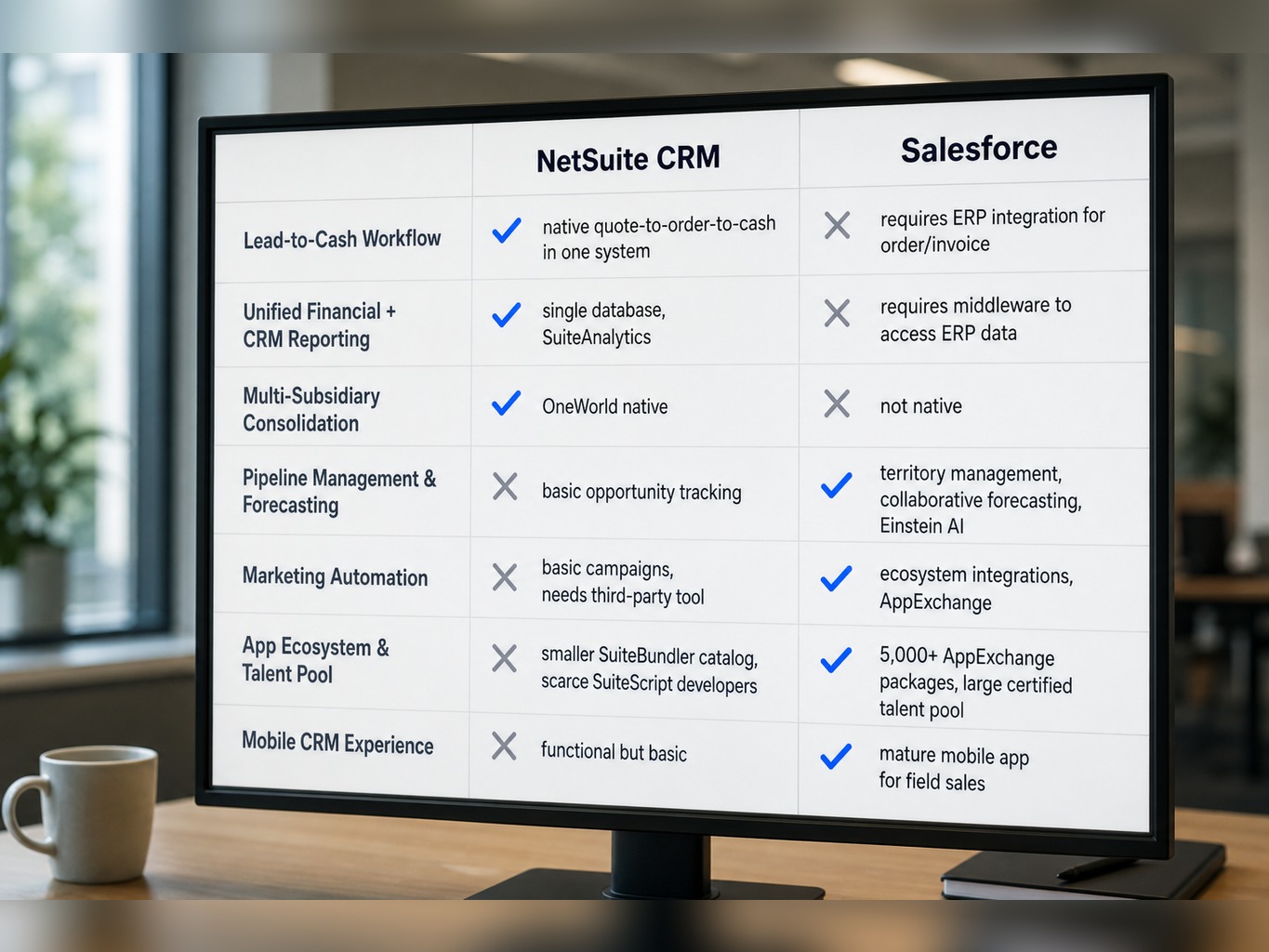
NetSuite CRM is strongest when your revenue operations are driven by finance and operations, not a large, specialized sales force. Its primary strength is a frictionless quote-to-order-to-cash process. A transaction flows from opportunity to sales order to fulfillment to invoice to cash application without ever leaving the system.
This is where the unified data model shines. You get native revenue recognition tied directly to CRM opportunities. For companies operating across multiple legal entities, the multi-book accounting tie-in (a feature of NetSuite OneWorld) provides a consolidated view of the business that is nearly impossible to achieve with a separate CRM and ERP. For businesses with recurring revenue, SuiteBilling manages subscriptions natively. Finance teams using saved searches and SuiteAnalytics Connect have reporting power that would require a separate business intelligence tool in a Salesforce environment. NetSuite CRM's sweet spot is operational efficiency in the back half of the revenue cycle.
Limitations: Sales Depth, Marketing, and the Talent Gap
You have to be direct about where NetSuite CRM falls short. There are three main limitations:
- Pipeline Management and Forecasting: NetSuite lacks the collaborative forecasting by territory, product line, or overlay rep that is standard in Salesforce. It has no native equivalent to Salesforce Einstein AI for predictive forecast adjustments or lead scoring.
- Marketing Automation: The native campaign management is basic. Most organizations will need a third-party marketing automation platform like HubSpot, which reintroduces the very integration complexity NetSuite CRM is meant to avoid.
- The Talent Gap: The ecosystem is a significant factor. The Salesforce AppExchange has over 5,000 managed packages , while NetSuite's SuiteBundler catalog is much smaller. More importantly, experienced SuiteScript developers are far scarcer and more expensive than the vast pool of certified Salesforce developers and admins who know Apex and Flow Builder.
Finally, the mobile CRM experience in NetSuite is functional for basic tasks, but it doesn't compete with the Salesforce mobile app, especially for field sales teams that live on their phones. This isn't a weak product; it's a product with a specific, narrower optimal use case.
Read more: Everything You Need to Know About the NetSuite-HubSpot Integration
Where Salesforce Wins and What It Costs You Operationally
Salesforce is the dominant market leader for a reason. But ignoring the operational cost of integrating it into an existing ERP environment is a common and expensive mistake. While evaluating whether to extend a Salesforce contract or consolidate onto NetSuite CRM for a professional services firm, one of my teams modeled the total cost of ownership. The analysis had to include not just license fees but also the ongoing middleware subscription, the internal FTE time for integration monitoring, and the cost of maintaining separate user provisioning workflows for SOX compliance. The Salesforce renewal looked cheaper on a per-seat basis until those operational costs were layered in, at which point the five-year TCO difference narrowed to less than eight percent.
Strengths: Sales-Led Organizations and Ecosystem Depth
Salesforce is the default choice when growth is driven by a dedicated sales team that requires sophisticated tooling. The platform's capabilities are deep: advanced lead routing and territory assignment, opportunity splits for team selling, collaborative forecasting with manager adjustments, and Salesforce Einstein AI for lead scoring and identifying deals at risk. For process automation, Flow Builder provides a powerful no-code/low-code environment for building complex sales workflows.
The ecosystem is a genuine advantage. The breadth of managed packages on the AppExchange for functions like CPQ, e-signature, and sales engagement allows you to extend the platform without custom code. For organizations with complex post-sale support needs, Salesforce Service Cloud offers a depth that NetSuite's case management module can't match. This CRM depth is not just marketing; it is the result of over two decades of focused investment.
The Middleware Tax and Hidden Cost Reality
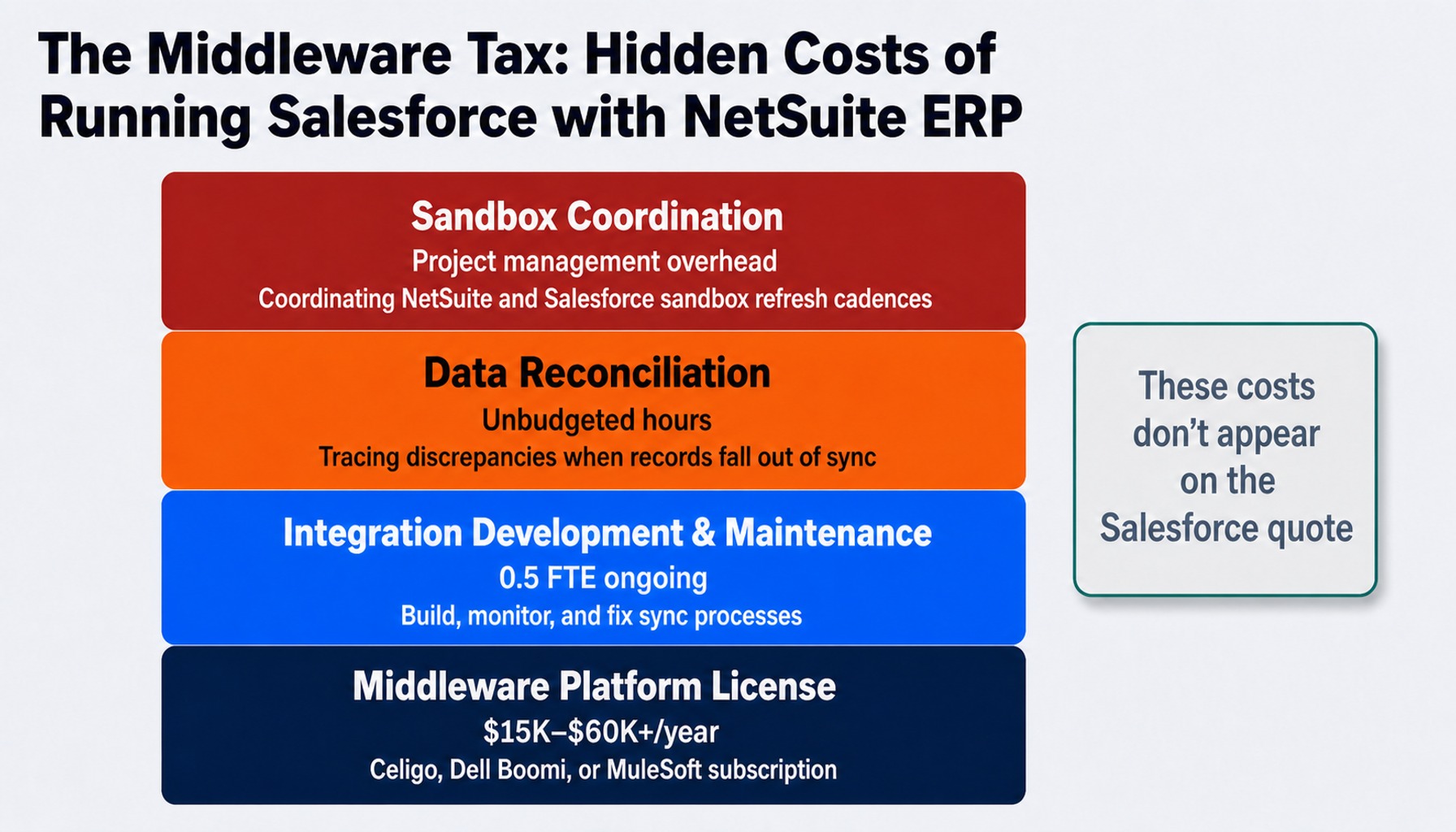
The total cost of ownership for Salesforce in a NetSuite ERP environment is significantly higher than the per-user license fee. The middleware tax breaks down into four components:
- Middleware Platform License: A subscription for Celigo, Dell Boomi, or MuleSoft typically runs $15,000 to $60,000+ annually , depending on data volume and the number of integration flows.
- Integration Development & Maintenance: Someone must build, monitor, and fix the sync. This is often a half-FTE or a contracted resource, adding another significant recurring cost.
- Data Reconciliation: When records fall out of sync and they will finance and operations teams spend hours tracing discrepancies between the two systems. This is unplanned, unbudgeted work.
- Sandbox Coordination: Testing integration changes requires coordinating NetSuite's sandbox refresh cadence with Salesforce's, adding project management overhead that few teams account for.
These operational costs don't show up on the Salesforce quote, but they are a very real part of the total investment.
What the Salesforce-to-NetSuite Integration Actually Looks Like in Production
Most comparisons mention "integration" but never describe what it means day-to-day. Here's the reality. In a typical setup, Salesforce manages leads, contacts, and opportunities. When a deal is marked closed-won, a middleware process triggers the creation of a sales order in NetSuite. From there, NetSuite handles fulfillment, invoicing, and revenue recognition. Key data like order status and tracking numbers sync back to Salesforce.
This sounds clean, but the three most common failure points are:
- Duplicate Records: Imprecise matching logic between Salesforce accounts and NetSuite customers inevitably creates duplicates that pollute both systems.
- Field Mapping Drift: A sales admin adds a new custom field in Salesforce. An accounting user adds one in NetSuite. The integration knows about neither, and data is lost in translation until someone notices.
- Unmonitored Errors: A sync fails due to a temporary API limit or a validation rule conflict. The transaction lands in an error queue that nobody monitors until a customer calls asking why their order hasn't shipped.
The most critical and often overlooked step is defining data ownership. Which system is the master for a customer's billing address? If sales updates it in Salesforce and finance updates it in NetSuite, which one is correct? Without clear governance, the two systems will diverge within months.
Four Questions That Determine Your Answer
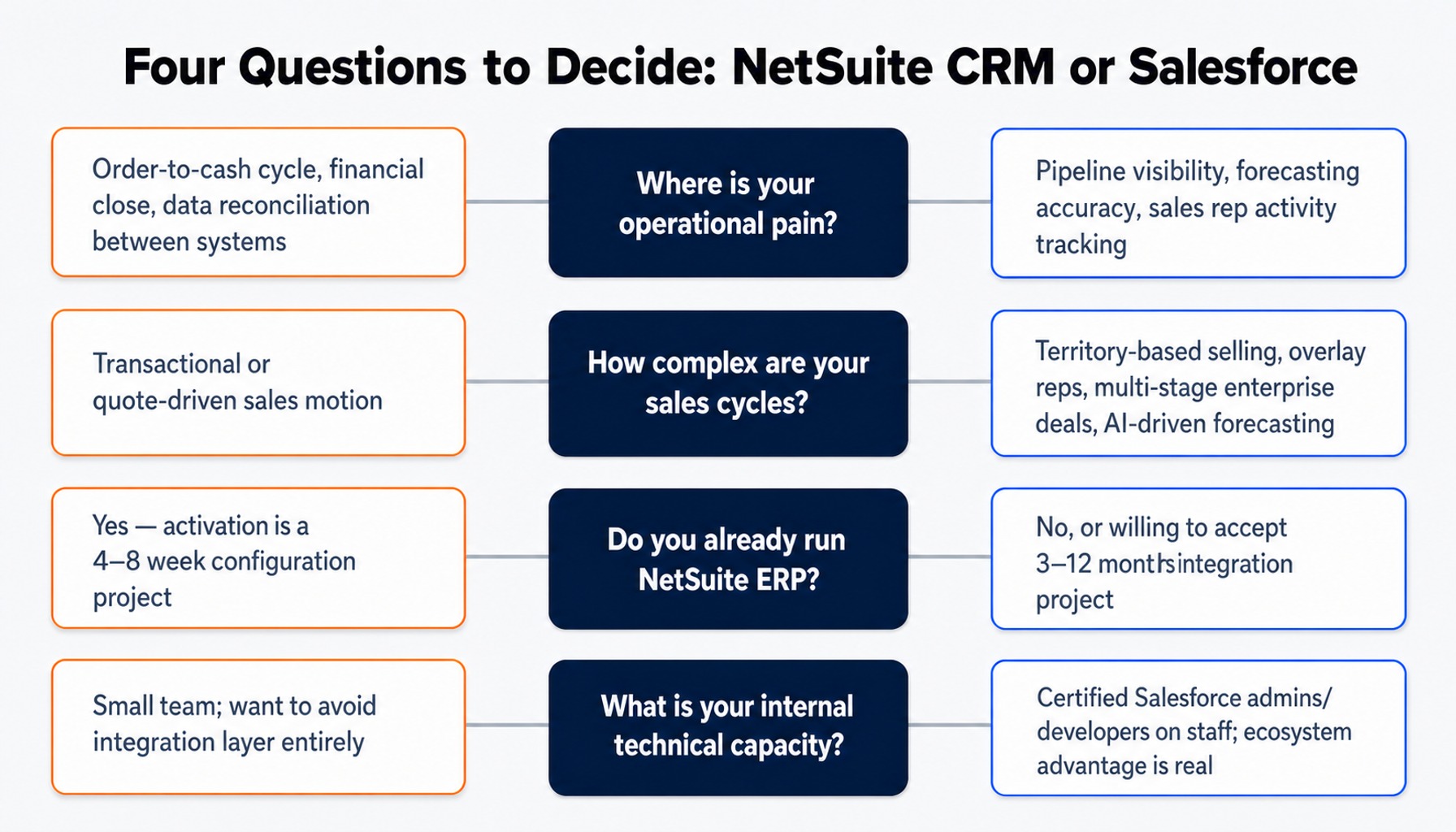
There is no universal winner in the NetSuite CRM vs Salesforce debate. There is only a better fit for your specific organization. Use these four questions to guide your decision.
- Where is your operational pain today? If it's in pipeline visibility, forecasting accuracy, and sales rep activity tracking, lean toward Salesforce. If your pain is in the order-to-cash cycle, financial close, and reconciling data between systems, the unified model of NetSuite CRM is your answer.
- How complex are your sales cycles? If you have territory-based selling, overlay reps, multi-stage enterprise deals, and need AI-driven forecasting, Salesforce earns its cost. If your sales motion is largely transactional or quote-driven, NetSuite CRM can handle it natively without the extra overhead.
- Do you already run NetSuite ERP? If yes, the burden of proof is on Salesforce to justify the middleware tax. Activating NetSuite CRM is a configuration project, often taking 4-8 weeks. Adding Salesforce is a 3-12 month integration project.
- What is your internal technical capacity? If you have a team of certified Salesforce admins and developers, its ecosystem advantage is real. If you don't, remember that finding and retaining SuiteScript talent is harder, but it allows you to avoid the integration layer entirely.
Read more: HubSpot vs. Salesforce: Finding the Best CRM for Your Business
When You Need a Partner Who Knows Both Platforms
The NetSuite CRM vs. Salesforce decision is an architecture choice that most organizations get wrong because they evaluate features in isolation. The right answer requires a partner with deep, unbiased experience in both platforms, not a reseller pushing a single product.
GSI's consultants, with over 15 years of average experience, have implemented and integrated both NetSuite and Salesforce across manufacturing, distribution, and professional services. This dual expertise means our recommendation is driven by your operating model, not our sales targets. We assess whether a NetSuite CRM activation, a full Salesforce implementation, or a governed integration of both is the right path for you.
Our 100% service guarantee is a commitment to accountability for that recommendation. We don't just advise on the architecture; our 24/7 managed support teams can help you run and maintain it, ensuring the solution delivers the business outcomes you expect.
Get in touch with GSI to find the right CRM architecture for your business.
The Final Word: Architecture Over Features
The single most important takeaway is this: the NetSuite CRM vs Salesforce decision is not about which platform has more features. It is about which data architecture best matches your operating model and whether the unavoidable middleware tax is justified by the CRM depth you actually need.
If your organization is finance-led and already runs NetSuite, the burden of proof is firmly on Salesforce to justify the integration cost and complexity. The path of least resistance and greatest operational efficiency is to build on the unified platform you already own. Choosing the right NetSuite partner can accelerate that process significantly.
Conversely, if your organization is sales-led with complex pipeline needs, Salesforce likely earns its keep. But you must budget for the full reality of the integration the middleware licenses, the developer time, and the data governance not just the per-user license fee. The companies that get this right treat it as an architecture commitment, not a software purchase, and they build a plan to govern it for the long term.
Frequently Asked Questions
1. How long does it take to activate NetSuite CRM vs implementing Salesforce from scratch?
Activating NetSuite CRM in an existing NetSuite ERP instance is a configuration project, typically taking 4–8 weeks. Implementing Salesforce alongside an ERP is a 3–12 month project involving data migration, customization, and building the integration layer. One extends an existing system; the other introduces a new one.
2. Can NetSuite CRM handle complex B2B sales cycles with multiple decision-makers and long timelines?
NetSuite supports basic opportunity tracking, but it lacks the depth of Salesforce for complex B2B selling. It does not have native territory management, opportunity splits for team selling, or AI-driven deal scoring. If your average deal involves 4+ stakeholders and a six-month cycle, Salesforce's tooling is materially stronger.
3. Which platform has stronger AI-driven forecasting capabilities in 2026?
Salesforce holds a clear lead with Einstein Forecasting, which uses historical data to predict close rates and flag at-risk deals. NetSuite's SuiteAnalytics is powerful for financial reporting, but its CRM-specific AI forecasting is less mature. Organizations relying on predictive pipeline analytics will find Salesforce's tooling more developed.
4. How do NetSuite saved searches compare to Salesforce reports and SOQL for CRM reporting?
NetSuite saved searches are powerful because they query CRM and ERP data in a single request joining pipeline with AR aging or inventory status. Salesforce reports and SOQL are more flexible for CRM-specific analysis with better visualization, but they cannot natively access ERP data without an integration and a middleware tool.
5. Is it possible to start with NetSuite CRM and migrate to Salesforce later if we outgrow it?
Yes, but it's a significant project. The migration involves re-mapping all customer, opportunity, and activity data into Salesforce's model and then building the integration layer back to NetSuite ERP. Define your trigger criteria upfront typically when the sales team exceeds 15-20 reps or pipeline complexity demands territory management.